Loading…


KnowledgeBase
Getting Started with AI Engage CRM: Your Complete Setup Guide
Welcome to AI Engage CRM. This guide walks a brand-new administrator through every configuration step in the order the steps depend on each other. By the end you will have a working CRM — with the right people, the right permissions, and your existing data already imported.
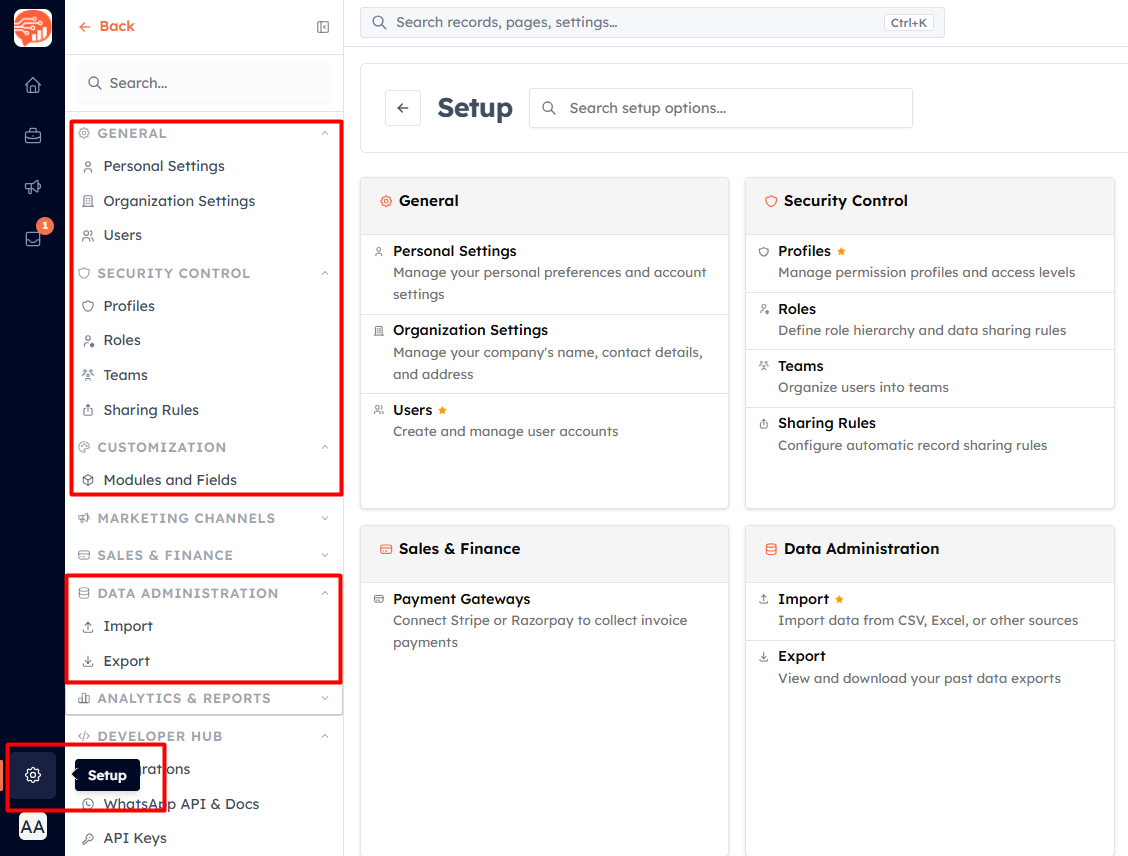
Almost everything below lives under Setup — the gear icon at the bottom of the left rail. The groups outlined above (General, Security Control, Customization and Data Administration) hold the settings for Phases 1–6.
💡
Follow the phases in order the first time. Each one depends on the one before it — most importantly, profiles and roles must exist before you invite users, because every invite needs one of each.
The setup sequence at a glance#
| Phase | What you set up | Why it comes here |
|---|---|---|
| 1 | Your account | You are the admin; secure the account first. |
| 2 | Organisation, currency, seats | Everything later inherits these; currency is one-time. |
| 3 | Profiles & roles | The invite form needs both. |
| 4 | Users, teams, sharing rules | Teams and rules are built from existing users. |
| 5 | Modules & fields | Imports need fields to map into. |
| 6 | Data | Test one record, then import. |
| 7 | Views & daily tools | Easier to set up once real data is there. |
| 8 | Go live | Final check, then automation. |
The setup sequence#
Phase 1 — Your own account#
Start with the account you are signed in to. Everything later is set up by this user, so secure it first.
Sign Up & Verify Your Account — create the account and confirm your email address.
Set Up Your Personal Profile — your name, photo, timezone and date / number formats. The timezone decides when your reminders and scheduled items fire.
Change Your Password & Account Security — set a strong password for the admin account.
Two-Step Verification — add an email code to every sign-in. Strongly recommended for the account that controls everyone else’s access.
Phase 2 — Your organisation#
Company-wide settings come next, because every user and record you add afterwards inherits them.
Organization Settings — company name, logo, contact details and address.
Set Your Home Currency — the currency deals, quotes and reports are totalled in. It can be set only once, so choose it before any money is entered.
Billing & Subscription — check your plan and buy enough seats for the people you are about to invite.
Phase 3 — Permissions: profiles and roles#
Build these before inviting anyone. The invite form asks for a Profile (what the person can do) and a Role (whose records they can see), so both must already exist.
Understanding Profile Permissions — what each permission controls.
Create Profiles — one permission template per job type — for example Sales Rep, Manager, Support.
Understanding the Role Hierarchy — how the reporting line decides who sees whose records.
Create Roles — build the hierarchy that mirrors your organisation chart.
Phase 4 — Your team#
With profiles and roles in place, invite people. Teams and sharing rules come after the invites, because both are built from users who already exist.
Invite Your Team — give each teammate a login and assign their profile and role.
Accepting Your Invitation — send this to the people you invite; it walks them through their first sign-in.
Create Teams — group users for lead routing, reporting and sharing.
Understanding Sharing Rules — when the role hierarchy alone is not enough.
Create Sharing Rules — open specific records to other roles or teams.
Phase 5 — Shape the CRM around your data#
Add the fields and modules you need before importing, so every column in your spreadsheet has a field to land in.
Create a New Module — only if your business tracks something the standard modules do not (projects, properties, stores…).
Customize Modules and Fields — add the fields specific to your business.
Field Layouts and Required Fields — arrange the forms and make key fields mandatory.
Advanced Field Types — formulas, rollups, auto-numbers, lookups and subforms, if you need them.
Phase 6 — Bring your data in#
Add one record by hand first to check the form, then import the rest.
Add Your First Contact — create one contact manually and check every field behaves as expected.
Bulk Import Contacts — bring your existing contacts in from CSV or Excel.
Import Data into Any Module — the same importer for companies, deals and custom modules.
Find & Merge Duplicates — clean up any duplicates the import brought in.
Phase 7 — Get comfortable with daily work#
Now that there is real data to look at, set up the views your team will use every day.
The Record Detail Page — related lists and pinned fields on each record.
Create, Share & Manage Custom Views — saved list and Kanban views for each team.
Choose & Reorder List Columns — show the columns that matter.
Bulk Actions on Records — update, merge or delete many records at once.
Sidebar Bookmarks — pin the pages you use most.
Phase 8 — Go live#
Check everything once, then move on to automation and campaigns.
Pre-Launch Checklist — verify the whole setup before your team starts using it.
What’s Next — explore workflows, campaigns, integrations and AI.
⏱️
The core setup (Phases 1–6) takes about 45–60 minutes for a team of 10 or fewer, plus the time the import itself takes. After that your CRM is ready for daily use.
✅
Adding someone later? You only need Phase 4 for them — their profile and role already exist.
Was this article helpful?
Ready to implement this?
OpenAI Engage and apply what you just learned to your own workspace.
Open AI Engage CRM