Loading…


KnowledgeBase
The Booking Link Address — Direct Link & Embed
What this covers#
A published event has one public address, and two ways of reaching people: as a link you send, or embedded in a page on your own site.
This article covers what that address is made of, which part of it is yours to change, and which of the two options to use where.
What the address is made of#
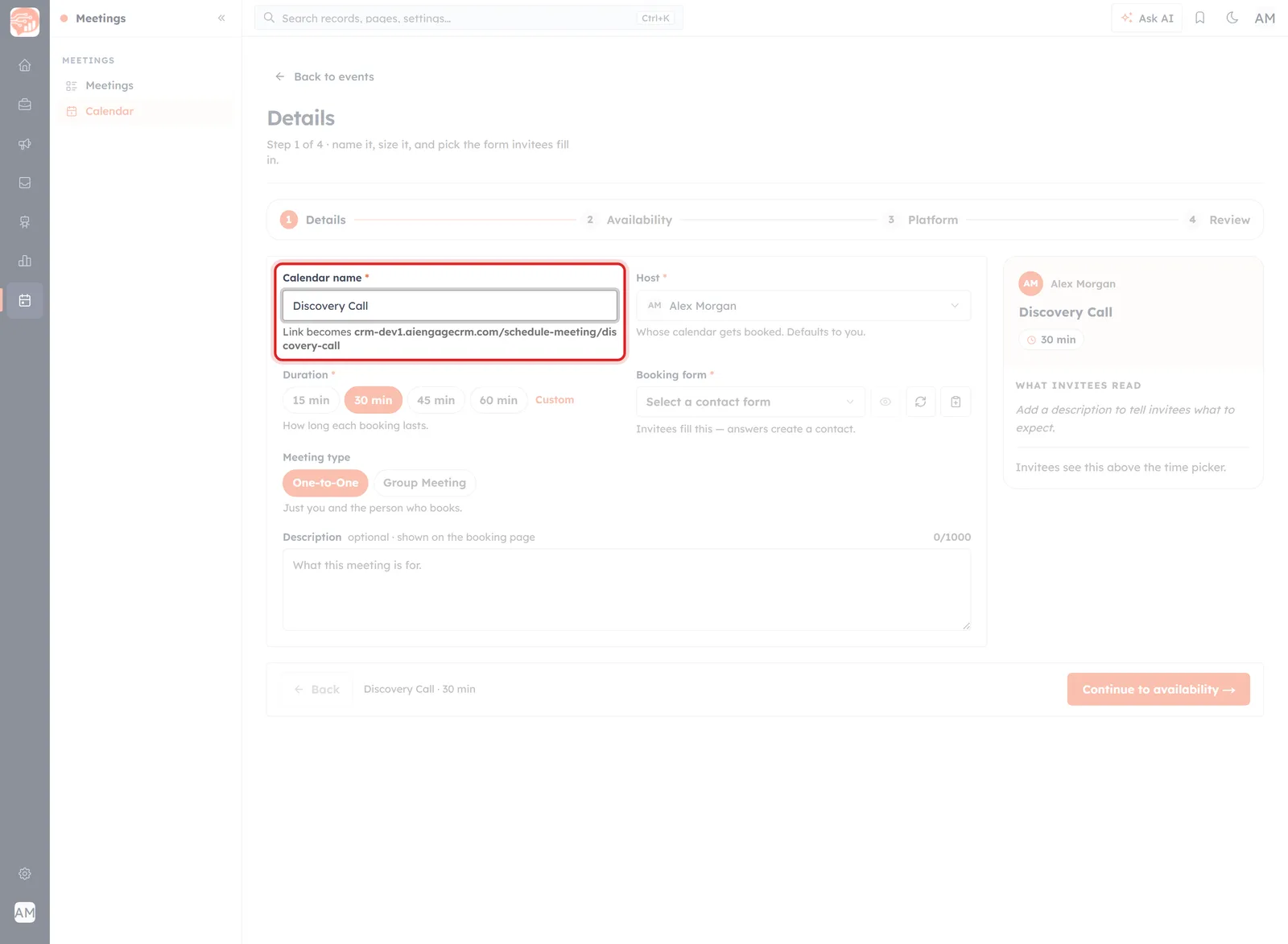
The wizard previews the address under the Calendar name, live, as you type.
Every booking link has the same shape:
<your CRM address>/schedule-meeting/<calendar-name>Two parts, and only one of them is yours:
- The host — your CRM's own address. Fixed.
- The last part — built from the Calendar name on step 1, lowercased with spaces turned into hyphens. Name an event Discovery Call and the address ends
/schedule-meeting/discovery-call.
So the way to change a booking URL is to change the event's name — there is no separate field for the address.
⚠️
On an event that is already live, renaming changes the public address and every copy of the old link stops working. Changing a Live Event covers what that costs and what to do instead.
Can the link use your company domain?#
No — not today. Booking pages are served from your CRM's address, and there is no setting anywhere to serve them from a domain of your own. There is no custom-domain, vanity-URL or white-label option in Organization Settings, in the event wizard, or in the share panel.
ℹ️
Worth separating from a feature that does exist: email sending-domain authentication. Authenticating your domain changes where your email appears to come from — it has no effect on the address of a booking page. The two are unrelated, and it is an easy pair to confuse.
The nearest thing to a branded address is the second sharing option, below.
The two ways to hand it out#
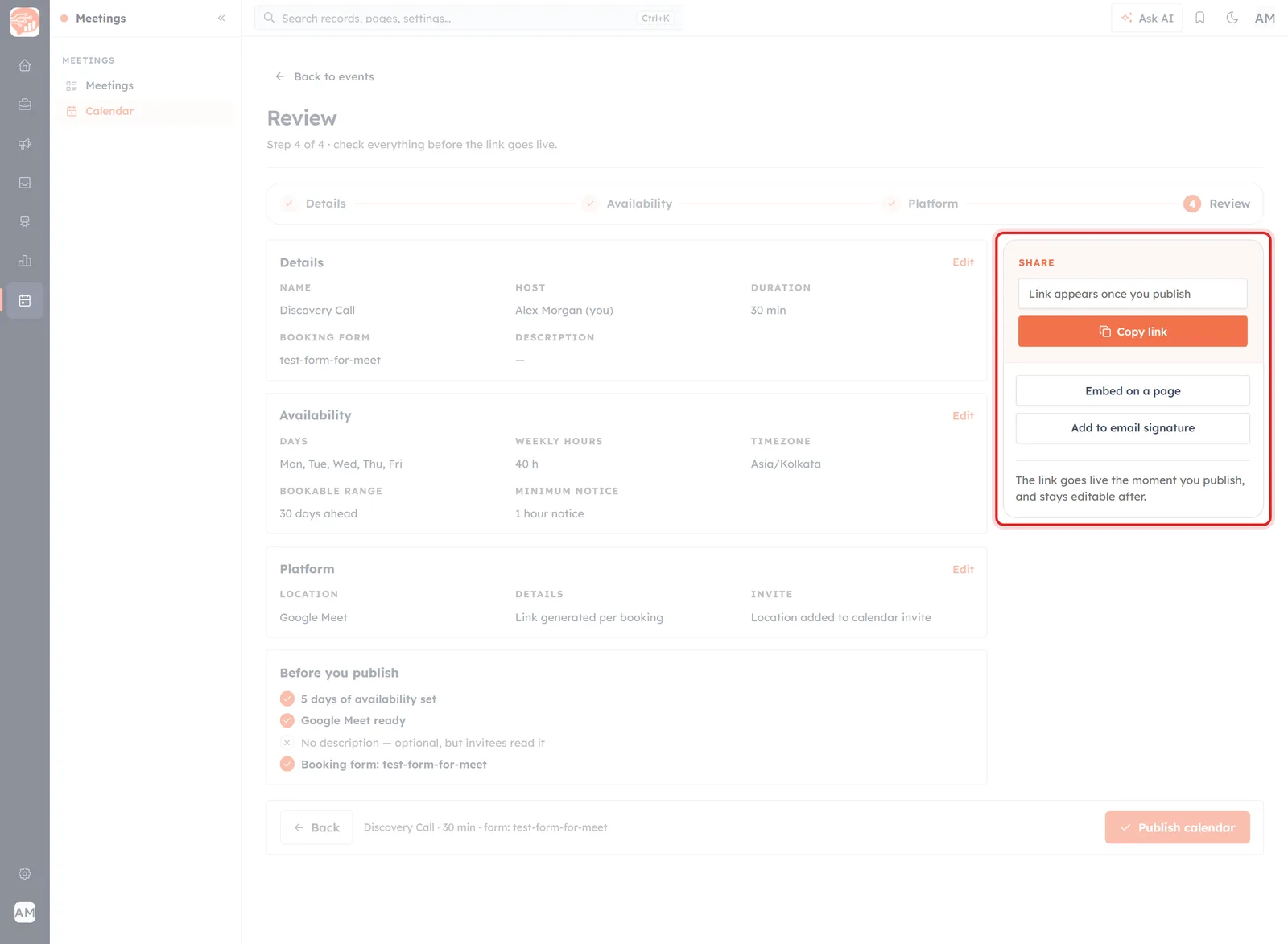
The SHARE panel on step 4. The address box stays a placeholder until you publish.
The SHARE panel sits on step 4 and stays available afterwards. Until you publish, the box at the top reads “Link appears once you publish”, and underneath the panel states the deal plainly:
The link goes live the moment you publish, and stays editable after.
Direct link — Copy link#
The primary button, and the one you will use most. It puts the address on your clipboard for an email, a chat message, a WhatsApp reply or a calendar invite.
The invitee sees the CRM address in their browser bar. In an email or a message that matters little — people click the link, they do not read it — and it is the fastest option by a distance.
Embed on a page#
This is the option to reach for if the address is what is bothering you.
Embedding puts the booking page inside a page on your own website — your Contact page, a landing page, wherever a “talk to us” button already lives. The visitor stays on your domain and books without leaving it. The booking page is still served by the CRM, but that is not the address anyone sees or shares.
💡
Use both, for different jobs. The direct link where a link is being clicked — email, chat, a bio. The embed where the address is part of your brand — your website. They point at the same event, so bookings from either land in the same place.
Add to email signature#
The third option, for the steadiest source of bookings there is: every email you already send.
📋
What these two buttons hand you is not documented yet. Embed on a page and Add to email signature only open once an event is published, and no published event has been available to capture them from. When somebody can open them on a live event, the exact snippet each one produces belongs in this article.
Choosing between them#
- Sending it to a person? Copy link.
- Putting it on your website? Embed, so visitors stay on your domain.
- Want it working in the background? Add it to your email signature.
- Care what the address says? Name the event well — that is the part you control — and embed it where the address is on show.
Share Your Booking Link covers where else the link is worth putting, and The Booking Page Your Invitee Sees shows what opens at the end of it.
Was this article helpful?
Ready to implement this?
OpenAI Engage and apply what you just learned to your own workspace.
Open AI Engage CRM