Loading…


KnowledgeBase
Share Your Booking Link
What this covers#
Building a booking link is only half the job. Until someone has the address, nobody can book anything.
This article covers where the link lives, what its address is made of, and the three ways the CRM offers to hand it out — picking up where Create an Event in the Calendar leaves off.
What your link looks like#
You do not compose the address; it is built from the Calendar name you typed on step 1. The wizard previews it live as you type, right under the field:
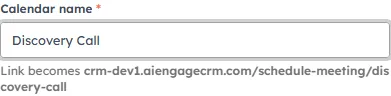
Name the calendar “Discovery Call” and the link becomes …/schedule-meeting/discovery-call.
The shape is always the same:
<your CRM address>/schedule-meeting/<calendar-name>The name is lowercased and spaces become hyphens, so Discovery Call gives /schedule-meeting/discovery-call.
💡
That makes the Calendar name worth a moment’s thought, because it is also the part of the URL people see. Discovery Call reads well in a signature; Meeting 2 does not.
Where the Share panel is#
The SHARE panel sits on the right of step 4, Review — the last step before you publish — and stays available afterwards.
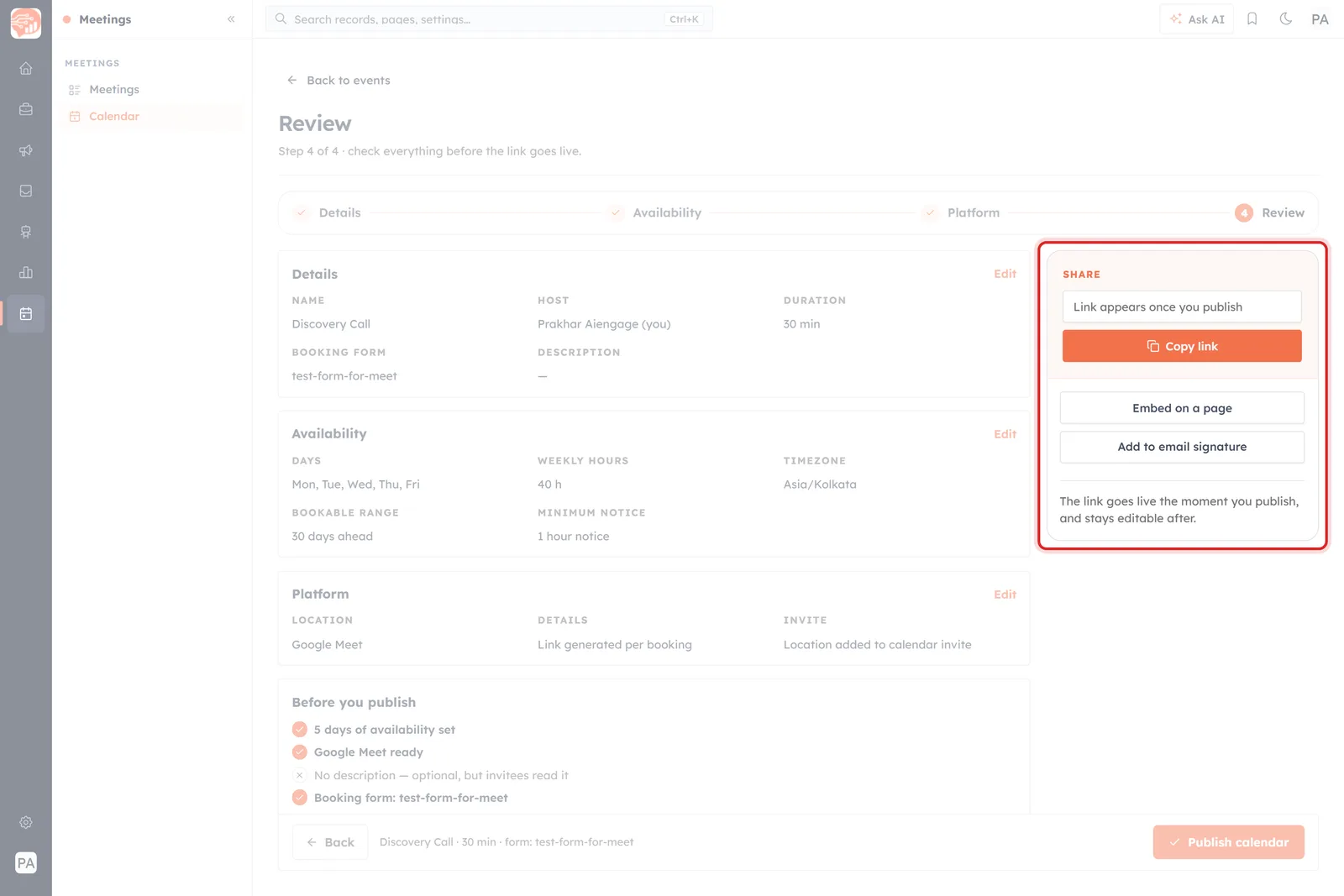
Step 4, Review. The SHARE panel is the outlined block on the right — Copy link, Embed on a page, Add to email signature. The link box is a placeholder until the calendar goes live.
Before you publish, the box where the link will appear reads “Link appears once you publish” — there is no address yet because the page does not exist yet. Underneath, the panel states the deal plainly:
The link goes live the moment you publish, and stays editable after.
So publishing is not a commitment you have to get perfect. The link starts working immediately, and you can keep editing the calendar behind it.
The three ways to share#
The panel offers three, and they suit different places.
Copy link#
The primary button, and the one you will use most. It puts the address on your clipboard so you can paste it into an email, a chat, a WhatsApp message or a calendar invite. Once the calendar is published, the address appears in the box above the button.
Embed on a page#
For putting the booking experience on your own website — a Contact page, a landing page, a pricing page — rather than sending people away to a separate link.
Add to email signature#
For the steadiest source of bookings there is: every email you already send. A signature link asks for nothing extra from you after the day you set it up.
Where to actually put it#
The link works anywhere a link works. The ones that earn their keep:
- Your email signature — every conversation becomes a chance to book, with no effort per message.
- Your website — on the Contact page, or wherever a “talk to us” button already lives.
- One-to-one emails — far better than proposing times back and forth. Replace “does Tuesday work?” with the link.
- Email and WhatsApp campaigns — a natural call to action when the goal is a conversation rather than a click.
- Your social and messaging profiles — the bio link on a profile people already visit.
- Chat replies — when a conversation reaches “let’s talk properly”, the link ends the scheduling round-trip in one message.
📈
Sharing the link in an email campaign? Switch on UTM tracking first, so you can see which campaign the bookings actually came from.
Before you hand it out#
- Open it yourself first. Paste the address into a private window and book a slot as an invitee would. It is the only way to see what they see.
- Check the times are right. Invitees pick slots in their own timezone, so a mistake in your weekly hours shows up as odd availability rather than an error.
- Make sure the booking form is the one you meant. Whatever an invitee fills in there becomes a contact record.
⚠️
Booking links are limited by plan. Clicking Publish calendar can produce an Unlock More Meeting Calendars message instead of a live link, if your plan’s allowance is already used. If that happens, nothing is created — the wizard keeps your work, and you can publish once the plan allows it.
Changing the link later#
The calendar stays editable after publishing, so hours, duration and location can all change without the address changing.
The one thing to be careful with is the Calendar name, since the address is built from it. Renaming a published calendar risks breaking every copy of the link already in the wild — in signatures, on your site, in messages you cannot edit. Get the name right before you circulate it widely.
Was this article helpful?
Ready to implement this?
OpenAI Engage and apply what you just learned to your own workspace.
Open AI Engage CRM