Loading…


KnowledgeBase
Introduction to Integrations & Lead Capture: Find, Connect and Manage Every Integration Step by Step
Introduction#
Integrations connect AiEngage CRM to the tools you already use. Leads from your ads land in Contacts in real time. Booked meetings get a video link. Customer emails become support conversations. App installs from your Shopify app become CRM records.
Every integration is managed from one place, the Integrations page. This guide is a step-by-step tour of that page:
Open the Integrations page.
Read an integration card and its status.
Find an integration by category or search.
Ask for an integration that isn’t listed yet.
See the other ways leads reach your CRM (web forms, WhatsApp forms and the API).
At the end, a table points you to the step-by-step guide for each integration. Each screenshot has a red ring and arrow on the part to look at, followed by a description of the whole screen.
What You Can Connect#
These integrations are available today:
Integration | Category | What it does | Who connects it |
|---|---|---|---|
Meta Lead Ads | Advertising | Syncs Facebook and Instagram lead ads into Contacts in real time. | Once for the whole organisation |
Google Lead Form Ads | Advertising | Captures leads from Google Ads lead form extensions into Contacts. | Once for the whole organisation |
Custom Platform | Advertising | Tracks offline advertising (newspaper, radio, hoardings, events) so it appears in your unified ad reports. | Once for the whole organisation |
Google Calendar | Meetings | Booked meetings get a Google Meet link and land on your Google Calendar. | Each person connects their own |
Zoom | Meetings | Creates Zoom meetings automatically for bookings made on your pages. | Each person connects their own |
Support Mailboxes | Connects the mailbox your support team answers from. Customer emails arrive in the Team Inbox as conversations. | Once for the whole organisation | |
Shopify Partner | Ecommerce | Syncs the stores that installed your Shopify app, with their installs, uninstalls, plans and charges. | Once for the whole organisation |
ℹ️
Integrations that are still being built aren’t shown on the page. If you need one that isn’t listed, use Request Integration (Part 4).
Before You Begin#
The Integrations page is under Settings. The account owner and administrators can open it. If you can’t see it, ask one of them.
Organisation-wide integrations (ads, Support Mailboxes, Shopify Partner) are usually connected once by an administrator.
Google Calendar and Zoom are personal. Each teammate connects their own account, and the connection only affects their own meetings.
Part 1: Open the Integrations Page#
Step 1: Open Settings#
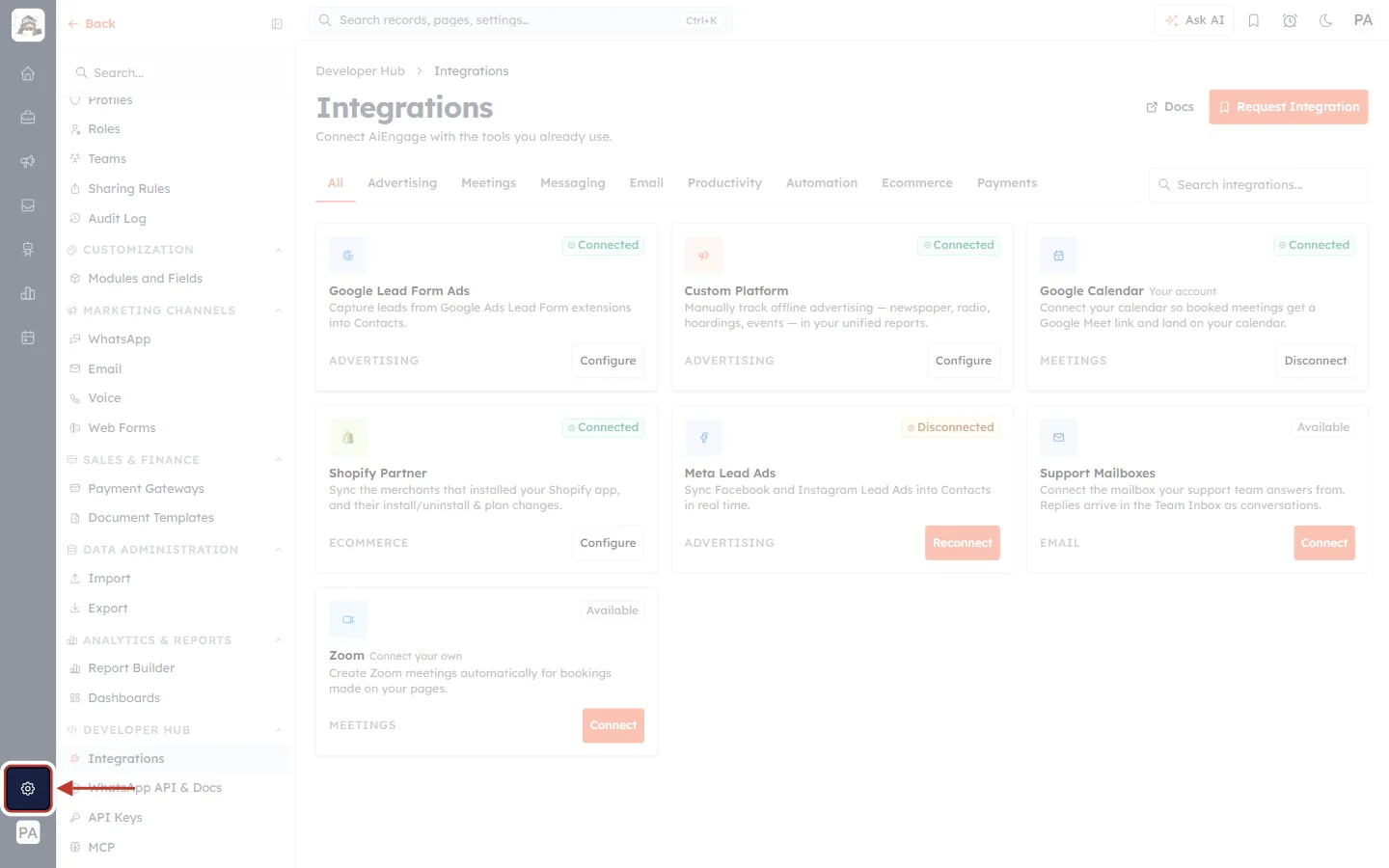
What this screenshot shows. The Settings gear is ringed near the bottom of the dark icon rail on the far left.
The rail is on every screen of the CRM. The icons above the gear open your modules (Home, Sales, Marketing and so on). The circle with your initials at the very bottom is your profile.
Click the gear. The Settings menu opens in the panel next to the rail.
Step 2: Go to Developer Hub → Integrations#
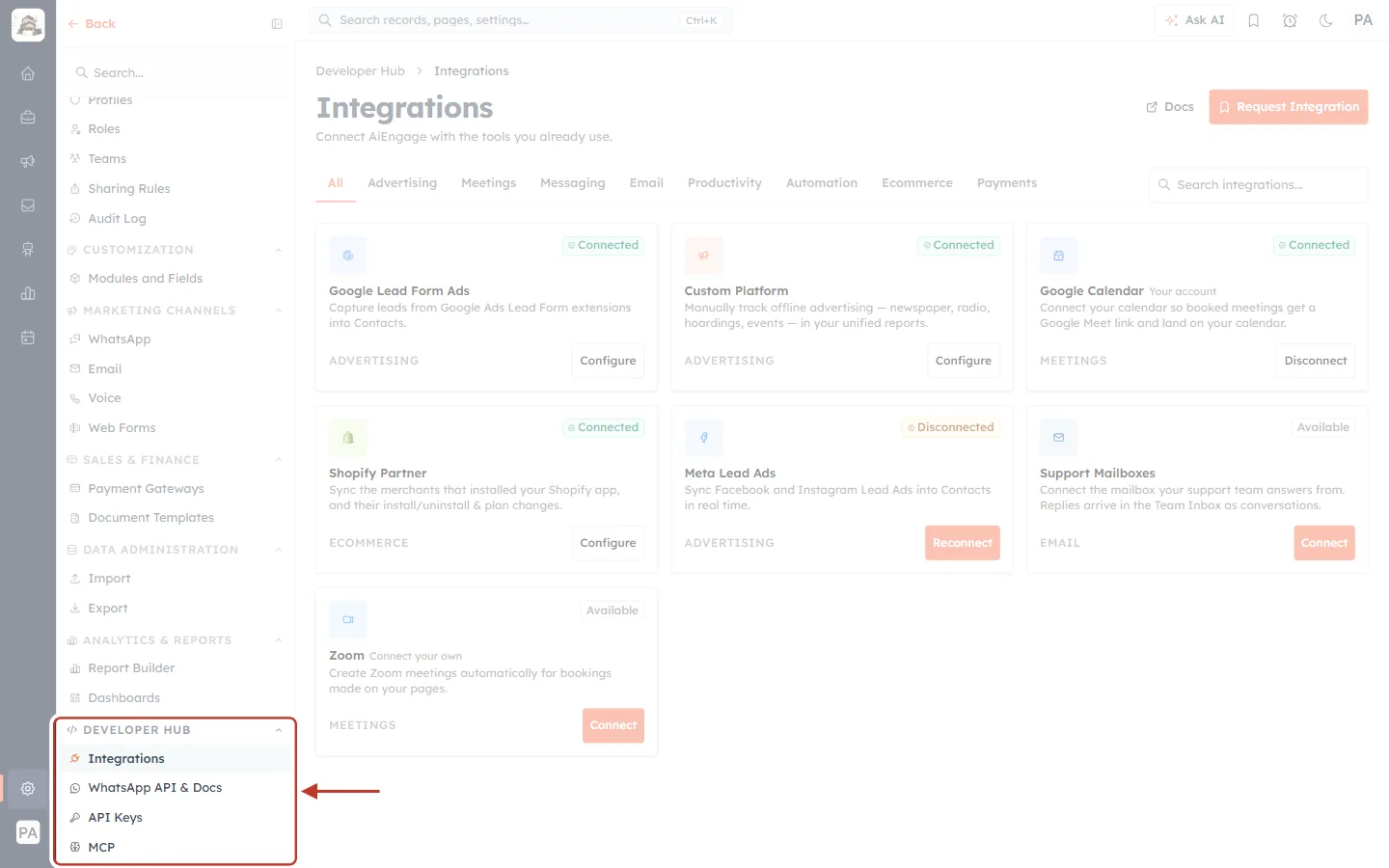
What this screenshot shows. The ringed DEVELOPER HUB group is at the bottom of the Settings menu. Scroll down to reach it.
Integrations: the page this guide covers. Click it.
WhatsApp API & Docs: WhatsApp API details for developers.
API Keys: access tokens for the AiEngage REST API, for building your own integrations. See API Keys: Build Custom Integrations.
MCP: connect an AI assistant such as Claude to your CRM. See Connect Claude to AiEngage CRM (MCP): Ask Your CRM Questions in Plain English.
Step 3: Get to know the page#
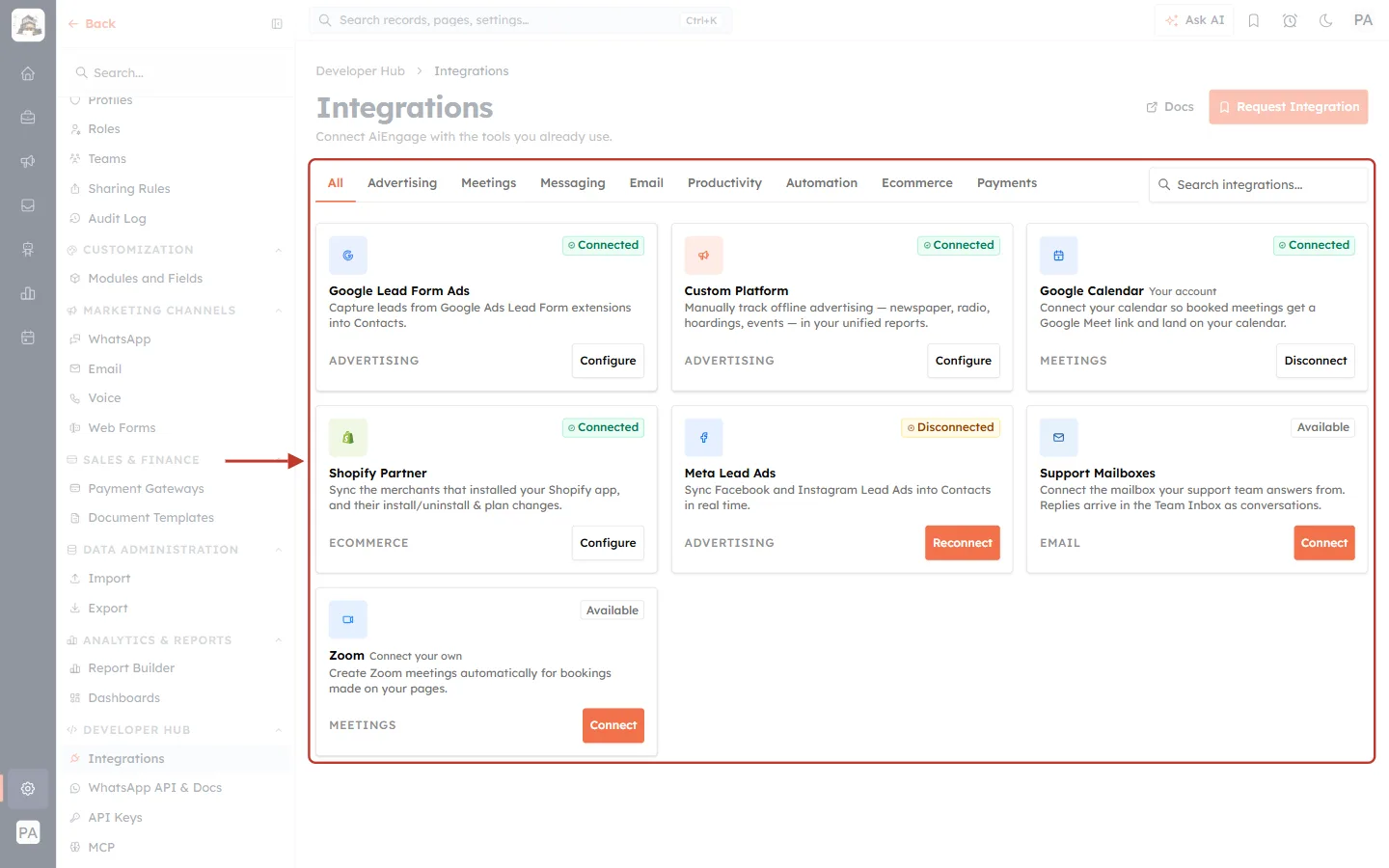
What this screenshot shows. The ringed area is the integrations catalog: a row of category tabs, a search box, and a card for each integration.
The All tab is selected, so every integration is shown: Google Lead Form Ads, Custom Platform, Google Calendar, Shopify Partner, Meta Lead Ads, Support Mailboxes and Zoom.
Cards are sorted by status: connected integrations first, then disconnected ones that need attention, then the ones you haven’t connected yet. What’s working, and what needs fixing, is always at the top.
The breadcrumb above the title reads Developer Hub › Integrations.
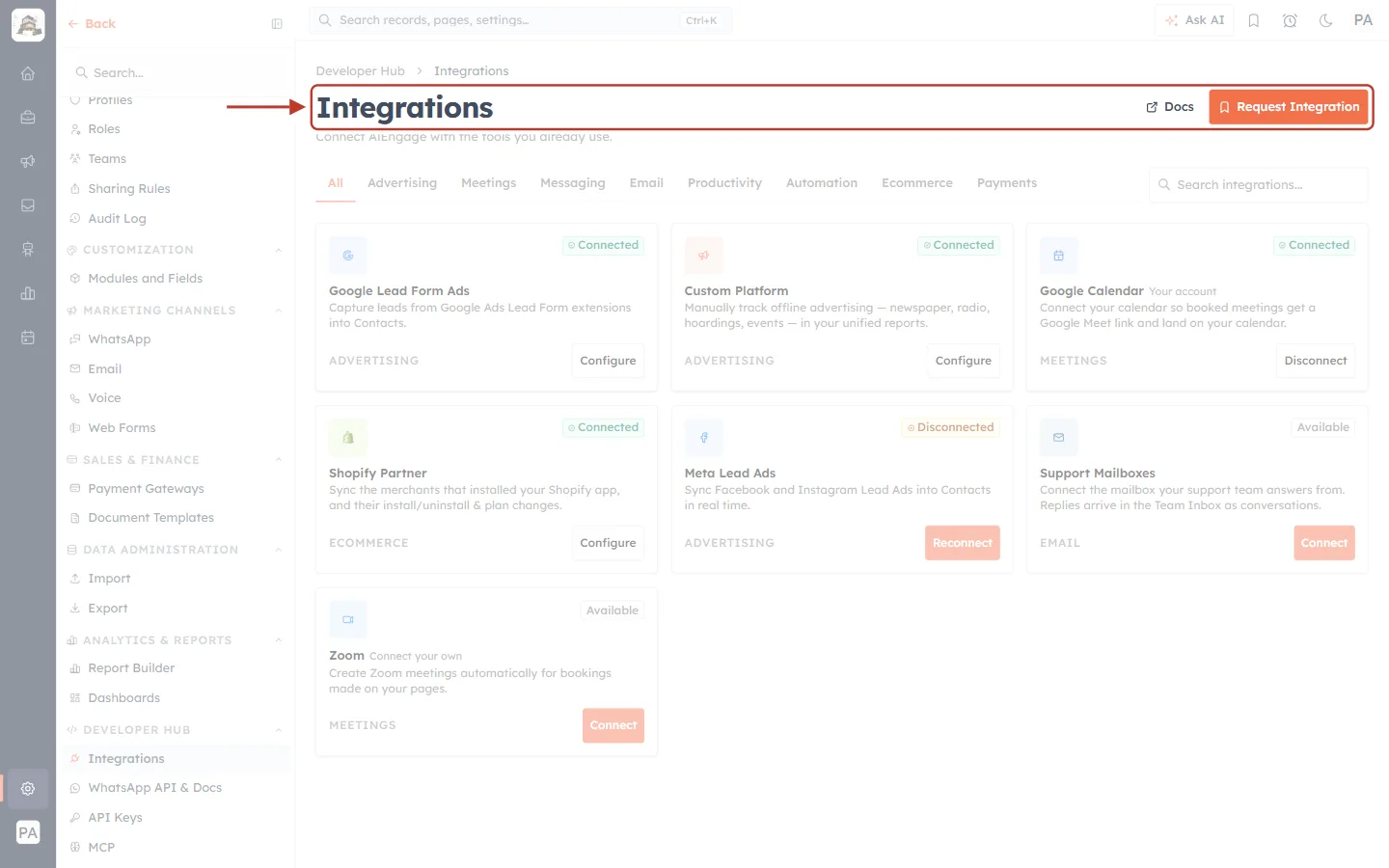
What this screenshot shows. The ringed header holds the page title and its buttons.
Integrations: Connect AiEngage with the tools you already use.
Docs: in-app documentation. It currently shows Coming soon. Use this help centre in the meantime.
Request Integration (orange): ask our team for an integration that isn’t listed (Part 4).
On the Advertising tab only, a Conversion Settings button also appears here (Step 8).
Part 2: Read an Integration Card#
Every card has the same layout: an icon and name at the top left, a status badge at the top right, a short description, the category at the bottom left, and an action button at the bottom right. The badge and button tell you what to do next.
Step 4: Recognise a connected integration#
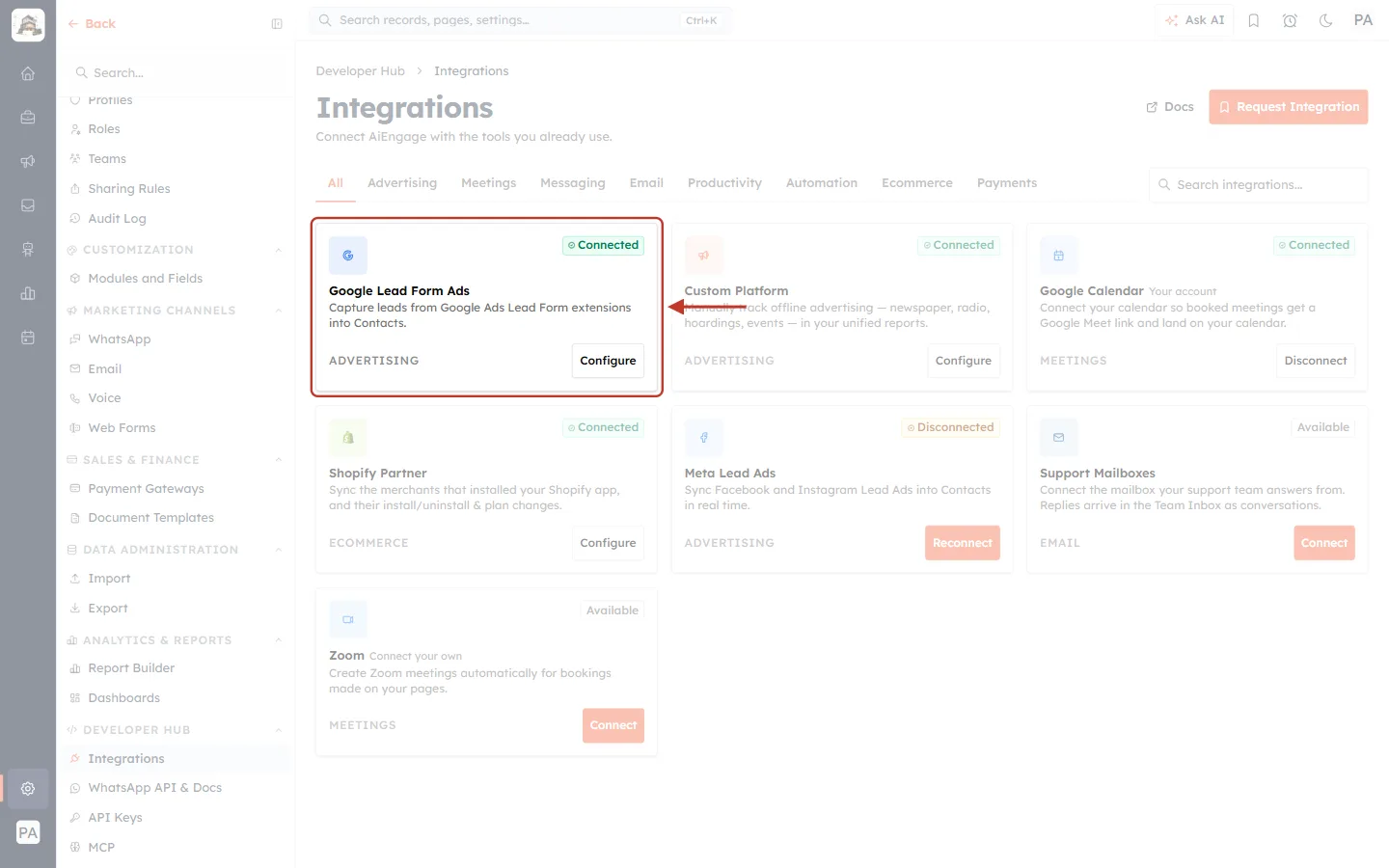
What this screenshot shows. The ringed Google Lead Form Ads card is connected.
The green Connected badge means it is working and syncing.
Description: Capture leads from Google Ads Lead Form extensions into Contacts. Category: ADVERTISING.
Configure opens the integration’s own page, where you manage its settings, see its sync history and disconnect it.
Step 5: Spot one that needs reconnecting#
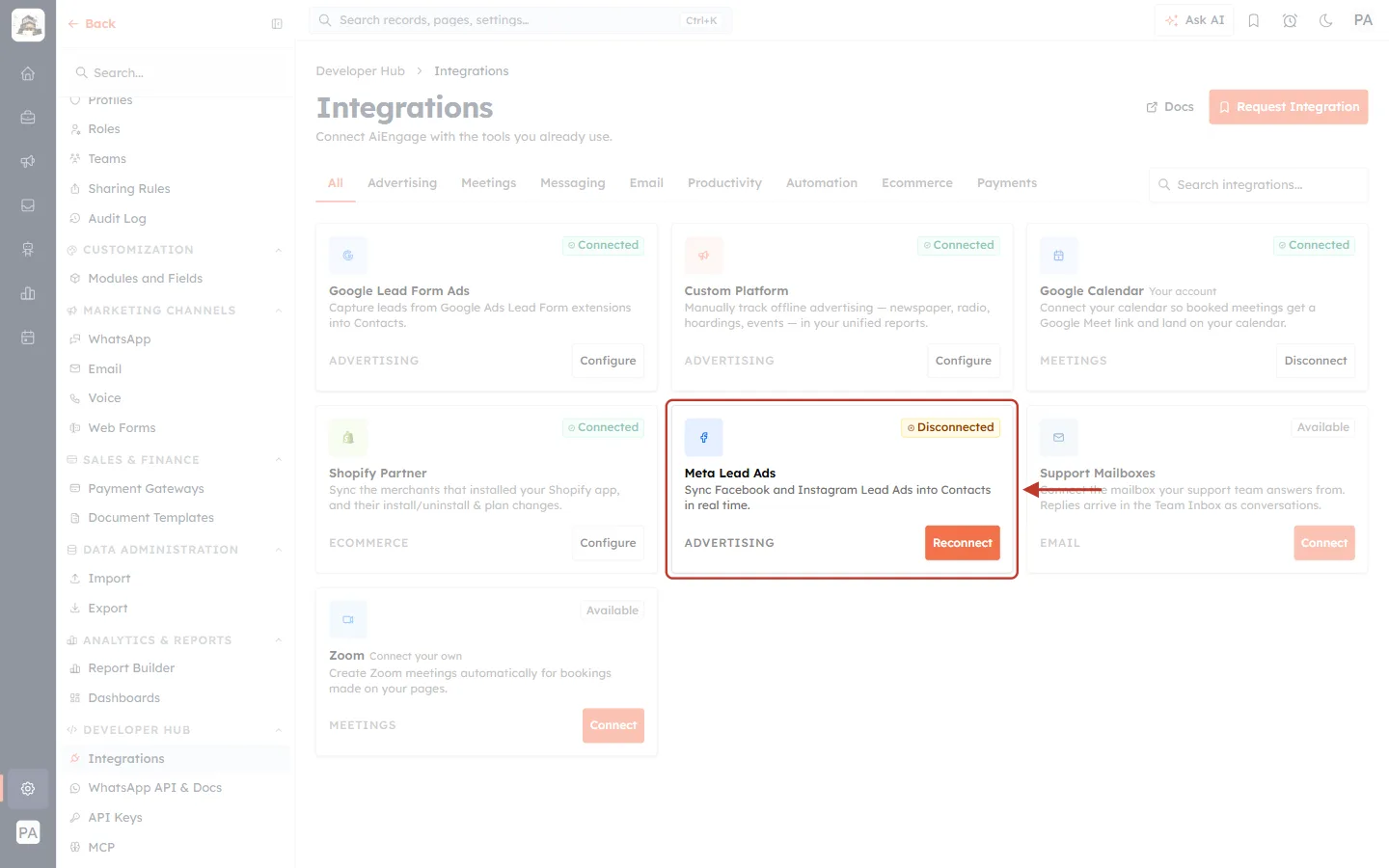
What this screenshot shows. The ringed Meta Lead Ads card is disconnected.
The orange Disconnected badge means the connection was working before but has stopped, for example because the access was removed or expired. No new leads arrive until it is fixed.
Description: Sync Facebook and Instagram Lead Ads into Contacts in real time.
The orange Reconnect button takes you through signing in again. Leads you already received are kept. See Connect Meta Lead Ads (Facebook & Instagram).
Step 6: Connect a new integration#
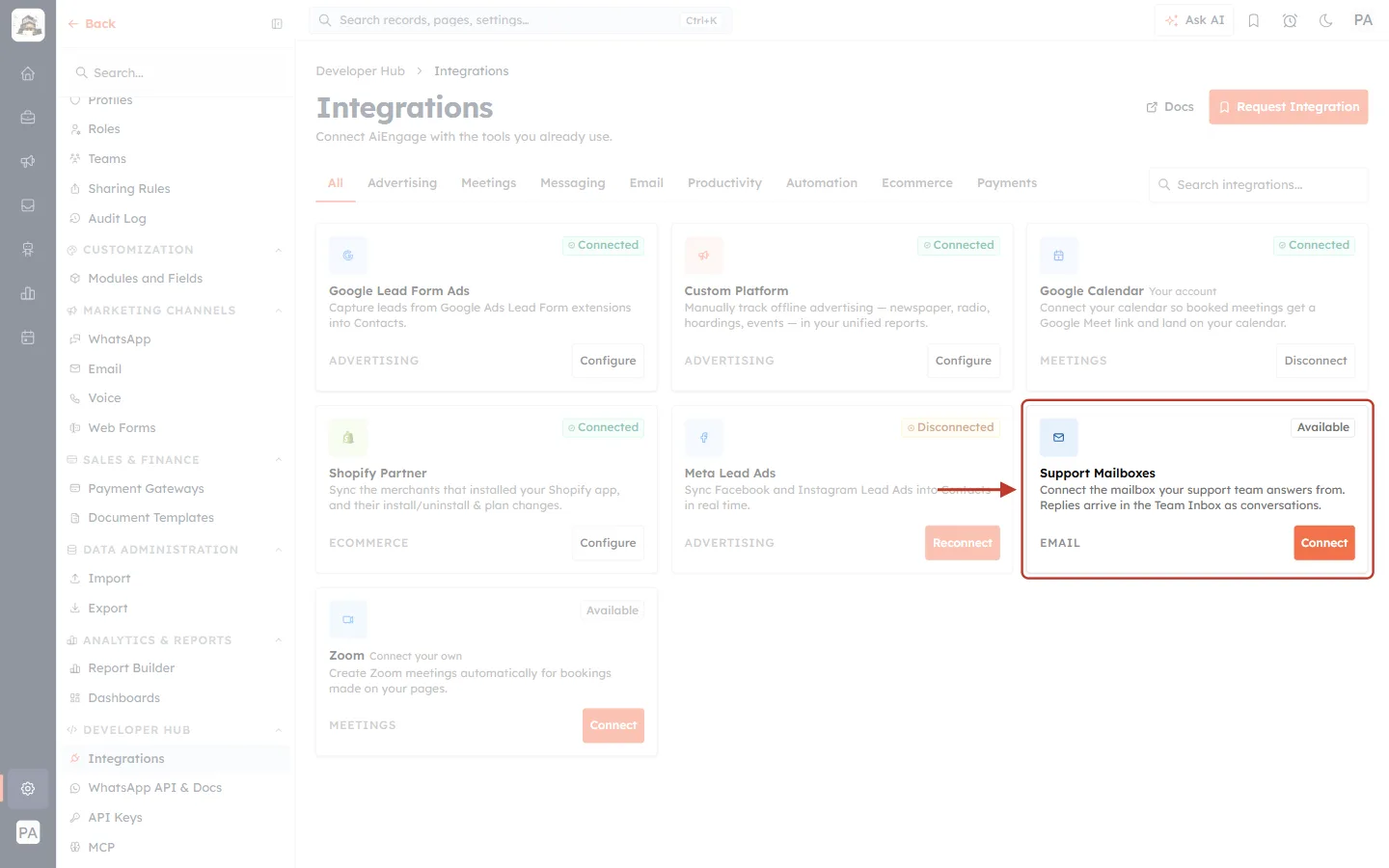
What this screenshot shows. The ringed Support Mailboxes card hasn’t been connected yet.
The grey Available badge means it is ready to connect.
Description: Connect the mailbox your support team answers from. Replies arrive in the Team Inbox as conversations. Category: EMAIL.
The orange Connect button starts the setup. Each integration’s steps are in its own guide (see “Which Guide to Read Next” below).
Step 7: Personal integrations (calendars and Zoom)#
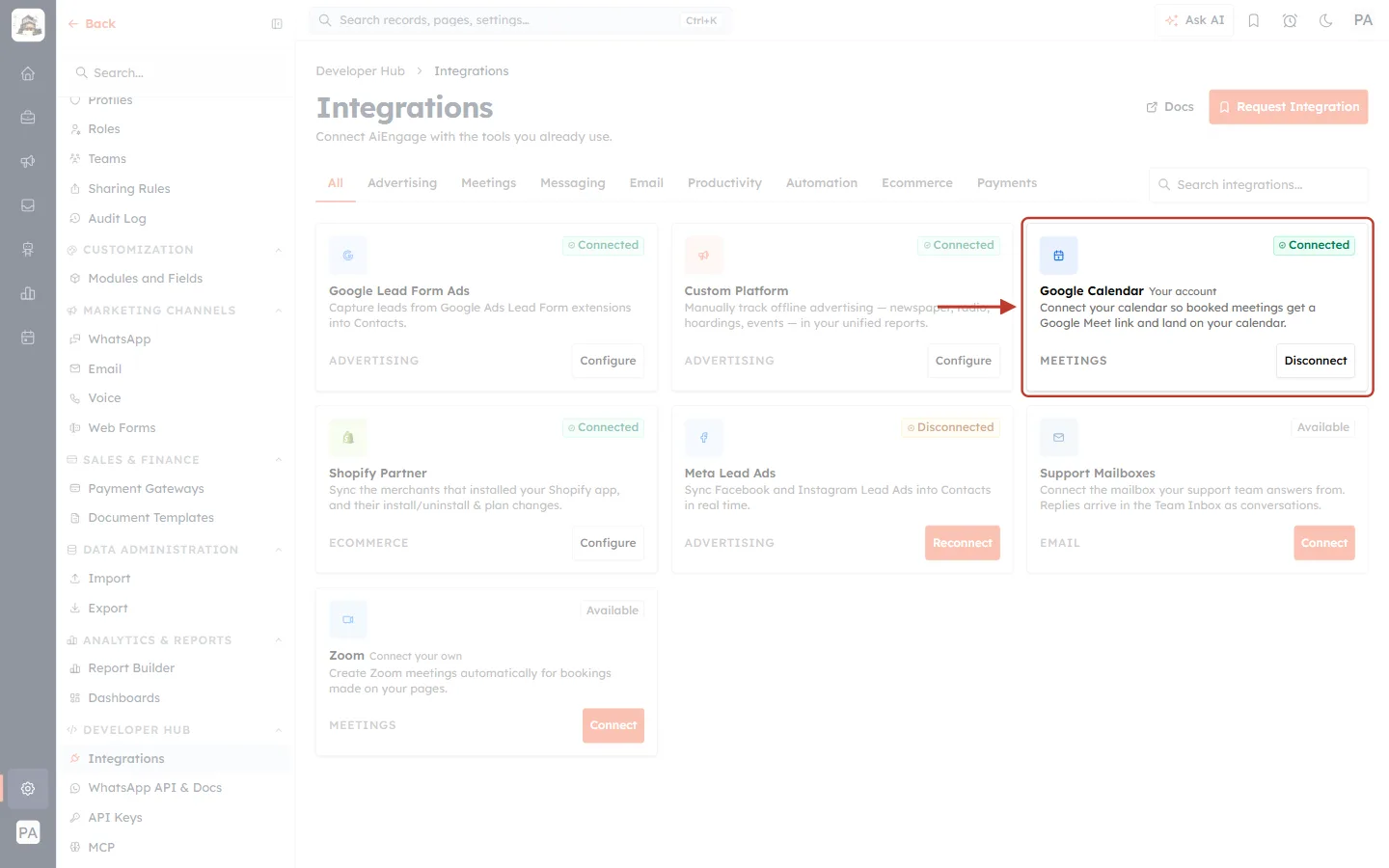
What this screenshot shows. The ringed Google Calendar card is connected to your own account.
Next to the name, Your account shows that this connection belongs to you, the signed-in user. Before you connect, the card reads Connect your own instead, as on the Zoom card.
Description: Connect your calendar so booked meetings get a Google Meet link and land on your calendar. Category: MEETINGS.
Personal integrations connect right on this page: a sign-in window opens, and the card updates when you finish. There is no separate settings page.
Disconnect asks you to confirm first: New bookings will no longer get a Google Calendar link. Meetings already booked keep the links they have.
Badge | Button | What it means |
|---|---|---|
Connected (green) | Configure | Working. Open it to manage settings or disconnect. |
Connected (green) + Your account | Disconnect | Your personal calendar or Zoom account is connected. |
Disconnected (orange) | Reconnect | It stopped working. Reconnect to resume syncing. |
Available (grey) | Connect | Not connected yet. Click to set it up. |
Part 3: Find an Integration#
Step 8: Filter by category#
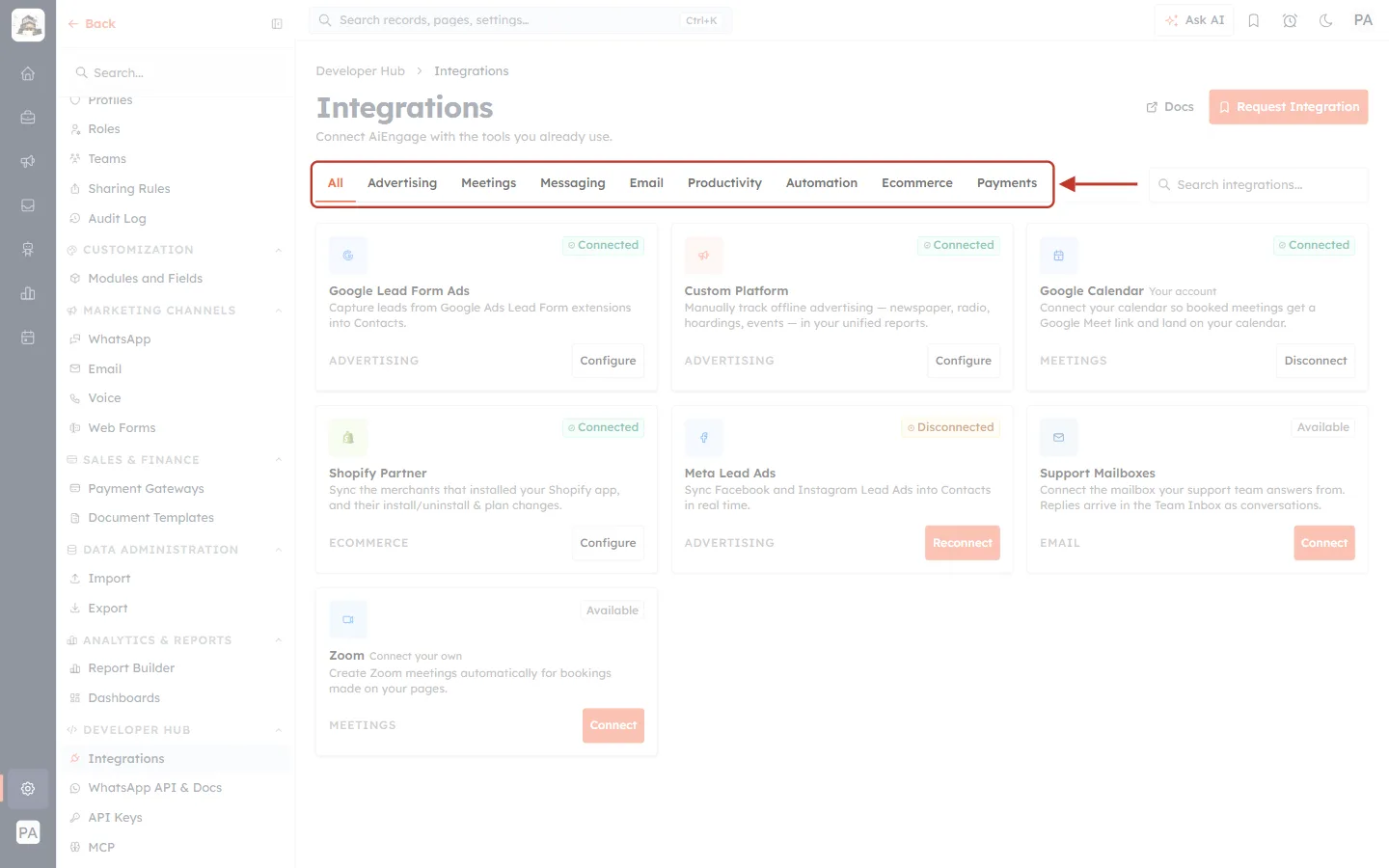
What this screenshot shows. The ringed row of tabs filters the cards by category.
All, Advertising, Meetings, Messaging, Email, Productivity, Automation, Ecommerce and Payments.
The selected tab is underlined in orange. Click any tab to show only that category.
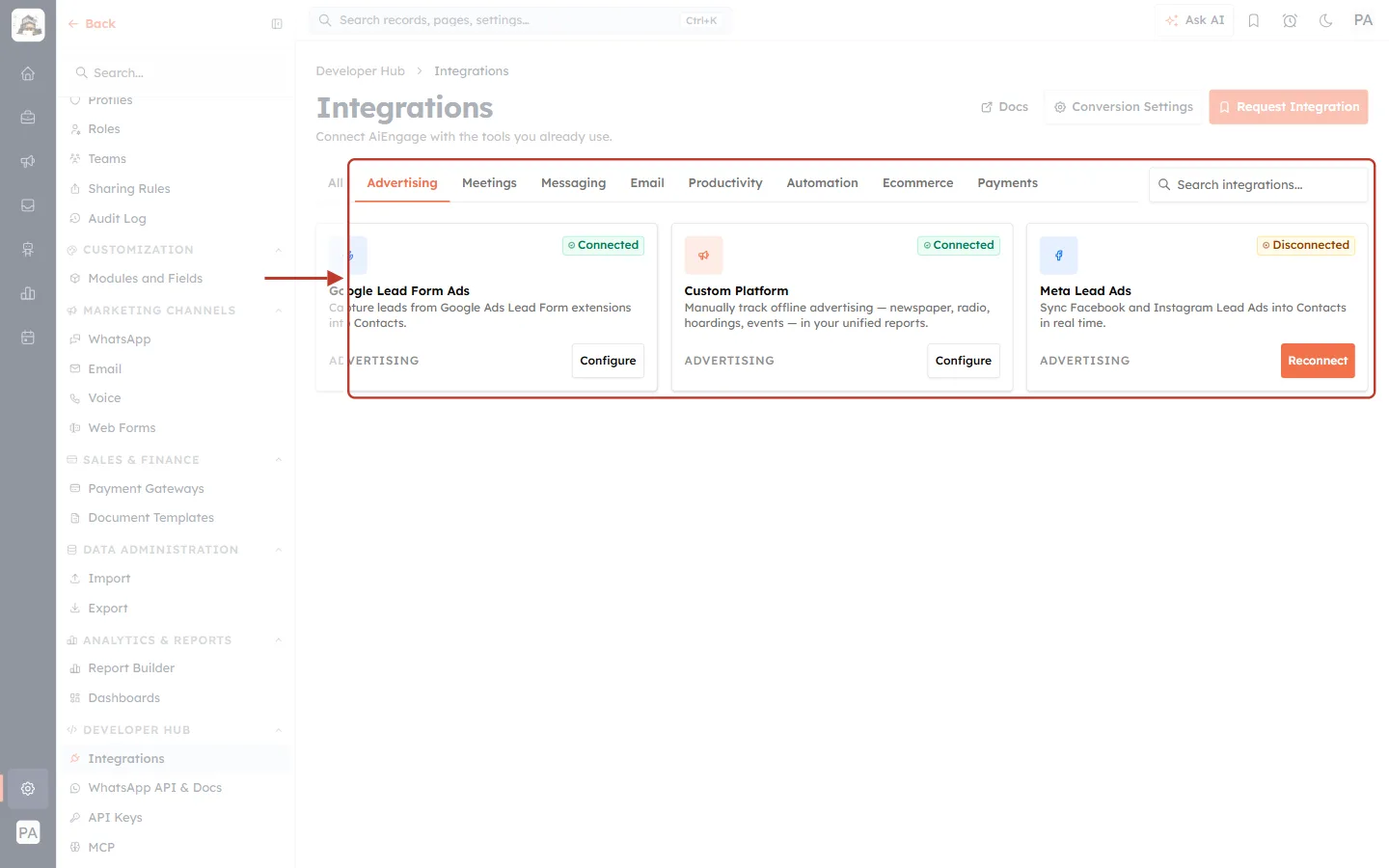
What this screenshot shows. With Advertising selected, the ringed area shows only the ad integrations.
Google Lead Form Ads (Connected), Custom Platform (Connected) and Meta Lead Ads (Disconnected).
Leads from Meta and Google ads are created as Contacts automatically, and all three feed your advertising reports. See Advertising Analytics: Unified Ad Performance & Cost Per Lead.
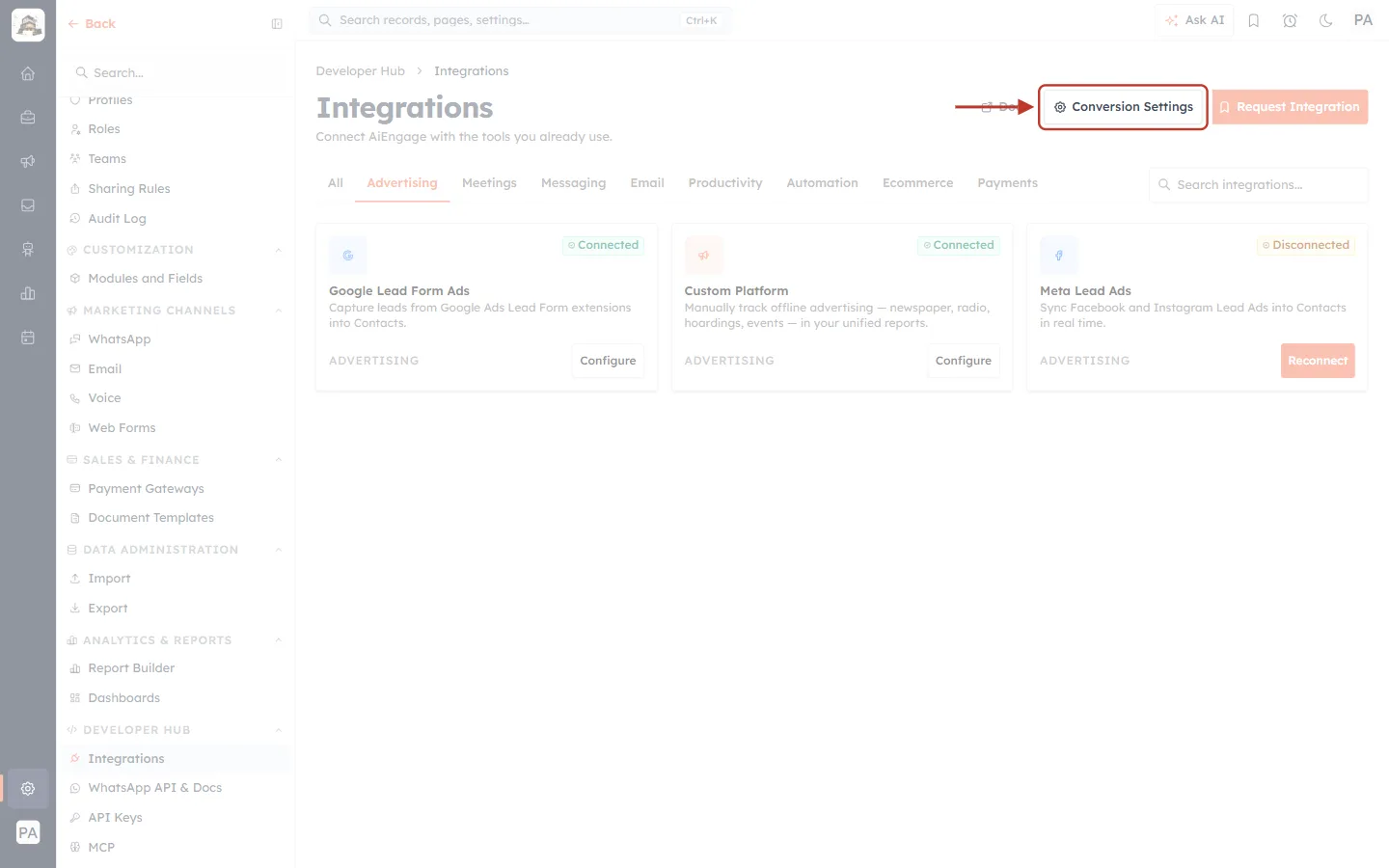
What this screenshot shows. The ringed Conversion Settings button appears only on the Advertising tab.
It sets one organisation-wide rule for what counts as a converted lead and its revenue, used by every ad platform’s ROAS and cost-per-lead figures.
See Configure Conversion Tracking: Revenue, ROAS & Converted Leads.
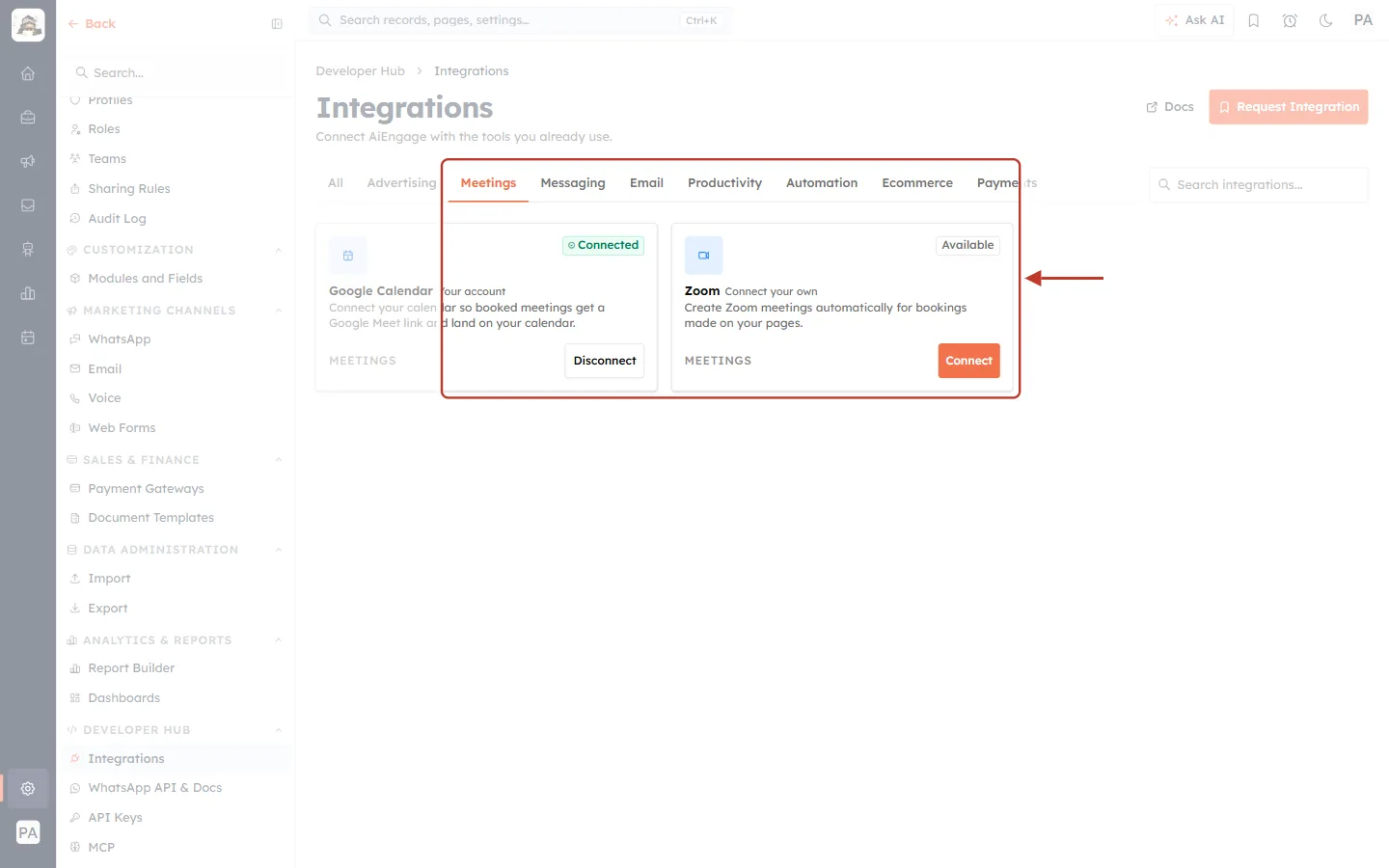
What this screenshot shows. The Meetings tab shows the two video-meeting integrations.
Google Calendar (Connected, Your account, with Disconnect).
Zoom (Available, Connect your own, with Connect): Create Zoom meetings automatically for bookings made on your pages.
Guides: Connect Google Meet: Automatic Links, Calendar Events & Status and Zoom Integration: Add, Use and Remove the App.
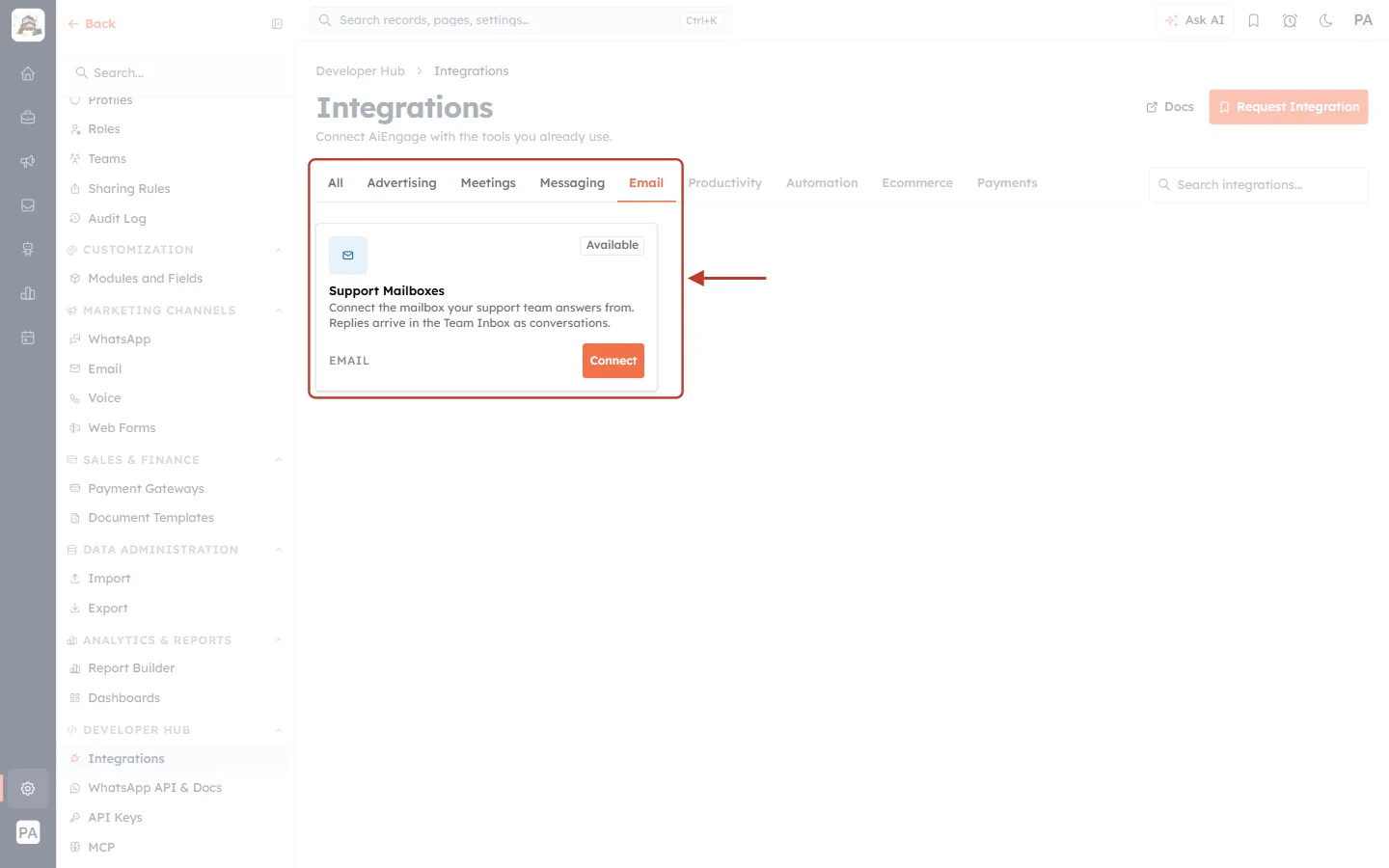
What this screenshot shows. The Email tab shows Support Mailboxes.
Connect your support address so customer emails become conversations and tickets. See Connect a Support Mailbox: Turn Customer Emails into Tickets Automatically (Email-to-Ticket).
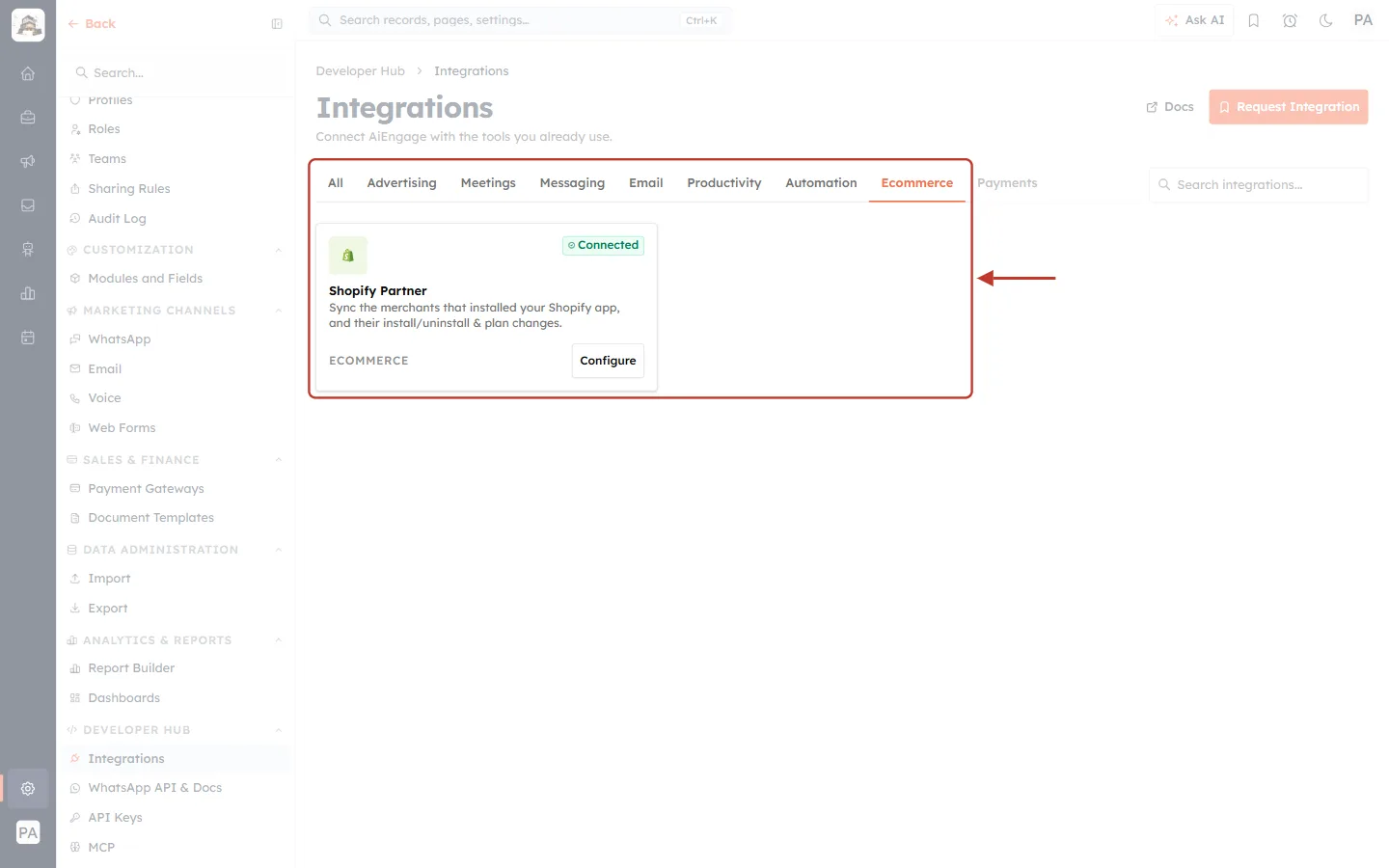
What this screenshot shows. The Ecommerce tab shows Shopify Partner (Connected, with Configure).
Sync the merchants that installed your Shopify app, and their install/uninstall & plan changes. This is for Shopify app developers. See Connect Shopify Partner Step by Step: Sync App Installs, Uninstalls, Plans & Charges into AiEngage CRM.
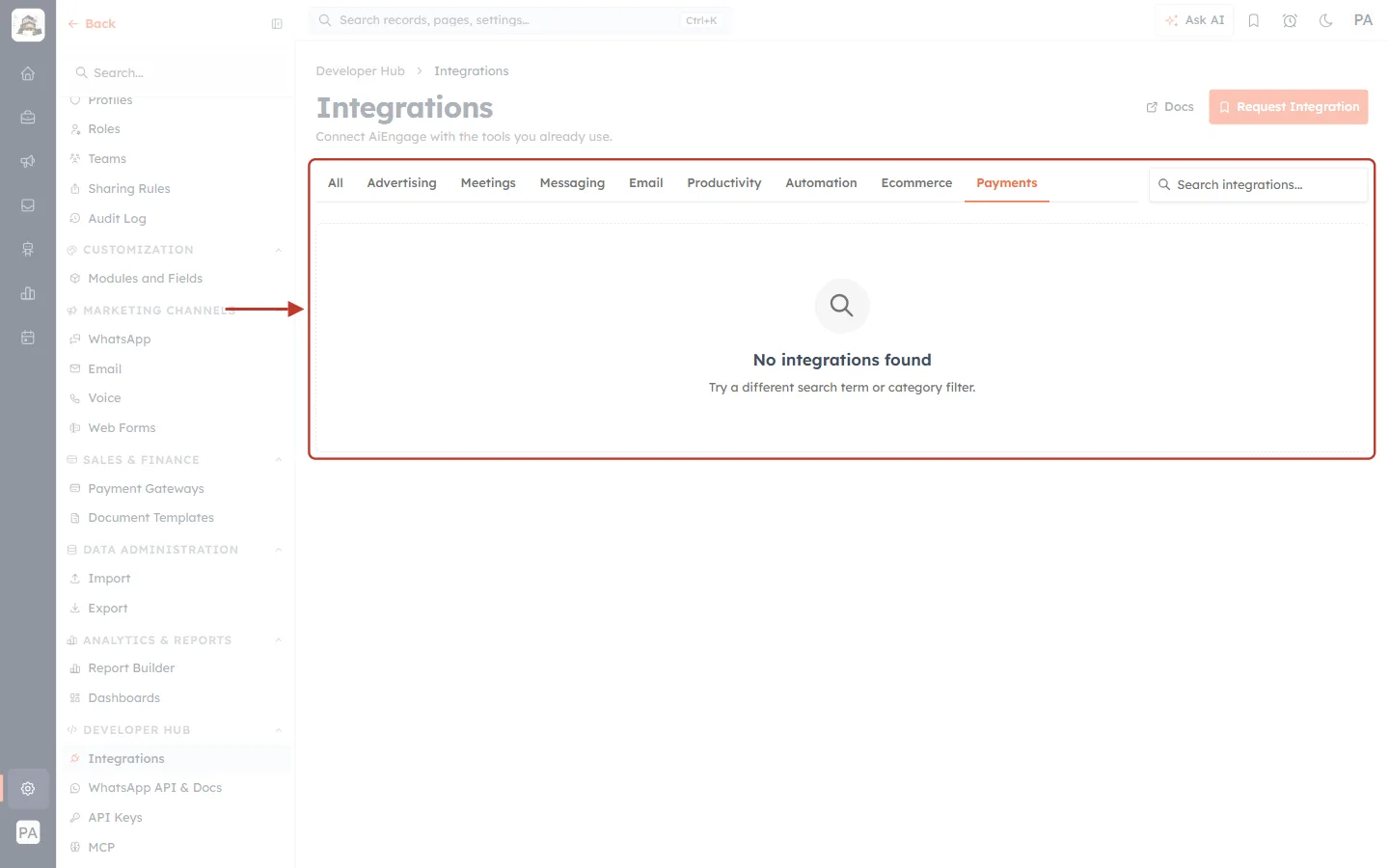
What this screenshot shows. The Payments tab is selected and shows No integrations found.
Try a different search term or category filter.
Some categories (Messaging, Productivity, Automation and Payments) have nothing listed yet. Click All to see everything again, or ask for what you need with Request Integration.
WhatsApp is set up under Settings → Marketing Channels → WhatsApp, not on this page.
Step 9: Search by name#
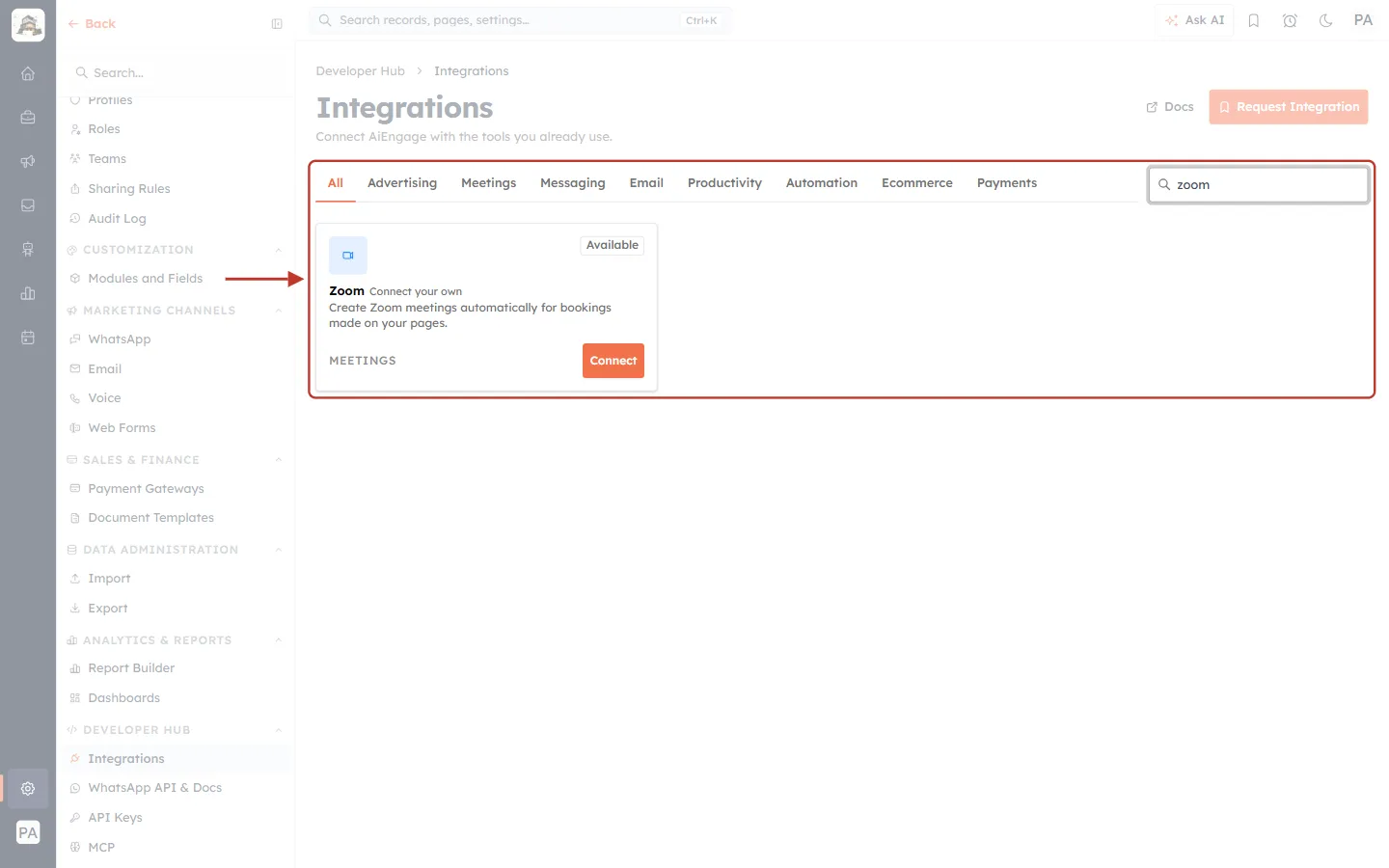
What this screenshot shows. “zoom” is typed in the ringed Search integrations… box, and only the Zoom card is left.
The search matches names and descriptions as you type. There is no need to press Enter.
Search works together with the tabs. With All selected, it searches everything.
Clear the box to show every card again.
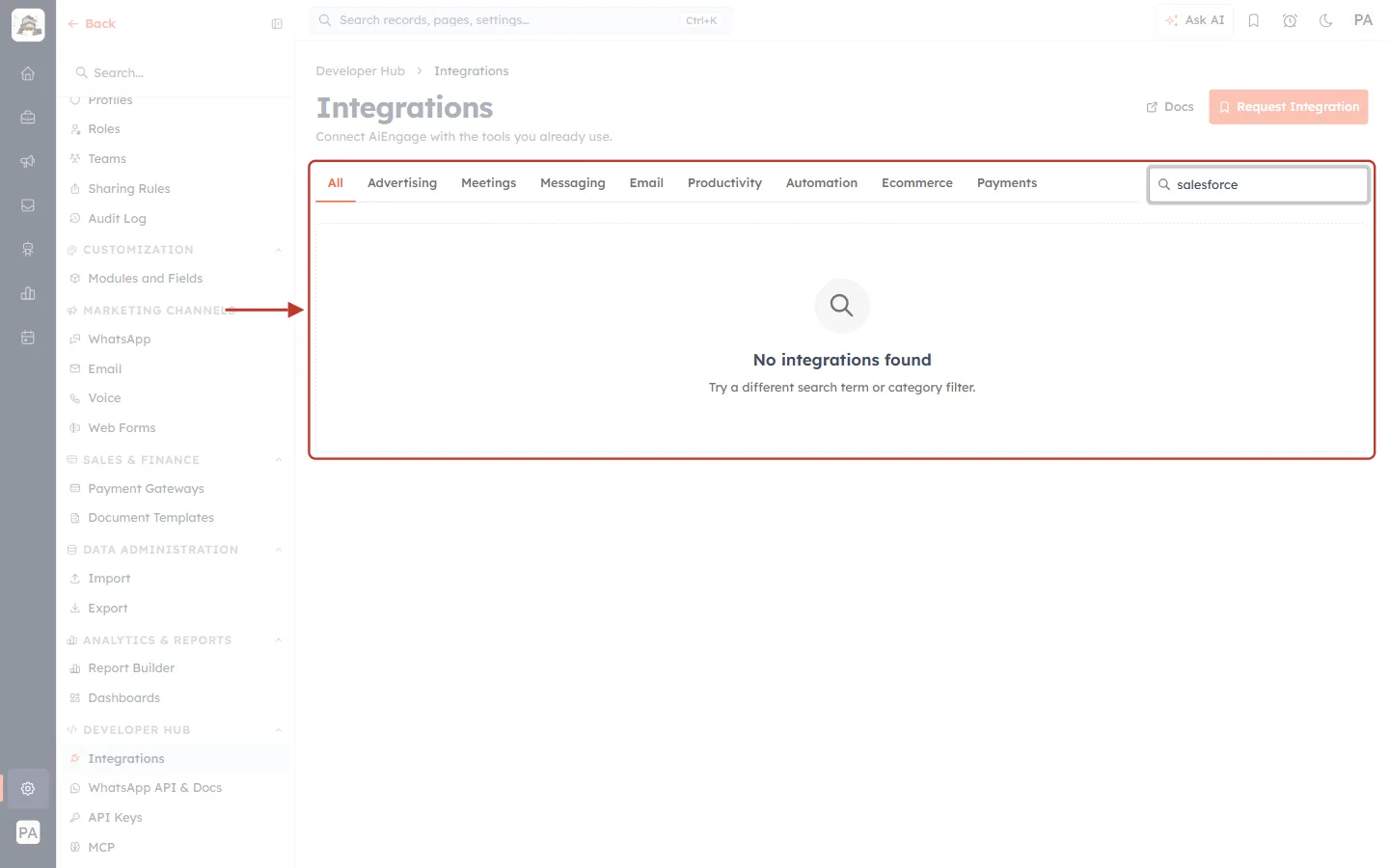
What this screenshot shows. Searching for “salesforce” finds nothing, so the page shows No integrations found.
Check the spelling, try a shorter word, or click All in case another tab is selected.
If the integration really isn’t there, request it (next step).
Part 4: Request an Integration#
Step 10: Click Request Integration#
Click the orange Request Integration button at the top right of the page.
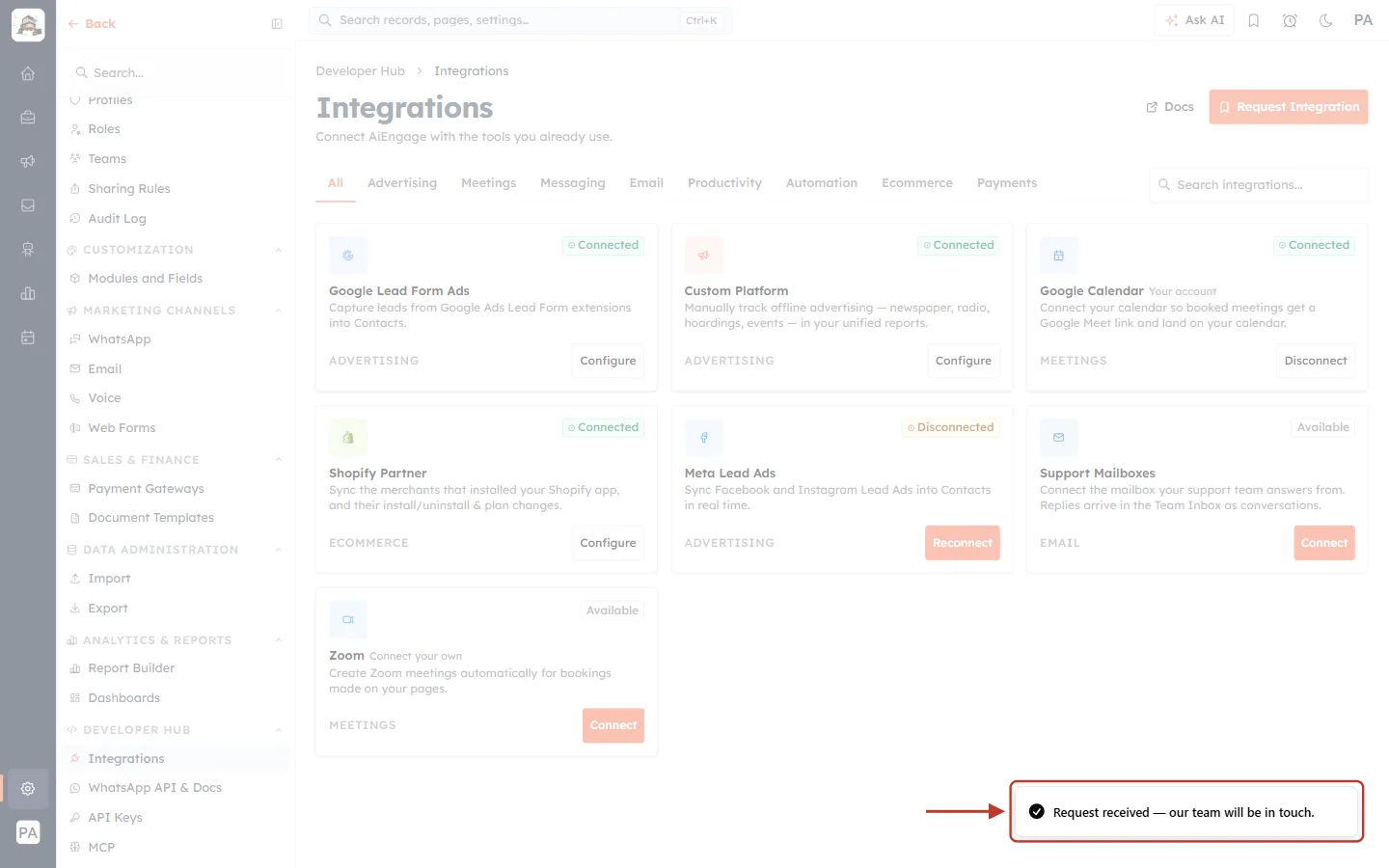
What this screenshot shows. A confirmation (ringed, bottom right) reads Request received — our team will be in touch.
It disappears on its own after a few seconds.
To help us prioritise, also tell us which tool you need and what you want it to do. Email support@aiengagecrm.com.
Part 5: Other Ways Leads Reach Your CRM#
The Integrations page covers connections to other services. Leads can also come in through tools built into AiEngage:
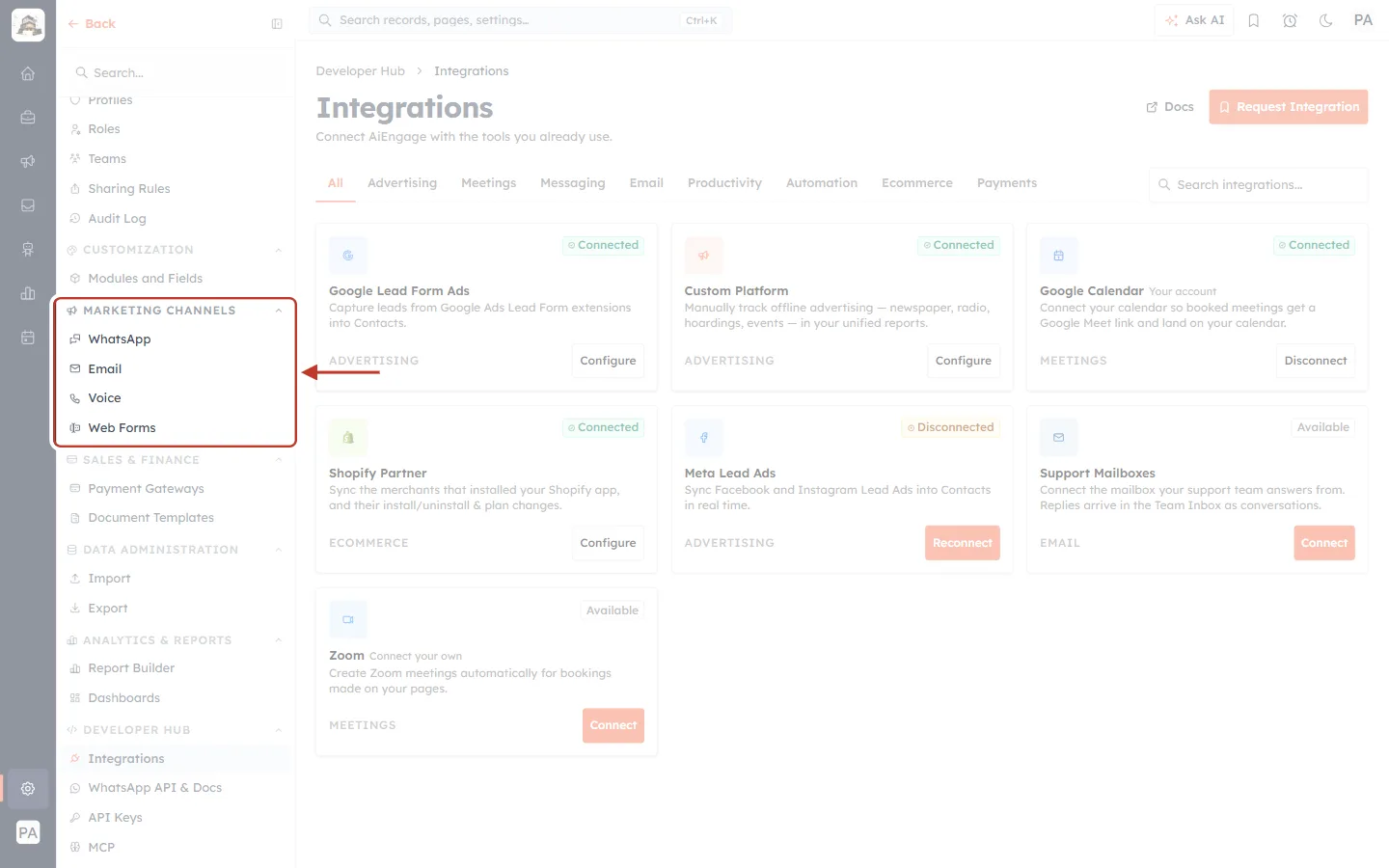
What this screenshot shows. The ringed MARKETING CHANNELS group in the Settings menu holds WhatsApp, Email, Voice and Web Forms.
Web Forms: build hosted or embeddable forms that create records in any module. See Introduction to Web Forms: Capture Leads Directly from Your Website.
WhatsApp: includes WhatsApp Forms, which collect leads through a conversation instead of a website. See WhatsApp Forms: Collect Leads via Conversational Forms.
Lead source | Where it is set up | Where the lead lands |
|---|---|---|
Meta and Google lead ads | Settings → Developer Hub → Integrations | Contacts, in real time |
Web Forms | Settings → Marketing Channels → Web Forms | Any module you choose (usually Contacts) |
WhatsApp Forms | Settings → Marketing Channels → WhatsApp | Contacts, from the WhatsApp conversation |
Your own systems | Settings → Developer Hub → API Keys | Any module, through the REST API |
✅
Once leads arrive, decide who gets each one with Assign Owner: Automatically Route Leads to Your Team. Track where each came from with Managing Leads: Lifecycle Stage, Lead Status & Source.
Which Guide to Read Next#
You want to… | Read |
|---|---|
Get leads from Facebook and Instagram ads | |
Get leads from Google Ads | |
Track offline campaigns (print, radio, events) | |
Add Google Meet links to booked meetings | Connect Google Meet: Automatic Links, Calendar Events & Status |
Add Zoom links to booked meetings | |
Turn customer emails into tickets | Connect a Support Mailbox: Turn Customer Emails into Tickets Automatically (Email-to-Ticket) |
Sync the stores that installed your Shopify app | |
Capture leads on your website | Introduction to Web Forms: Capture Leads Directly from Your Website |
Build your own integration |
Frequently Asked Questions#
I can’t see the Integrations page.
Your permission profile doesn’t include it. Ask your account owner or an administrator to connect the integration, or to give you access.
An integration that used to be listed as “Coming soon” is gone.
Integrations that are still being built are no longer shown. When one is released, it appears on the page with an Available badge.
A card says Disconnected. Did I lose any data?
No. Records that already synced are kept. Click Reconnect to resume.
My teammate connected Google Calendar. Do my meetings get Meet links too?
No. Calendar and Zoom connections are personal. Each person connects their own account from this page.
Previous and Next#
Related Articles#
Was this article helpful?
Ready to implement this?
OpenAI Engage and apply what you just learned to your own workspace.
Open AI Engage CRM