Loading…


KnowledgeBase
UTM Link Tracking for Campaigns
What UTM tracking does#
Your campaign report tells you who opened and who clicked. What it cannot tell you is what happened next — whether that click became a signup, a purchase, or a bounce off your homepage. That part happens on your website, in your own analytics.
UTM parameters are the bridge. Switch this on and the CRM rewrites every link in the campaign to carry a few extra values:
Append tracking parameters to all links so analytics tools can attribute traffic.
A plain link becomes a tagged one:
https://example.com/pricing
  → https://example.com/pricing?utm_source=aitrillion&utm_medium=email&utm_campaign=spring_launch
Google Analytics reads those values and files the visit under that campaign, so the revenue lands next to the email that earned it.
Turning it on#
Open your campaign and stay on step 1, Audience. In the Sending Settings card, below Smart sending, is UTM tracking.
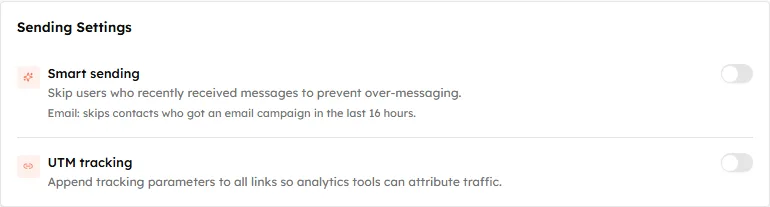
Sending Settings before you touch anything — both switches off.
Switch it on and three fields appear beneath it.
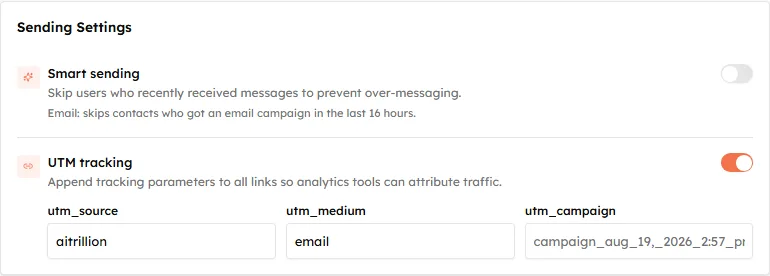
UTM tracking on. The three parameters are editable — the first two arrive pre-filled.
The three parameters#
| Field | Arrives as | What it answers |
|---|---|---|
utm_source | Your organization name | Where did this visitor come from? |
utm_medium | email | What kind of channel was it? |
utm_campaign | Empty — see below | Which campaign specifically? |
All three are editable. The first two are sensible as they come and most people leave them alone.
⚠️
Fill in
utm_campaign yourself. It is the only one that ships empty. The grey text in the box is a suggestion built from the campaign’s name, not a value that is already there — and a suggestion built from a name like “Campaign Aug 19, 2026 2:57 PM” is not something you want in a report either way. Type a short, deliberate name.Good campaign names are short, lowercase and consistent: spring_launch, webinar_invite_may, winback_q3. Consistency matters more than cleverness — analytics treats Spring_Launch and spring_launch as two different campaigns, and you will be the one reconciling them later.
Only three, and that is the lot#
The standard UTM set has five parameters. This screen offers three. There is no utm_content and no utm_term, so you cannot use the built-in toggle to tell two buttons in the same email apart.
If you need that level of detail, add the parameter to the link yourself when you build the email — a link you have already tagged by hand keeps what you typed.
Checking before you send#
On Review & Send, UTM tracking appears in the summary next to Smart sending, so you can confirm at a glance that it is on.
It is worth a proper check, because a UTM mistake is invisible until the reporting is already wrong:
- Send yourself a test, then hover or click a link and read the address. The parameters should be on the end of it.
- Confirm
utm_campaignis the name you meant, not blank. - Check a link that already had a
?in it — those are where malformed tagging shows up first.
💡
This is set per campaign and starts off, so it is a decision you make each time. If you rely on UTM reporting, make switching it on part of your pre-send routine — a campaign sent without it cannot be re-tagged afterwards.
Where the data ends up#
UTM parameters are read by your own analytics, not by the CRM. Nothing about them changes what appears in campaign performance — opens and clicks are tracked separately and work whether this is on or off.
The two answer different questions, and you want both: campaign performance tells you the email worked, UTM tracking tells you the traffic was worth having.
Was this article helpful?
Ready to implement this?
OpenAI Engage and apply what you just learned to your own workspace.
Open AI Engage CRM