Loading…


KnowledgeBase
Manage Unsubscribes and Email Compliance
Why unsubscribe management matters#
Every marketing email sent from AI Engage CRM must include an unsubscribe link. This is a legal requirement under CAN-SPAM (USA), GDPR (EU/UK), CASL (Canada), and most other email regulations worldwide.
Beyond compliance, a working unsubscribe process is good for your sender reputation — contacts who want to opt out but cannot find the link will mark your email as spam instead, which damages deliverability for everyone on your domain.
💡
Do not disable the unsubscribe link. AI Engage CRM warns you explicitly if you attempt to turn it off. Sending marketing emails without an opt-out mechanism carries significant legal risk and can result in your sending domain being blacklisted.
How unsubscribes work in AI Engage CRM#
When a contact clicks the unsubscribe link in any campaign email:
They are taken to a confirmation page within the CRM (hosted on your KB/portal domain)
They confirm their opt-out
The contact's record is automatically flagged as unsubscribed in the CRM
That contact is excluded from all future campaign sends — automatically, with no manual action required
💡
Unsubscribed contacts remain in your CRM — their record and activity history are not deleted. Only marketing email sends are blocked. You can still log calls, create tasks, or send individual one-off emails to unsubscribed contacts if there is a legitimate transactional reason.
Unsubscribe settings to configure#
Navigate to Settings → Marketing Channel → Email → Unsubscribe.
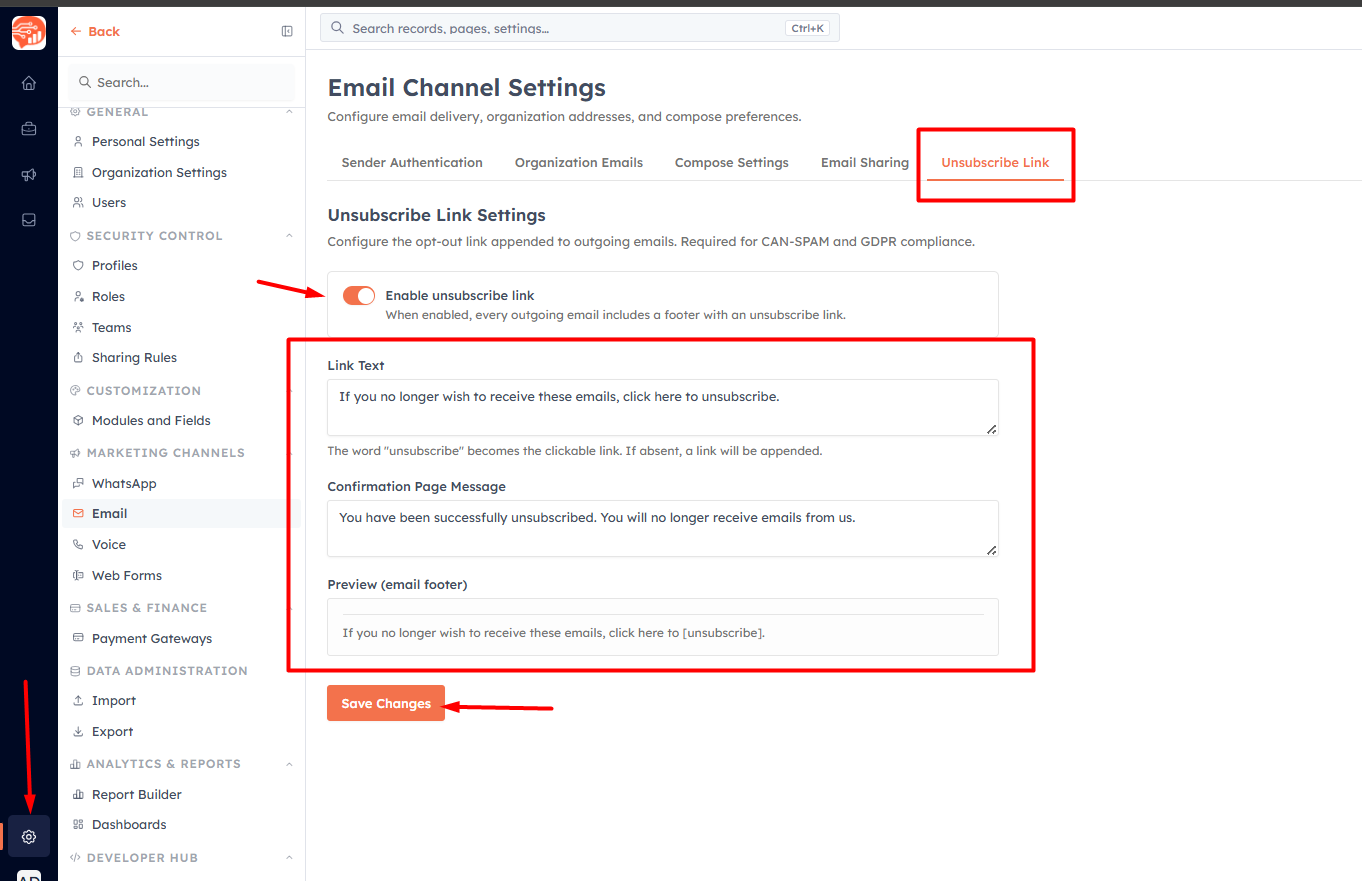
Configure the following:
Enable unsubscribe link — keep this on. When enabled, the unsubscribe footer is automatically appended to every campaign email.
Link Text — the paragraph shown in the email footer above the unsubscribe link. Customise this to match your brand voice. Example: "You received this email because you opted in to hear from us. If you no longer wish to receive marketing emails, you can unsubscribe at any time."
Confirmation Page Message — the text displayed to the contact after they successfully unsubscribe. Keep it friendly and informative. Example: "You've been unsubscribed. You won't receive any more marketing emails from us. It may take up to 24 hours to take effect."
A live preview updates in real time as you edit the link text, so you can see exactly how the footer will appear in your emails before saving.
💡
Personalise your unsubscribe footer to reduce opt-out rates. Remind contacts why they are receiving the email ("You signed up for our newsletter in January") — context helps contacts decide to stay subscribed rather than opting out reflexively.
Was this article helpful?
Ready to implement this?
OpenAI Engage and apply what you just learned to your own workspace.
Open AI Engage CRM