Loading…


KnowledgeBase
Assign Owner: Users, Teams, Related Records & Live-User Routing
What the Assign Owner action does#
The Assign Owner action decides who becomes the owner of a record when a workflow runs. Instead of watching a list and handing leads out by hand, you let the workflow do it the moment the record appears — to one named person, evenly across a group, down through a role hierarchy, to whoever is actually online right now, or even to the owner of a linked record.
It is the difference between a lead sitting unassigned overnight and a lead landing in someone's queue three seconds after it arrives.
ℹ️
The owner is the one user responsible for a record. Ownership drives what appears in that person's “my records” views, who receives notifications about it, and who its follow-up tasks belong to. Every record has exactly one owner at a time.
What's new in this release#
Two things changed in the Assign Owner action, and both affect how round-robin routing behaves. If you built workflows before this release, read this section — the second change in particular means an option you may have thought was Team-only is now available everywhere.
🆕
1. Include users in sub-roles. When you route by Role (Round Robin), a new checkbox lets the rotation reach everyone beneath the chosen role in your hierarchy, not just the people holding that exact role.
2. Assign only to online users now works with every round-robin type. Live presence routing used to be a Team-only option. It now appears for Multiple Users, Role, Profile and Team round-robin alike.
Before you start#
A workflow to put it in. Assign Owner is an action, so it needs a trigger ahead of it — typically Record Created on the module you are routing.
The people set up. Whichever grouping you plan to rotate across — users, a role, a profile or a team — needs to exist and have active members already.
The softphone, but only for live routing. Assign only to online users reads voice (softphone) presence. If nobody on your team signs in to the softphone, that option will never find an eligible user.
Step 1 — Add the Assign Owner action to your workflow#
Open your workflow in the builder. The Node Palette runs down the left-hand side and is split into TRIGGERS, CONDITIONS, ACTIONS and TIMING. Assign Owner sits in the ACTIONS group, between Create Record and Webhook.
Drag it from the palette onto the canvas, then click the node you just dropped. The Configure Node panel opens on the right — that panel is where everything in this article happens.
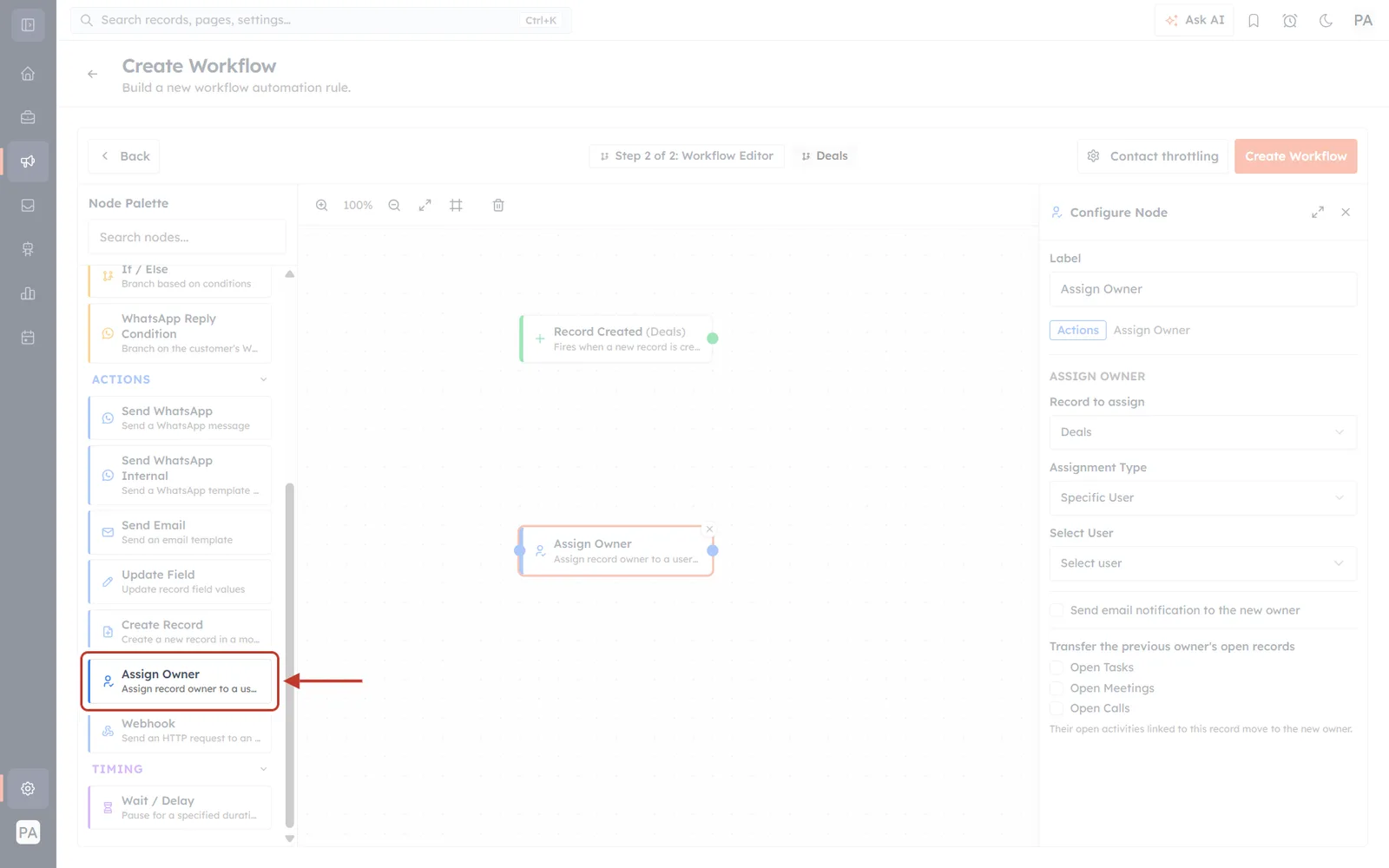
What this screenshot shows. The full workflow builder, with the one thing you need on this step ringed in red and arrowed. Everything else is faded back so the target is easy to find. Working across the screen:
Far left is the CRM's main navigation rail. The workflow icon is the highlighted one — you are inside Marketing → Workflow Automation.
The Node Palette column is next, with a Search nodes… box at the top. If your palette is long, typing “assign” there is faster than scrolling. The ringed entry is “Assign Owner — Assign record owner to a user or team.” The red arrow points at it from the canvas side.
The centre canvas already holds two nodes in this example: a green Record Created (Deals) trigger at the top, and the Assign Owner node that was dragged down below it. The small dots on a node's left and right edges are the connection handles you drag between to wire steps together.
The top bar shows Step 2 of 2: Workflow Editor, the target module (Deals), a Contact throttling button, and Create Workflow on the far right. Nothing you configure is stored until you use that save button.
The right-hand panel is Configure Node, already open for the selected Assign Owner node. Its Label field at the top is just the name shown on the canvas — renaming it to something like “Route to sales pod” makes a busy workflow much easier to read later, and changes nothing about behaviour.
💡
You can drop more than one Assign Owner node into a single workflow. That is the basis of the fallback pattern described at the end of this article.
Step 2 — Choose which record gets the new owner#
The first control in the panel is Record to assign. It answers a question people often skip past: whose owner are you setting?
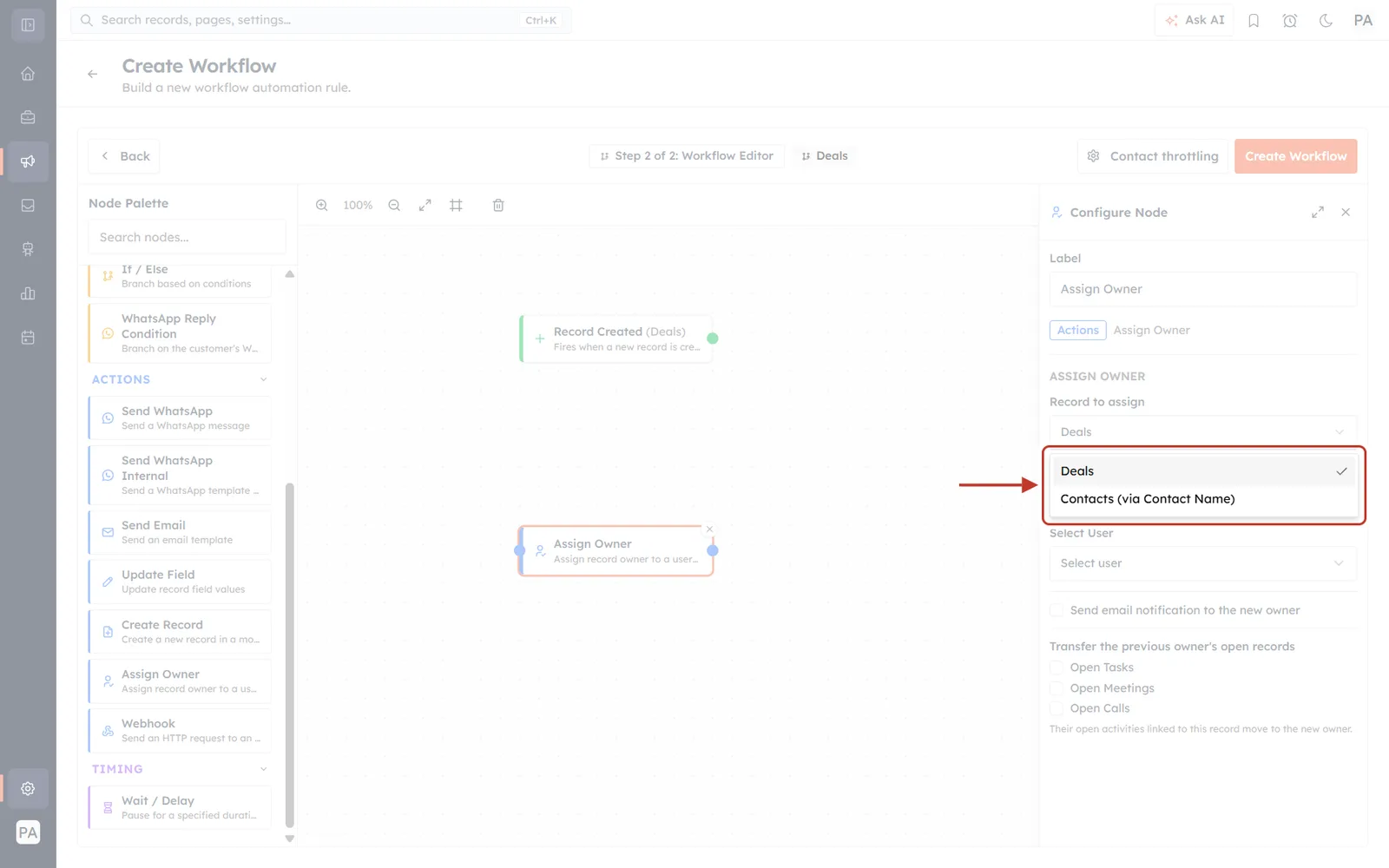
What this screenshot shows. The Record to assign dropdown has been clicked open, and the list of choices it produced is ringed in red with an arrow pointing at it. In this example the workflow is built on the Deals module, so the list offers exactly two entries:
Deals — the trigger record itself, marked with a tick because it is the current selection. Choose this and the workflow sets the owner of the very record that started it.
Contacts (via Contact Name) — a related record. The phrase in brackets is the lookup field the CRM followed to get there: the Deal has a Contact Name field pointing at a Contact, so that Contact can be assigned too.
What appears in this list depends entirely on your own module setup. Every lookup field on the trigger module produces one “related record” entry, so a module with three lookups gives you three extra choices beyond the trigger record itself. If you only ever see one entry, that module has no lookup fields configured.
✅
Assigning a related record is how you keep a Deal and its Contact with the same rep without building a second workflow. Add two Assign Owner nodes in a row — one set to the trigger record, one set to the related record — and both land with the same person.
Step 3 — Pick an Assignment Type#
This is the heart of the action: how the new owner is chosen. There are six strategies, and the rest of the panel changes depending on which one you pick.
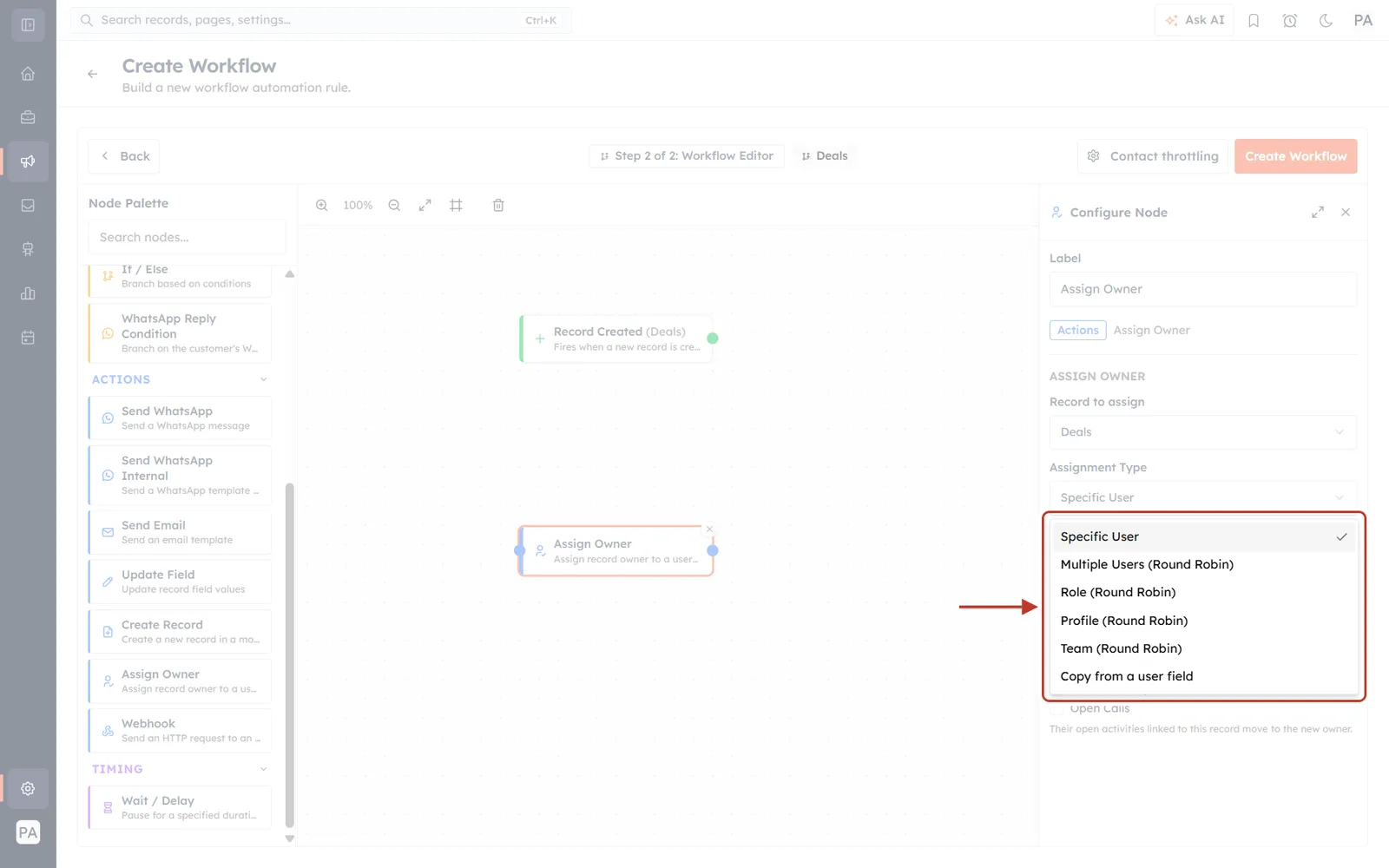
What this screenshot shows. The Assignment Type dropdown open, with the full list of six strategies ringed in red and arrowed. They appear in this fixed order, and the tick on the right marks whichever one is currently selected. Reading down the list:
Assignment Type | What it does | Use it when |
|---|---|---|
Specific User | Always the same named person. | One person owns a queue — an SDR who takes every web enquiry, say. |
Multiple Users (Round Robin) | Rotates evenly across a hand-picked list of users. | You want an exact, explicit list that ignores roles and teams. |
Role (Round Robin) | Rotates across everyone holding the selected role — and, optionally, everyone in its sub-roles. | Your org chart already describes who should get the work. |
Profile (Round Robin) | Rotates across everyone assigned the selected permission profile. | Eligibility is about what people are allowed to do, not where they sit. |
Team (Round Robin) | Rotates across the members of a team. | You already group people into teams for routing and reporting. |
Copy from a user field | Reads a user field already on the record and makes that person the owner. | The right owner is already recorded — a form captured it, or an earlier step set it. |
ℹ️
Round robin means each new record goes to the next person in line, then the next, then back to the start. Over a day the work is shared out evenly instead of piling onto whoever happens to be first alphabetically.
The four Round Robin types differ only in where the list of candidates comes from — a hand-picked list, a role, a profile or a team. Once the candidate list exists, they all rotate the same way, and all four now offer the online-only option covered in Step 5.
Step 4 — Role routing and the new sub-roles option#
Choose Role (Round Robin) and a Select Role dropdown appears, followed by the new Include users in sub-roles checkbox.
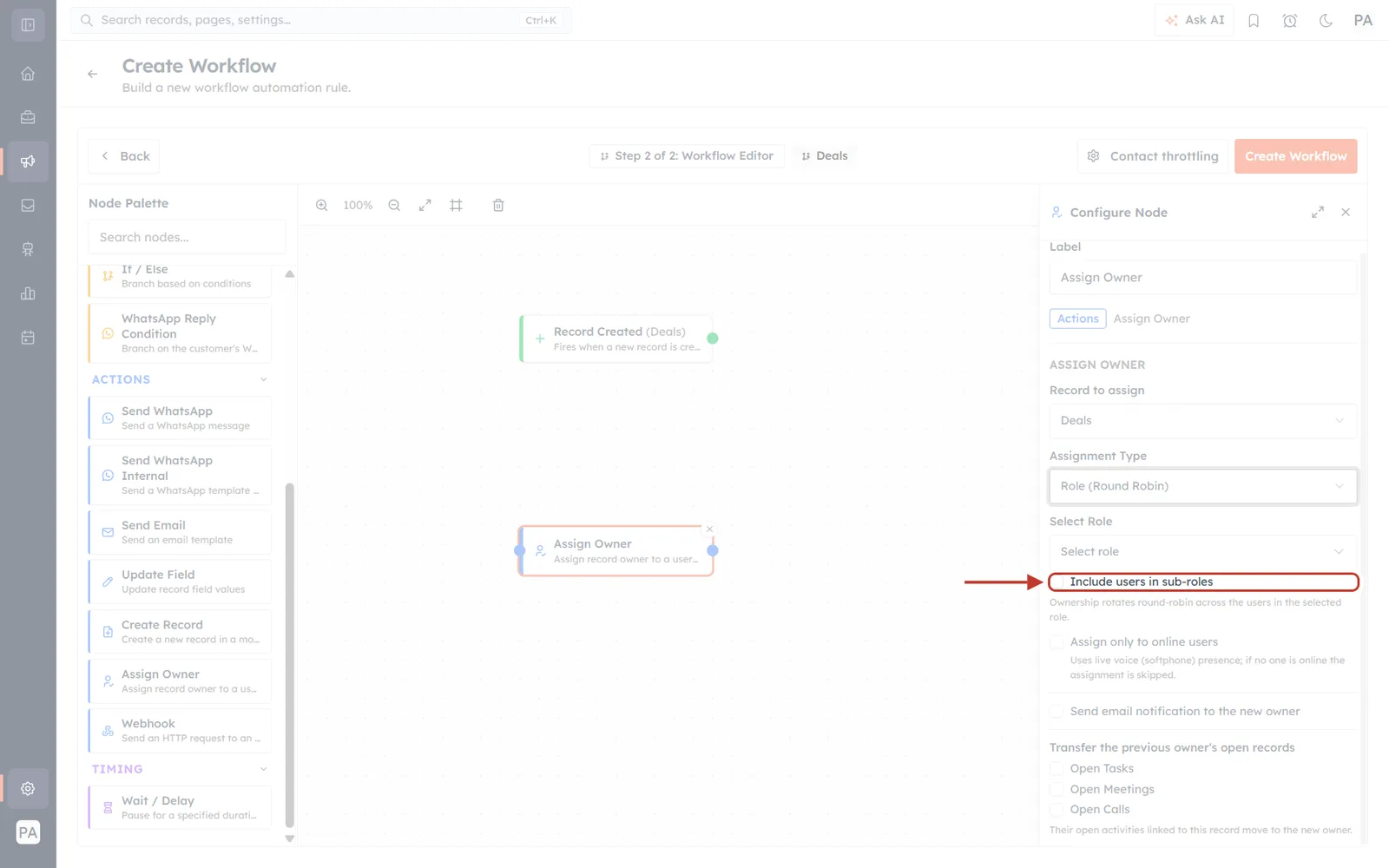
What this screenshot shows. The Configure Node panel with Role (Round Robin) chosen in Assignment Type. The ringed and arrowed control is the Include users in sub-roles checkbox — the new one. Reading the panel from the top down:
Record to assign is still Deals — the trigger record.
Assignment Type reads Role (Round Robin). Selecting it is what caused the two controls beneath to appear.
Select Role currently reads the placeholder Select role, so no role has been picked yet. This must be filled in — an empty role gives the rotation nobody to choose from.
Include users in sub-roles is the ringed checkbox, shown unticked, which is its default.
Directly underneath sits the explanatory line the product itself shows: “Ownership rotates round-robin across the users in the selected role.” That sentence describes the unticked behaviour.
Below that are Assign only to online users (Step 5), Send email notification to the new owner and the Transfer the previous owner's open records group (Step 7).
What the checkbox actually changes. Roles in AiEngage form a hierarchy — a Sales Manager role can sit above Senior Rep, which sits above Junior Rep. Suppose you pick Sales Manager:
Unticked (the default): only the people who hold the Sales Manager role are in the rotation. If that is two managers, the work alternates between exactly those two.
Ticked: everyone in Sales Manager and every role beneath it joins the rotation — the two managers plus every Senior Rep and Junior Rep under them.
💡
Tick this when you want to route to “the sales organisation under this manager” and you would rather not maintain a separate team that duplicates your org chart. As people join or leave roles beneath that manager, the rotation follows automatically — there is no list to keep updated.
⚠️
Ticking this on a senior role can widen the rotation a long way — a role near the top of a deep hierarchy may pull in most of the company. Check how many people sit beneath the role you chose before you turn it on, and prefer picking a lower role over ticking the box on a high one.
Step 5 — Assign only to online users (live routing)#
Assign only to online users narrows the rotation to people who are available right now, rather than handing a record to someone who left two hours ago.
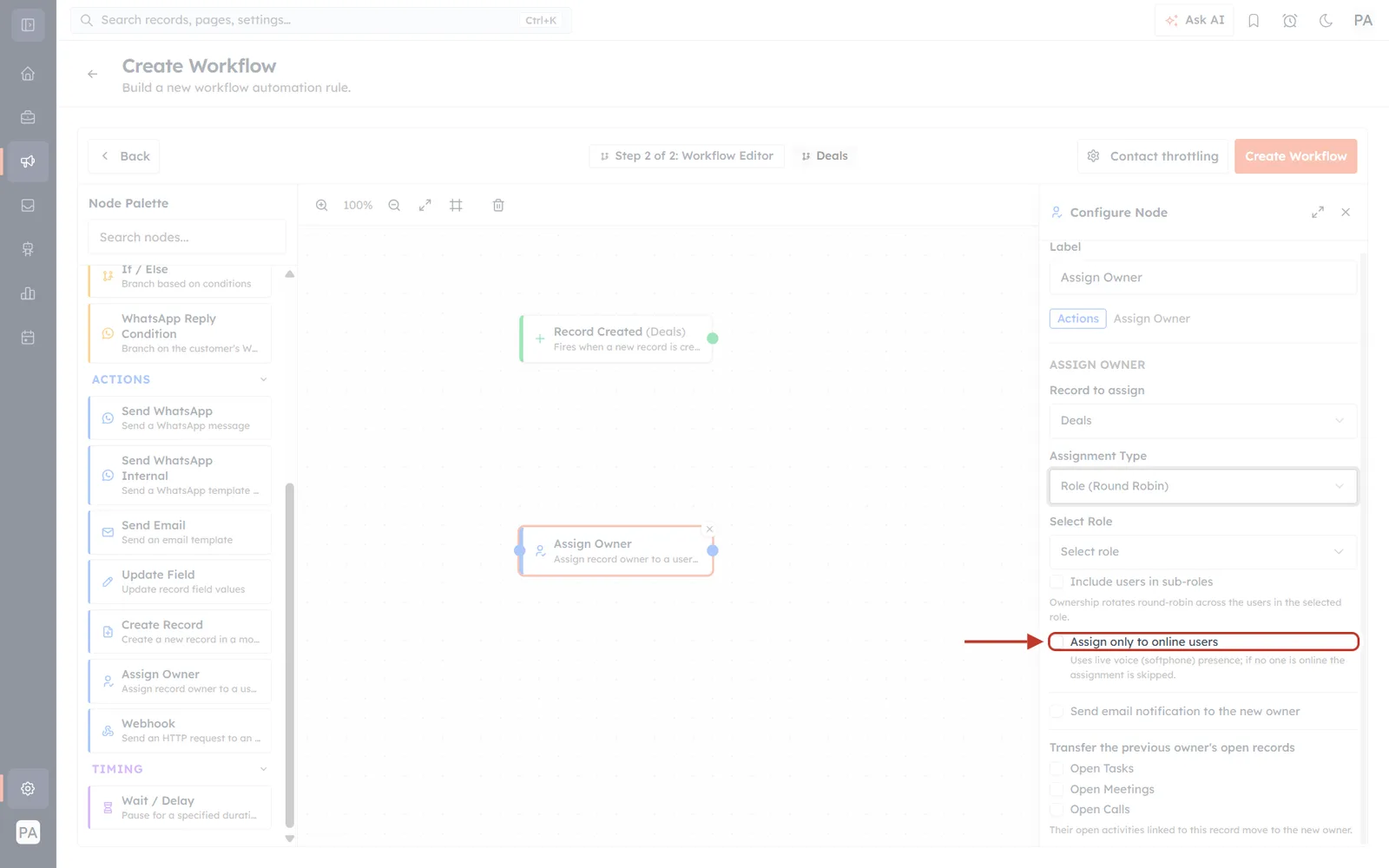
What this screenshot shows. The same panel as the previous figure, still on Role (Round Robin), but with the ring moved one control down to Assign only to online users. That is the whole point of this figure: the checkbox is sitting on a Role configuration, not a Team one — it is no longer Team-only.
Notice what is visible around the ring, because it tells you the order these controls appear in:
Above the ring sit Select Role and the Include users in sub-roles checkbox from Step 4 — the two Role-specific controls.
The ringed checkbox is unticked, its default. Live routing is never on unless you turn it on.
Directly beneath it is the product's own warning, in small red text: “Uses live voice (softphone) presence; if no one is online the assignment is skipped.” That sentence is the single most important thing on this screen — see the warning below.
Below that the panel continues into Send email notification to the new owner and the transfer group, unchanged by this setting.
How “online” is decided. Availability comes from voice (softphone) presence — whether the user is signed in to the softphone and showing as online. It is not based on being logged into the CRM in a browser tab, and it is not a working-hours calculation. Someone with the CRM open but the softphone closed does not count as online.
⚠️
If nobody is online, the assignment is skipped — the record keeps its existing owner and the workflow moves on. Nothing is queued for later and no error is raised, so a record can quietly stay unassigned. If that matters, build the fallback described in the examples below.
Step 6 — Team routing#
Choose Team (Round Robin) and a Select Team dropdown replaces the role controls.
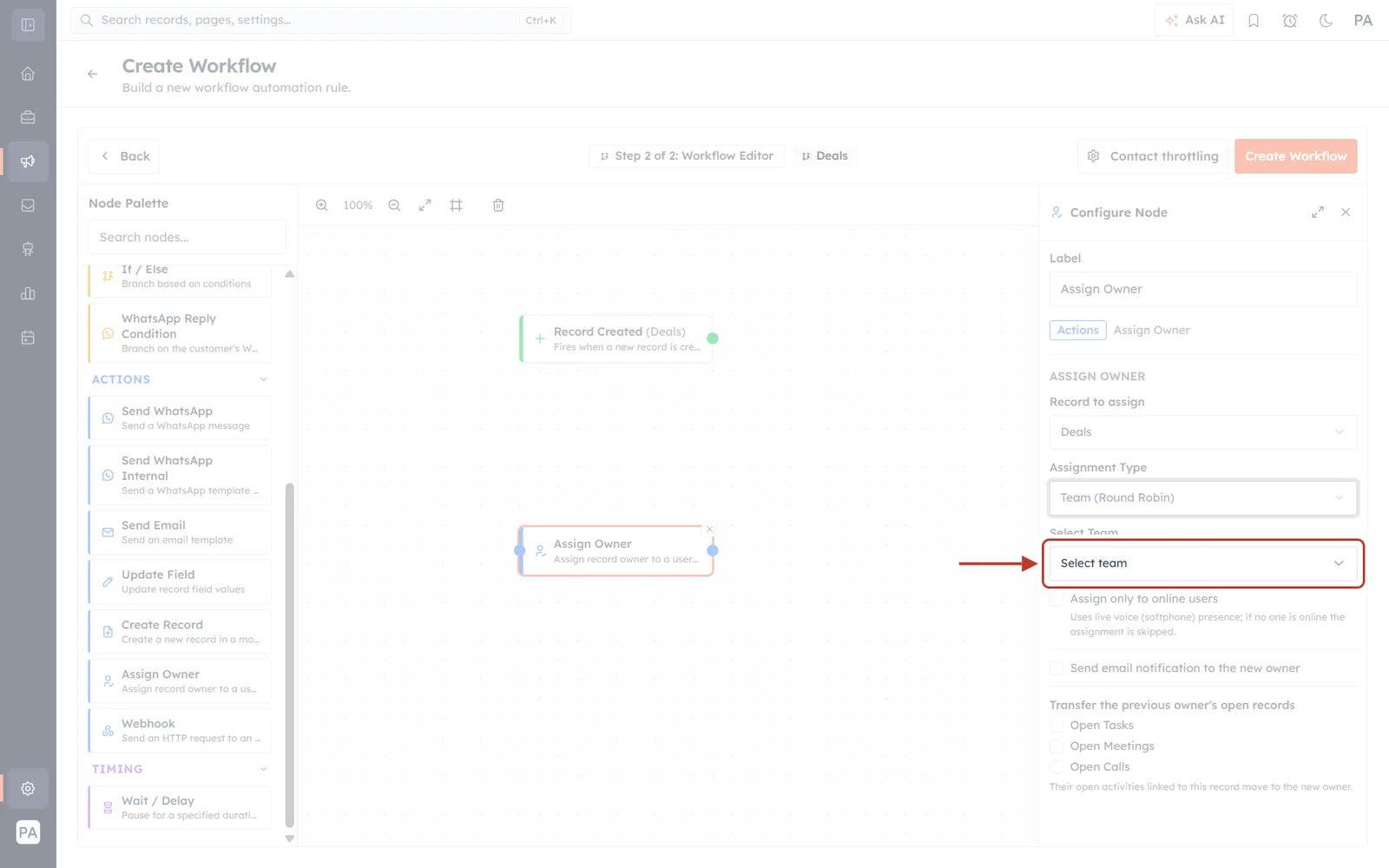
What this screenshot shows. The panel switched to Team (Round Robin), with the Select Team dropdown ringed and arrowed. Compare it against the Role figure above and you can see exactly what changed and what did not:
Assignment Type now reads Team (Round Robin).
Select Role and Include users in sub-roles are gone. Sub-role expansion is a role concept, so it does not apply here — a team is already an explicit list of people.
Select Team has taken their place, showing the placeholder Select team. Pick the team whose members should share the work.
Assign only to online users is still there, immediately below, with the same softphone-presence note. It behaves identically to Step 5.
Send email notification and the Transfer group below are unchanged — those two apply to every assignment type.
Team membership is managed separately, under Teams in your settings. Add or remove someone there and the rotation picks the change up on the next run; there is nothing to update inside the workflow.
Step 7 — Notify the new owner and hand over open work#
The last section of the panel covers what happens after the new owner is chosen.
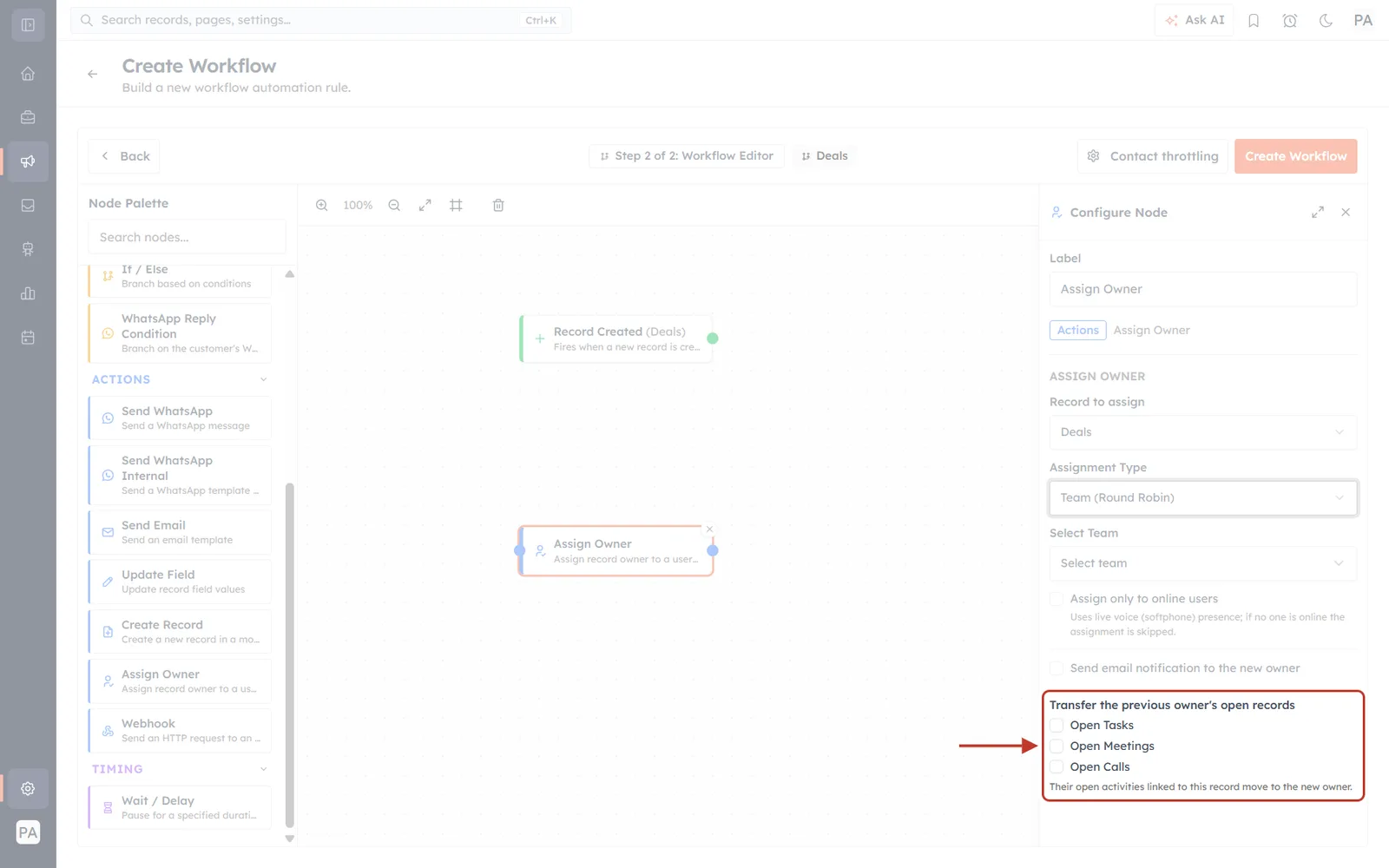
What this screenshot shows. The bottom of the Configure Node panel, with the whole Transfer the previous owner's open records group ringed and arrowed. Above the ring you can also see the single notification checkbox. In detail:
Send email notification to the new owner (just above the ring) emails the person the record has landed with. Leave it off for high-volume routing unless your team actually wants an email per record.
Transfer the previous owner's open records is the ringed heading, with three independent checkboxes beneath it — Open Tasks, Open Meetings and Open Calls. They are all unticked by default, and you can tick any combination.
The line underneath is the product's own explanation: “Their open activities linked to this record move to the new owner.” Two words in that sentence carry the weight — open and linked to this record.
What “open” and “linked” mean here. Only activities that are still open move; anything already completed stays with whoever did it, so your history stays accurate. And only activities attached to this record move — the previous owner's unrelated work is untouched. This is a per-record handover, not a bulk reassignment of everything that person owns.
✅
Tick all three when you are genuinely handing a relationship over — a rep leaving, or an account moving between pods. Leave them unticked when you are simply setting an owner on a brand-new record, since a new record has no open activities to move anyway.
Worked examples#
Example 1 — Route new Deals evenly across a sales team#
Trigger: Record Created on Deals
Record to assign: Deals (the trigger record)
Assignment Type: Team (Round Robin) → Sales Team
Assign only to online users: off
Every new Deal goes to the next member of the Sales Team in turn. Because live routing is off, nothing is ever skipped — deals created overnight are waiting with an owner in the morning.
Example 2 — Send hot leads only to reps who can pick up now#
Trigger: Record Created on Leads
Assignment Type: Role (Round Robin) → Inside Sales, with Include users in sub-roles ticked
Assign only to online users: on
Send email notification: on
The rotation covers the whole Inside Sales branch of the org chart, but only people signed in to the softphone are eligible, so the lead reaches someone who can call immediately.
Example 3 — Live routing with a safety net#
This is the pattern to use whenever you turn live routing on for something that must not be dropped. It needs two Assign Owner nodes:
First node: Team (Round Robin) → Sales Team, Assign only to online users on.
Then an If / Else node testing whether the owner is still empty (or still the default owner).
Second node on that branch: the same team, online-only off.
When someone is online the record is routed live. When nobody is, the first node skips, the condition catches it, and the second node assigns it anyway — so the record always ends up owned.
If something goes wrong#
Records are not being assigned at all. Check whether Assign only to online users is on. If nobody was signed in to the softphone when the workflow ran, the assignment was skipped silently. Turn it off to confirm, and if that fixes it, add the fallback from Example 3.
The same person keeps getting everything. The candidate list is probably down to one eligible person. With a role, check whether Include users in sub-roles needs ticking; with a team, check the team's membership; with online-only routing, check how many people are actually signed in.
Far more people are in the rotation than expected. This is the usual symptom of Include users in sub-roles being ticked on a senior role. Either untick it, or point the action at a lower role in the hierarchy.
The related record was not assigned. Check Record to assign. If it is set to the trigger record, the linked record is never touched — you need a second Assign Owner node pointing at the related record.
Open tasks stayed with the old owner. The three transfer checkboxes are independent and all off by default. Tick the ones you need, and remember that completed activities never move.
Related#
Was this article helpful?
Ready to implement this?
OpenAI Engage and apply what you just learned to your own workspace.
Open AI Engage CRM