Loading…


KnowledgeBase
Update Related Records (Latest Created)
What this does#
The Update Field action normally changes a field on the record that triggered the workflow. But it can also reach sideways — updating a field on a related record that the trigger record is linked to through a lookup field.
For example, when a Deal is marked Won, you can have the same workflow update a field on the Contact linked to that deal — no separate workflow, no manual edit.
ℹ️
A related record is any record connected to the trigger record through a lookup field — for example a Deal’s linked Contact, or a Task’s linked Company.
Before you start#
The two modules must already be connected by a lookup field on the trigger module. If your Deals module has a Contact lookup field, a Deal workflow can update that linked Contact. Without a lookup field, there is no related record to reach and the related module will not appear as an option.
Step 1 — Add an Update Field action#
Open your workflow in the builder, add an Update Field action, and open its configuration panel. Click Add Field Update and stay on the Create New tab.
Step 2 — Switch the Module to the related one#
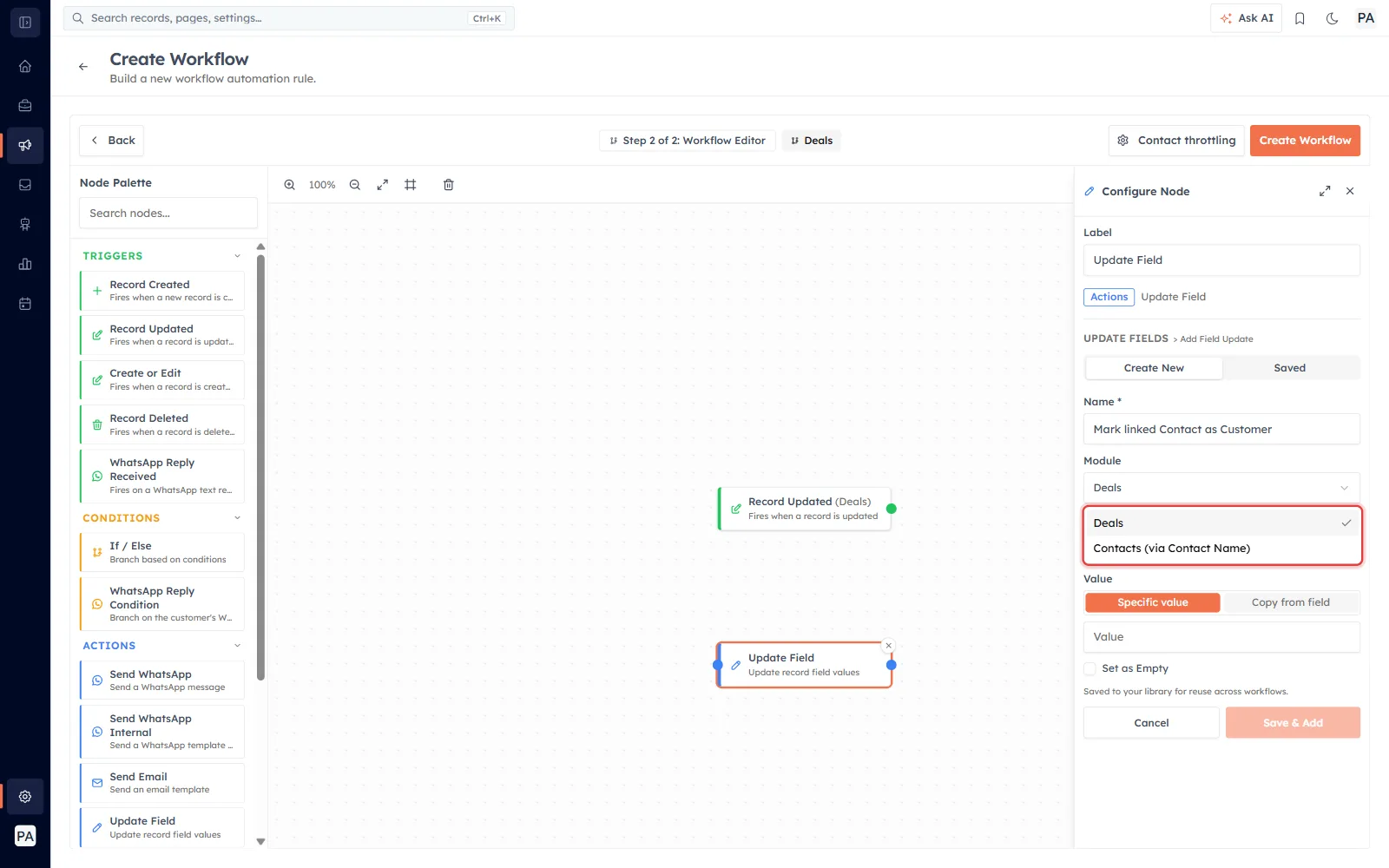
At the top of the field-update form is a Module dropdown. It lists your current module first, followed by every related module, each labelled with the lookup it travels through — for example Contacts (via Contact).
Pick the related module. The Field list below now shows that module’s fields instead of the trigger module’s.
💡
The wording “(via lookup name)” tells you exactly which link the update follows. If you have two lookups to the same module, choose the one that matches the record you want changed.
Step 3 — Choose the field and value, then save#
Select the Field on the related record you want to change, enter a Value (values support {{merge tags}}), or tick Set as Empty to clear it. Click Save & Add, then save and activate the workflow.
Which record gets updated: Latest Created#
A lookup can point at more than one related record over time. When that happens, the workflow does not update all of them and it does not pick at random — it updates the latest created related record: the newest one by its created date, most recent first.
✅
Rule of thumb: most recently created wins. If a Contact is linked to several Deals, an update that targets “the Deal” lands on the Deal that was created most recently.
Records that have been archived, merged away, or deleted are never chosen — they are skipped, and the newest live related record is used instead.
What happens when there is no related record#
If the trigger record has no live record on the other end of the lookup, there is nothing to update, so the workflow simply skips that field update and moves on. You can confirm what ran on the workflow report.
A worked example#
Goal: when a Deal is Won, stamp its linked Contact as a customer.
Trigger: Deal — Stage changes to Won
Action: Update Field → Module Contacts (via Contact) → Field Lifecycle Stage → Value Customer
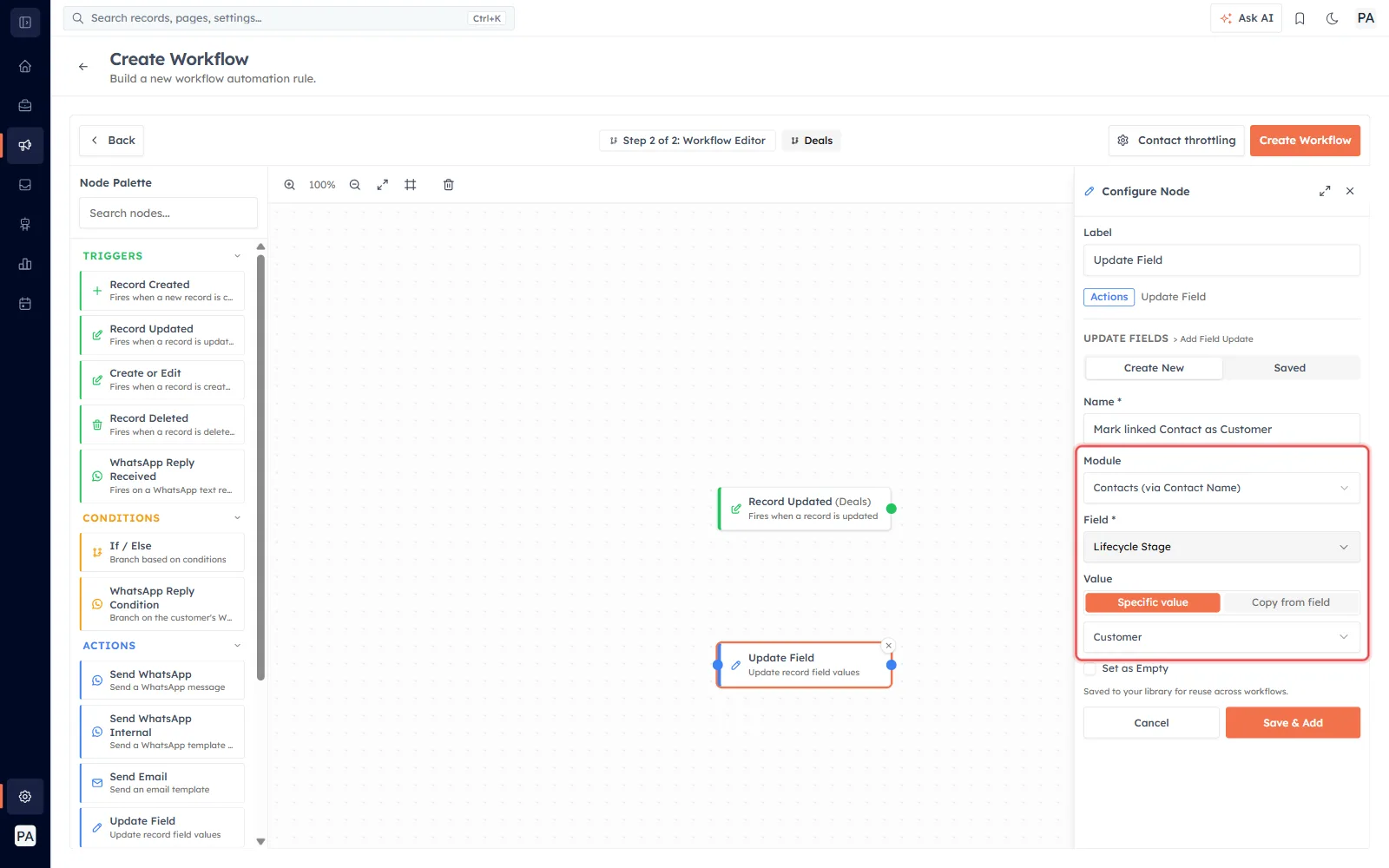
If the Deal is linked to more than one Contact, the most recently created Contact is the one marked Customer.
⚠️
Updating a related record changes data outside the trigger record. Test on a single record first and check the workflow report before activating for everyone.
Was this article helpful?
Ready to implement this?
OpenAI Engage and apply what you just learned to your own workspace.
Open AI Engage CRM