Loading…


KnowledgeBase
Assign Caller IDs & Outbound Routing
Where to assign caller IDs#
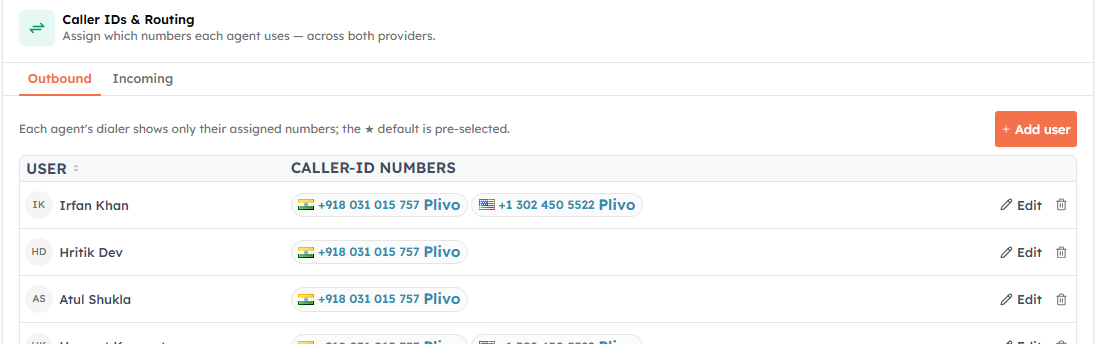
Open Settings → Voice and scroll to Caller IDs & Routing. Choose the Outbound tab. Each row is one agent, showing their assigned caller-ID numbers as chips — with a ★ default and a provider badge — plus Edit and Remove actions.
Assign numbers to an agent#
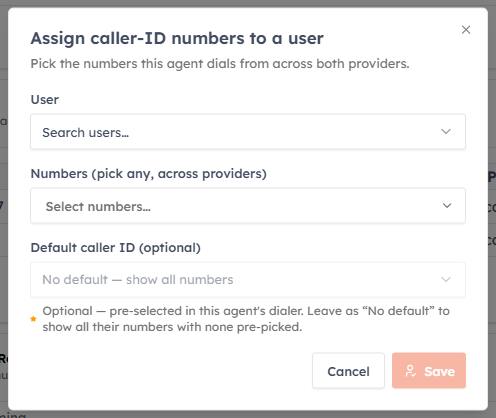
Click Add user (or Edit on an existing row):
- Pick the agent.
- Select the numbers they can call from. Numbers are grouped by connection and provider, each with a country flag, and you can mix numbers from different providers.
- Optionally choose a Default caller ID. Leaving it as “No default — show all numbers” is perfectly valid.
Click Save.
How this drives calling#
- An agent’s dialer only shows their assigned numbers.
- With a default set, click-to-call dials straight from that number.
- With multiple numbers and no default, click-to-call shows a “Call from…” chooser each time.
ℹ️
Removing an agent’s assignment makes them fall back to the organization’s first available number, so they can still place calls.
✅
Assign the number that matches each agent’s region so recipients recognise the local caller ID — see also country-match dialing in Click-to-Call from Records.
Was this article helpful?
Ready to implement this?
OpenAI Engage and apply what you just learned to your own workspace.
Open AI Engage CRM