Loading…


KnowledgeBase
Associations API: Link, List and Unlink Related Records (Contacts, Deals, Companies) with the CRM API
Introduction#
In AiEngage CRM, records rarely stand alone. A contact works at a company, is involved in several deals, has tickets, meetings and records in your own custom modules. These links are called associations. In the CRM you see them in the Related panel on the right side of a record and in lookup fields such as a deal’s Contact Name.
The Associations API lets your own systems read and manage these links:
Endpoint | What it does | Scope needed |
|---|---|---|
| Lists the records of another module that are linked to one record — for example all deals of a contact. |
|
| Links two records — for example a contact to a deal. |
|
| Removes the link. Both records stay exactly as they are. |
|
The words used in this guide:
Near side — the record you start from:
{module}and{id}(for examplecontactsand a contact id).Far side — the module you want linked records from:
{toModule}(for exampledeals) and, when linking or unlinking, one record of it:{toId}.
In this guide you will, step by step:
Create an API key with the right scopes on both modules.
Open the Associations endpoints in the developer portal.
List a contact’s deals, and page through a long list.
Link a contact to a deal (and see why repeating it is safe).
Remove a link.
Fix the common errors and use the endpoints from your own code.
Step 1 uses the CRM; the other steps use the AiEngage developer portal, developer.aiengagecrm.com. Each screenshot has a red ring and arrow on the part to look at, followed by a description of the whole screen. The Get Associations answers are a real contact and its two real linked deals from a demo CRM (names replaced with sample names). Linking and unlinking change real data, so those answers are examples of exactly what the API returns.
Before You Begin#
An API key (
cak_live_…). See API Token Scopes & Permissions.The API names (slugs) of both modules, such as
contacts,dealsandcompanies.GET /objectslists them.The record ids you want to work with. Find them with Search Records with the CRM API or Get, Create, Update and Archive Records with the CRM API.
Both modules must be published to the API by an administrator.
Step 1: Create an API Key with Scopes on Both Modules#
Associations always involve two modules, and the API checks your key on both sides. A key that can only read contacts cannot read a contact’s linked deals.
Go to Setup → Developer Hub → API Keys and click Generate API key.
Enter a Label, for example “Deal sync”.
In Scopes, tick Read (to list associations) and Write (to link and unlink) for Contacts.
Scroll down and tick the same scopes for the other module — here Deals.
Click Generate and copy the token straight away; it is shown only once.
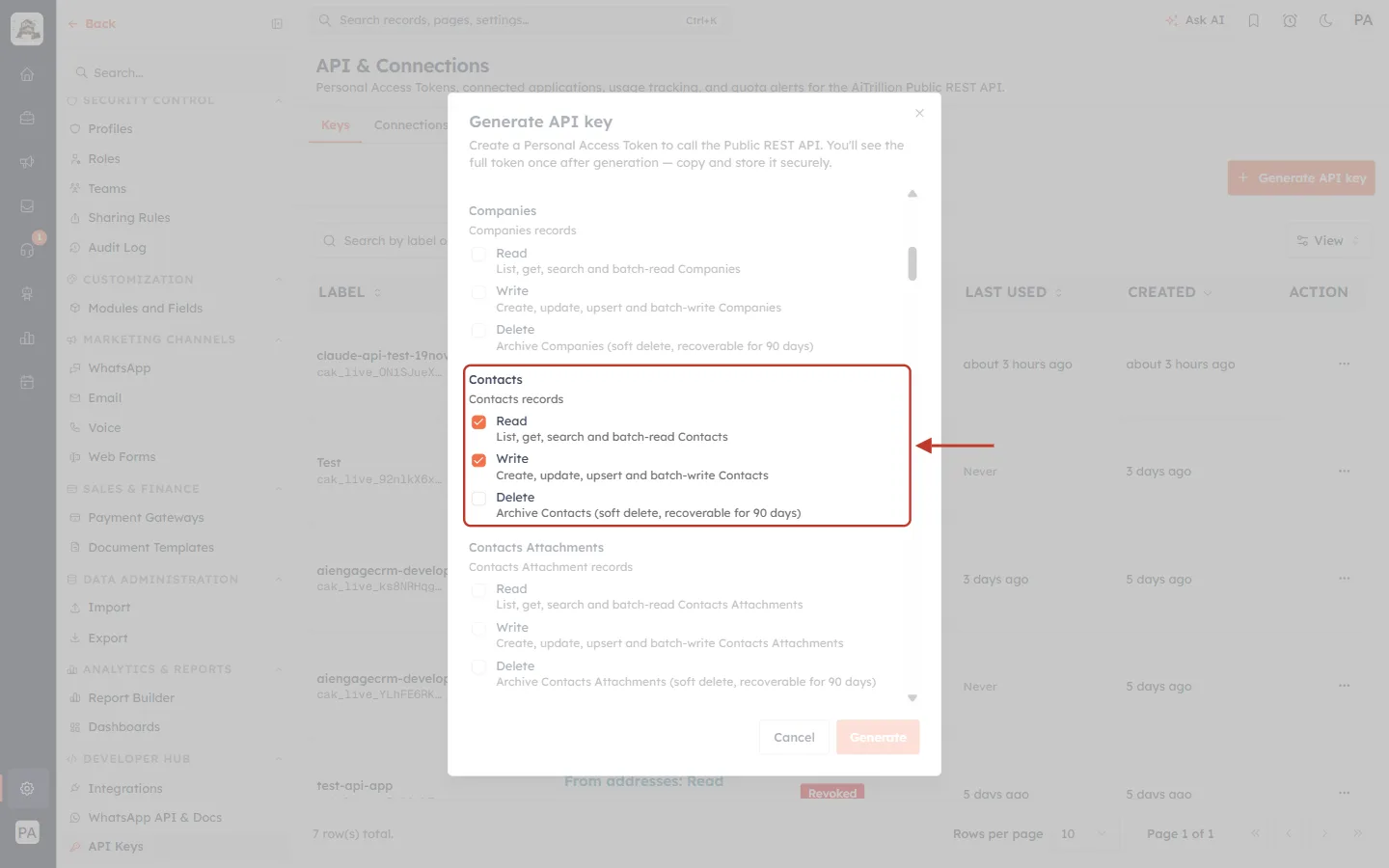
What this screenshot shows. The Generate API key dialog with the Contacts scope group ringed: Read and Write are ticked.
Read (
crm.contacts.read) — “List, get, search and batch-read Contacts”. Needed for Get Associations.Write (
crm.contacts.write) — “Create, update, upsert and batch-write Contacts”. Needed for Create and Delete Association.Delete (
crm.contacts.delete) archives records. It is not needed for associations, because removing a link never deletes a record — so it is left unticked.Every module has its own group (here Companies above and Contacts Attachments below). Tick Read and Write on the far-side module too, for example Deals.
At the bottom are Cancel and Generate; behind the dialog is your list of existing keys.
ℹ️
Your key also acts with the permissions of the person who created it. If that person cannot see a record in the CRM, the API cannot list it as a linked record either.
Step 2: Open the Associations Endpoints in the Developer Portal#
Open developer.aiengagecrm.com and paste your token once in Paste your key here. In the left menu, click Associations.
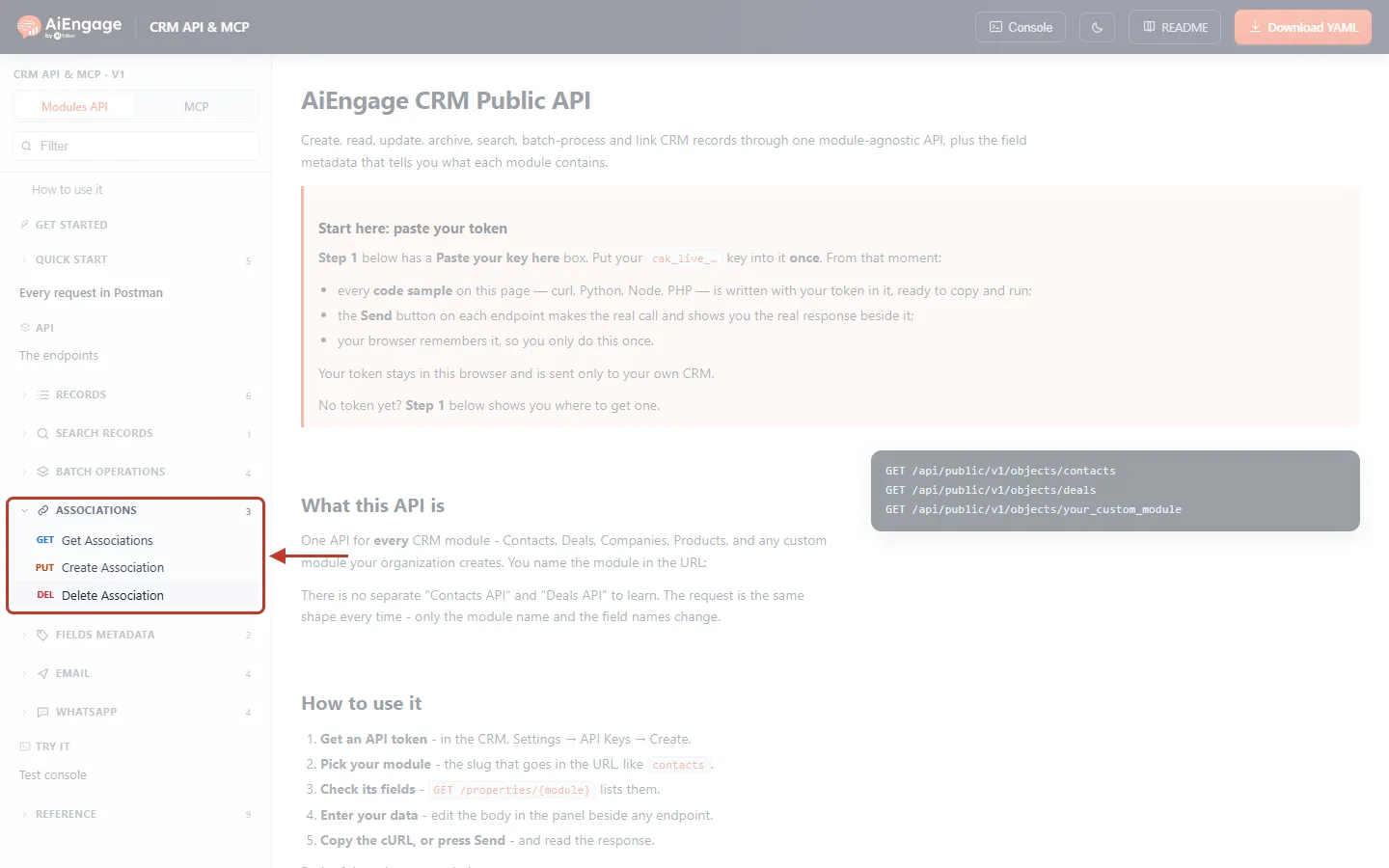
What this screenshot shows. The left menu with the ASSOCIATIONS group opened and ringed.
GET Get Associations — list linked records.
PUT Create Association — link two records.
DEL Delete Association — remove a link.
The 3 next to the group is the number of endpoints. Above are Records, Search records and Batch operations; below are Fields metadata, Email and WhatsApp.
Step 3: List a Record’s Linked Records#
Click Get Associations. In the Send panel on the right, fill in the three URL parameters:
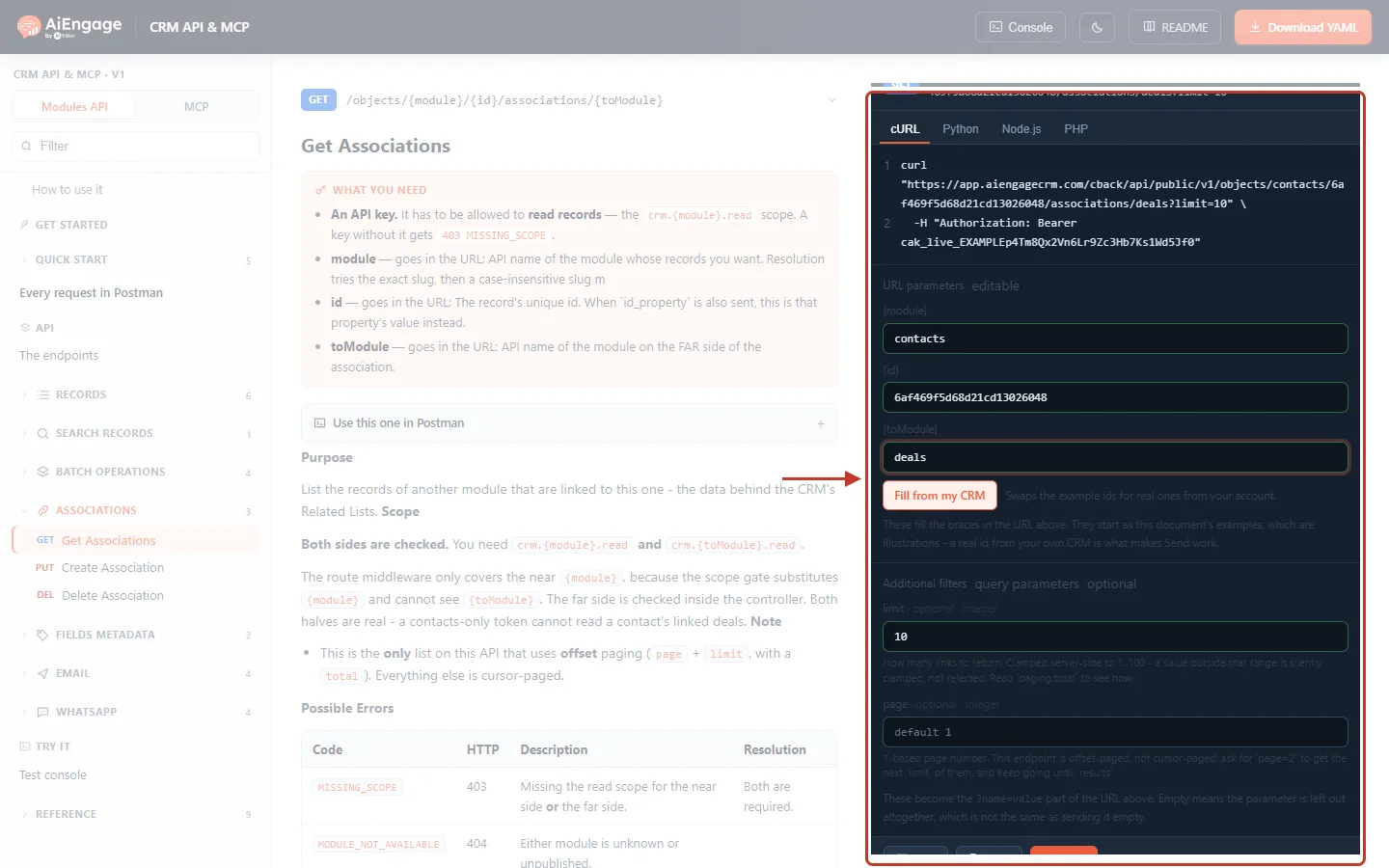
What this screenshot shows. The Send panel of Get Associations, ringed, with the parameters filled in.
At the top, the request as cURL (with Python, Node.js and PHP tabs). It updates as you type.
{module} =
contacts— the near side.{id} =
6af469f5d68d21cd13026048— the contact’s id.{toModule} =
deals— the module you want linked records from.Fill from my CRM swaps the example ids for real ones from your account.
Under Additional filters: limit (how many links to return; values outside 1–100 are quietly adjusted) and page (which page, starting at 1).
On the left, What you need lists the key and the three URL parameters, and the description explains that both sides are checked.
Press Send. This call only reads, so it is always safe.
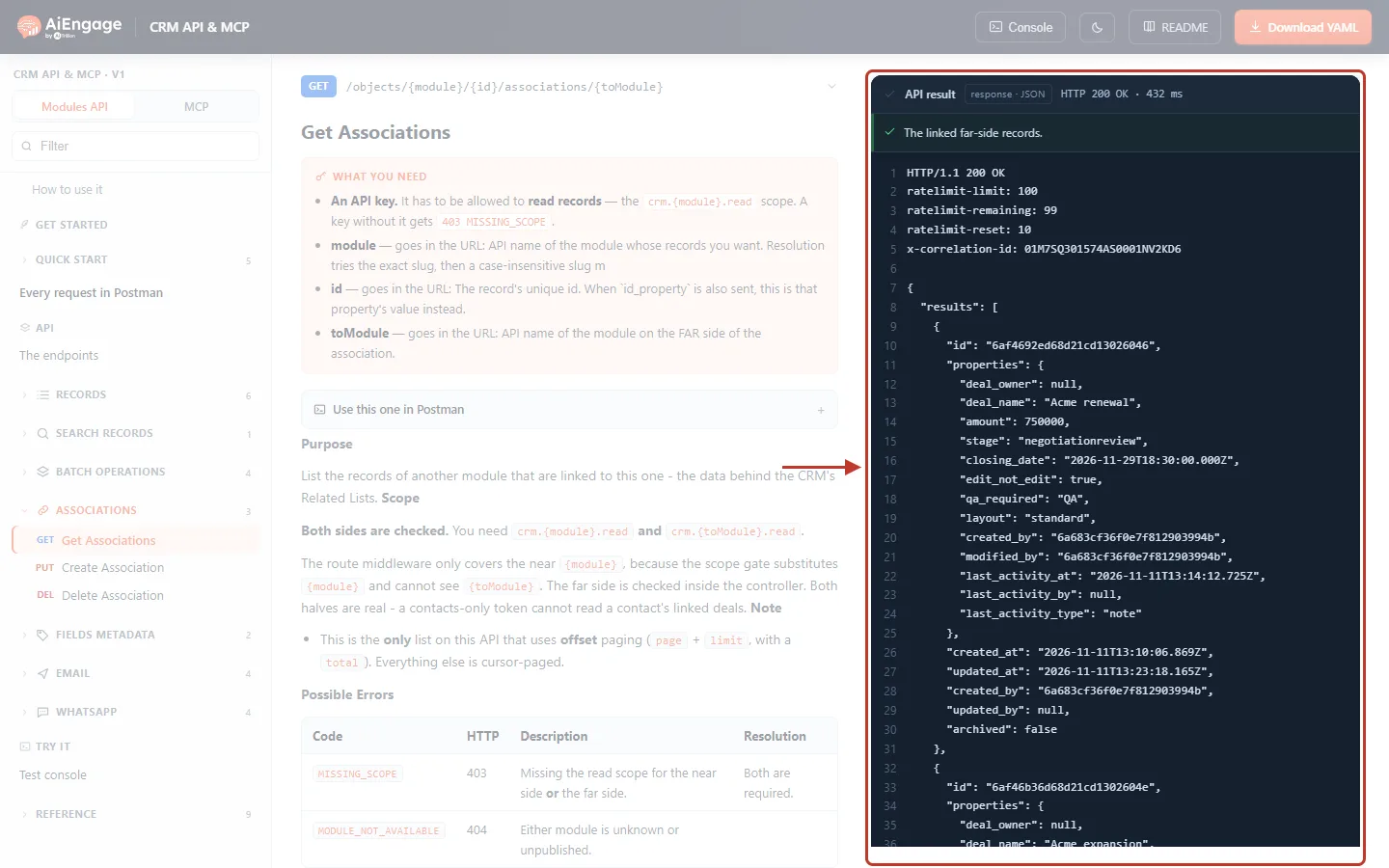
What this screenshot shows. The API result, ringed: HTTP 200, “The linked far-side records.”
resultsis a list of the linked deals. Each has the deal’sidand itsproperties— heredeal_name“Acme renewal”,amount750000,stage,closing_dateand other fields.Each record also has
created_at,updated_at,created_by,updated_byandarchived— the same record shape as every other records endpoint.Scrolling down shows the second deal, “Acme expansion”, and the
pagingblock.The headers at the top show your rate limit (
ratelimit-limit,ratelimit-remaining,ratelimit-reset) and thex-correlation-id.
Page through a long list#
Get Associations is the only list in this API that uses page numbers (page + limit) instead of a cursor. Set limit to 1 and page to 2 and press Send again:
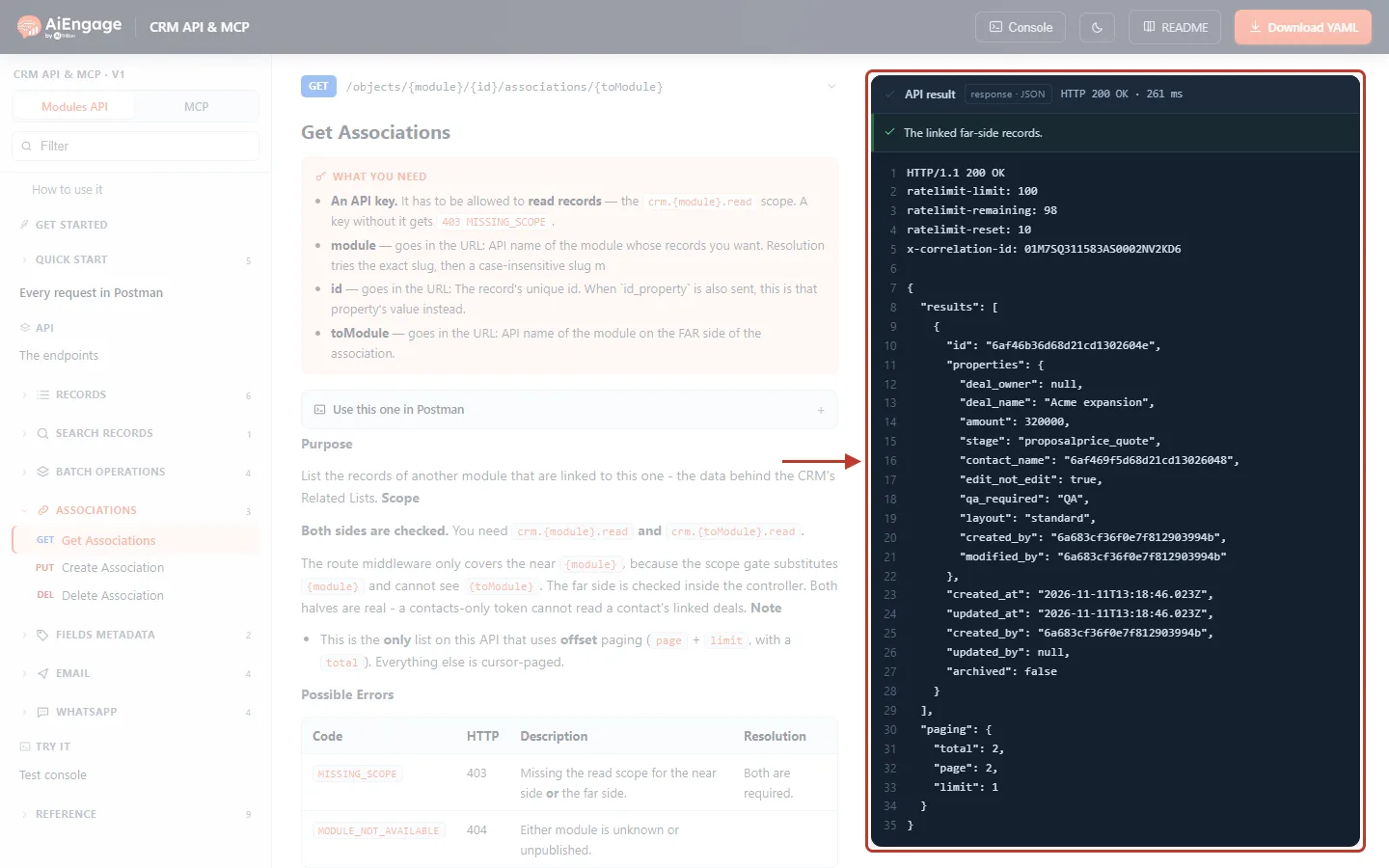
What this screenshot shows. The API result for ?limit=1&page=2, ringed.
resultsnow holds one deal — the second one, “Acme expansion”. Itscontact_namefield holds the contact’s id, because this deal is also linked through its Contact Name lookup.paging.totalis2— the contact has two linked deals in total.paging.pageis2andpaging.limitis1.To read everything, keep asking for the next page until you have
totalrecords (or a page comes back with fewer thanlimitresults).
✅
Use
limit=100 (the maximum) to read big lists in as few calls as possible. If you leave limit out, the API returns 20 per page.ℹ️
An id that does not exist returns 200 with an empty
results list and total: 0 — not an error. If you get an empty list unexpectedly, check the id.Step 4: Link Two Records#
Click Create Association. It needs four URL parameters and no request body:
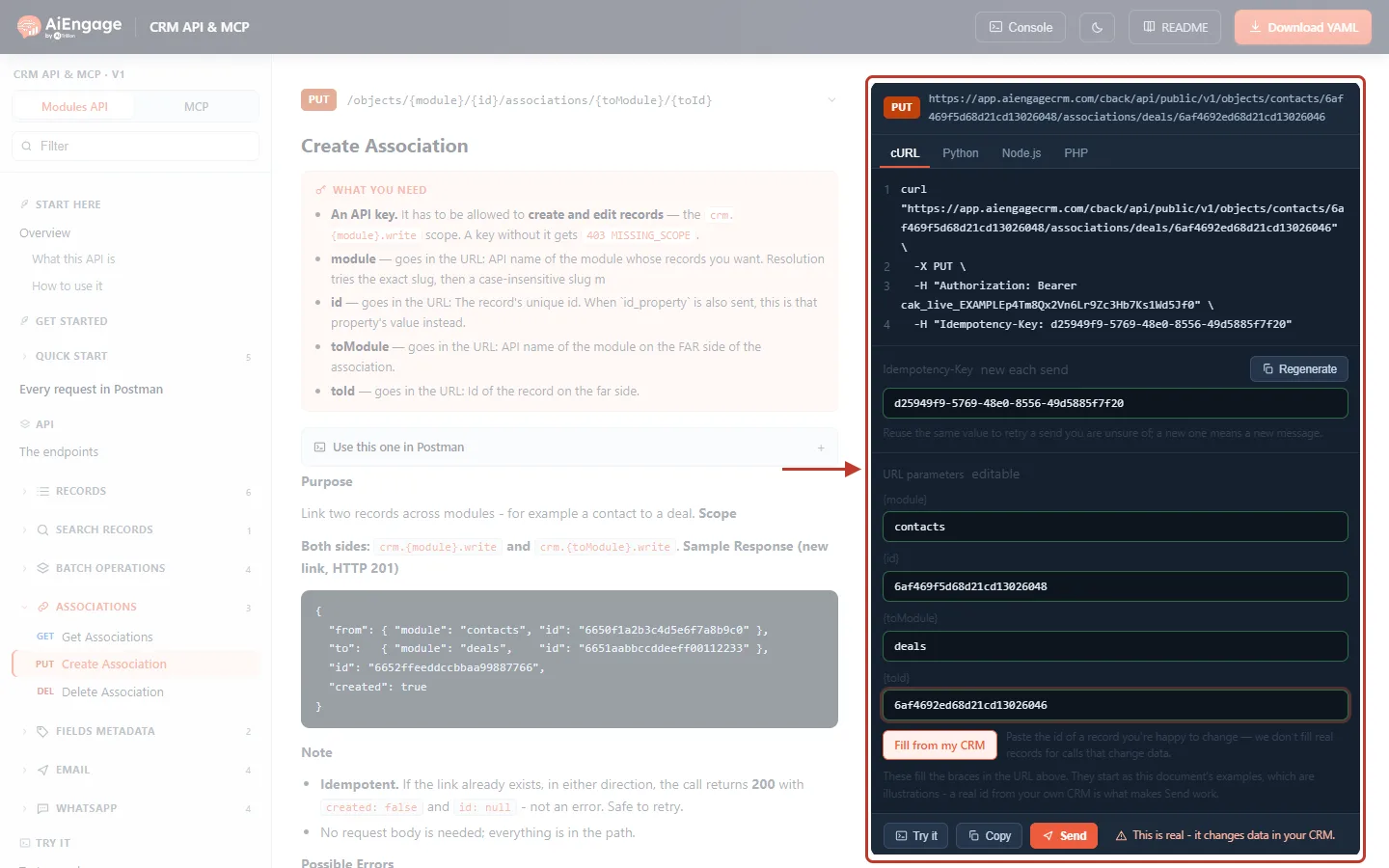
What this screenshot shows. The Send panel of Create Association, ringed.
The cURL sample shows PUT and the full address:
…/objects/contacts/6af469f5d68d21cd13026048/associations/deals/6af4692ed68d21cd13026046.Idempotency-Key — a fresh value for each new request (Regenerate makes another). Reuse the same value to retry a request whose outcome you are unsure of. See Idempotency Keys & Safe Retries.
{module}
contacts, {id} the contact id, {toModule}deals, {toId} the deal id.The warning next to Send says “This is real - it changes data in your CRM.”
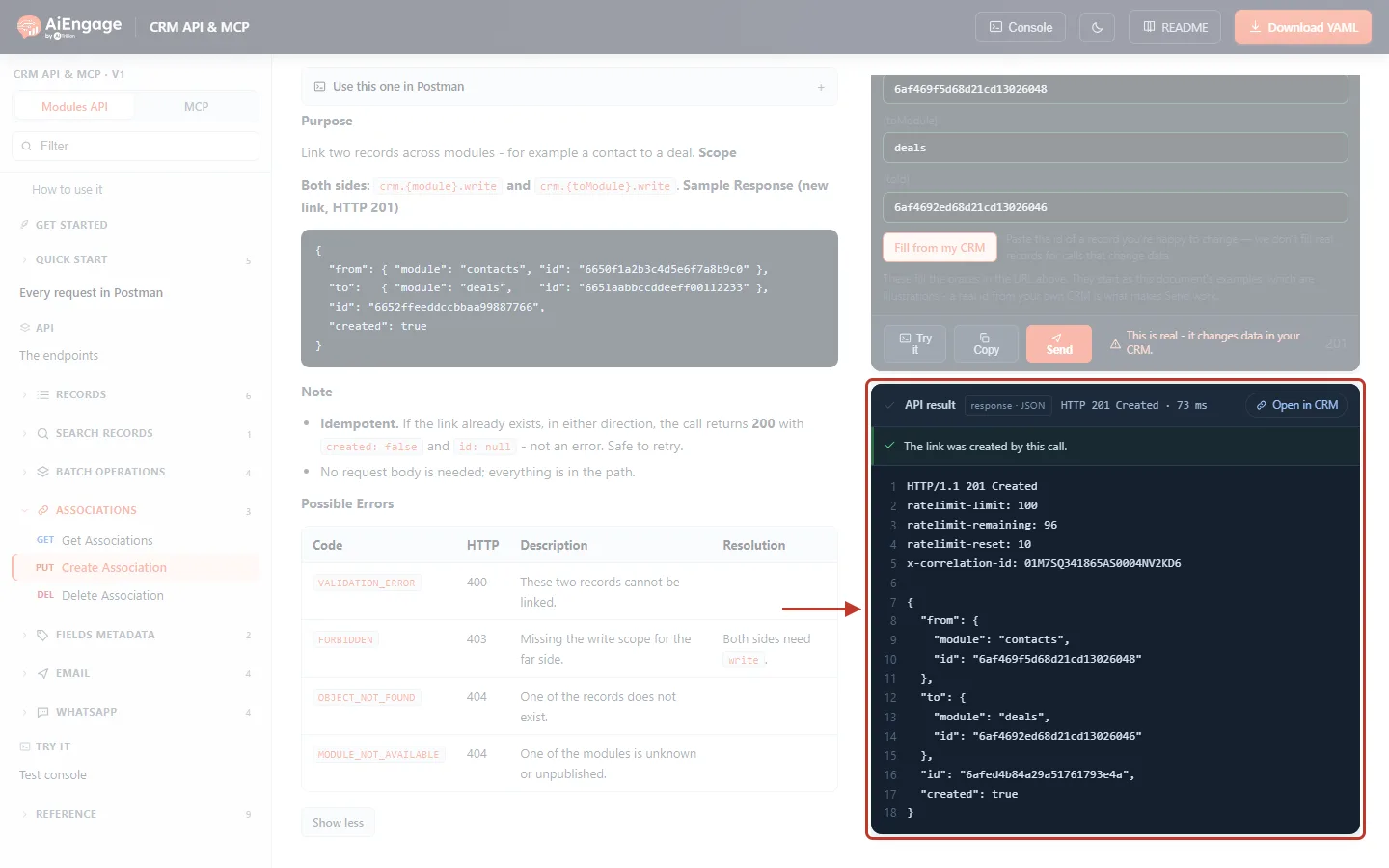
What this screenshot shows. The API result of a new link, ringed: HTTP 201 Created, “The link was created by this call.”
from— the near-side record (contactsand its id).to— the far-side record (dealsand its id).id— the id of the new link.created: true— this call made the link.Open in CRM (top right of the result) opens the record so you can see the link in its Related panel.
On the left, the endpoint’s Possible Errors table lists 400, 403 and 404 answers.
Press Send a second time with the same records:
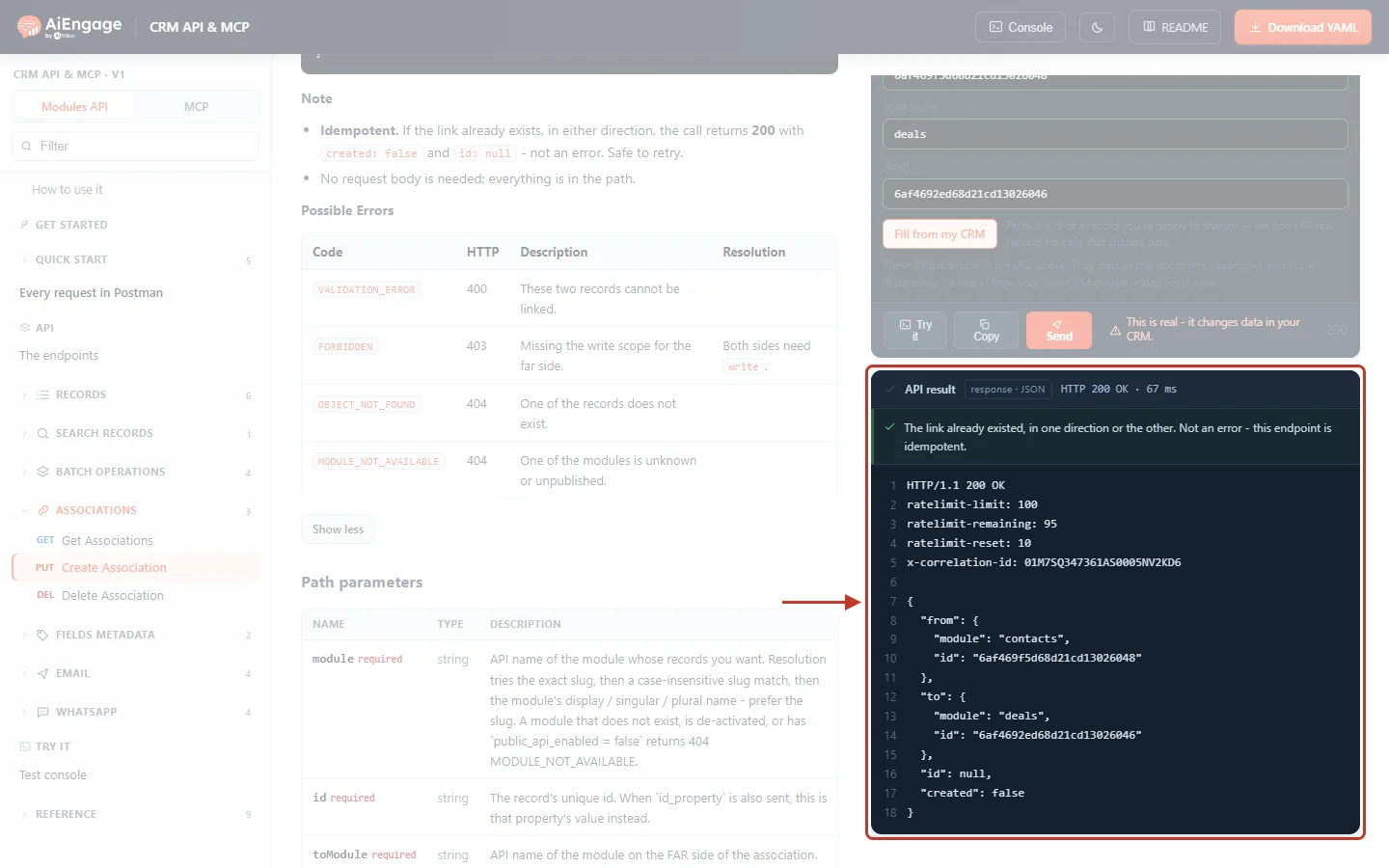
What this screenshot shows. The API result when the link already exists, ringed: HTTP 200 OK.
“The link already existed, in one direction or the other. Not an error - this endpoint is idempotent.”
created: falseandid: null— nothing new was made.“In one direction or the other” means linking a deal to a contact counts as the same link as linking that contact to the deal.
So it is always safe to call Create Association again — you never get duplicate links.
After linking, the CRM shows the link on the records: in the Related panel on the right of the record (when that module’s related list is part of the record’s layout), and — when the two modules are connected by a lookup field such as a deal’s Contact Name — in that field too.
Step 5: Remove a Link#
Click Delete Association, fill in the same four parameters and press Send.
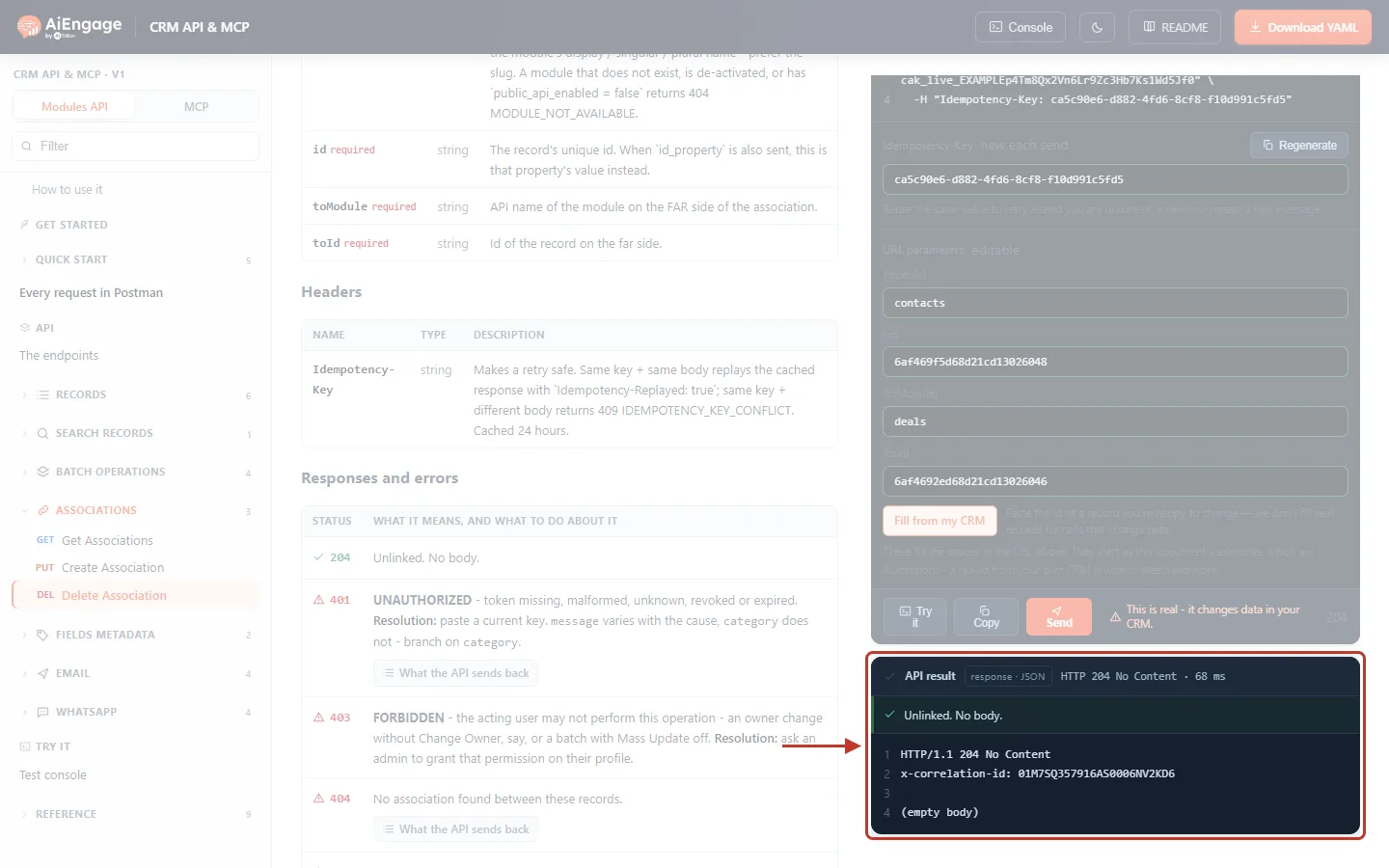
What this screenshot shows. The API result of a successful unlink, ringed: HTTP 204 No Content, “Unlinked. No body.”
A 204 answer has no body — the result shows “(empty body)”. The status code alone tells you it worked.
Only the link is removed. The contact and the deal are not changed or deleted.
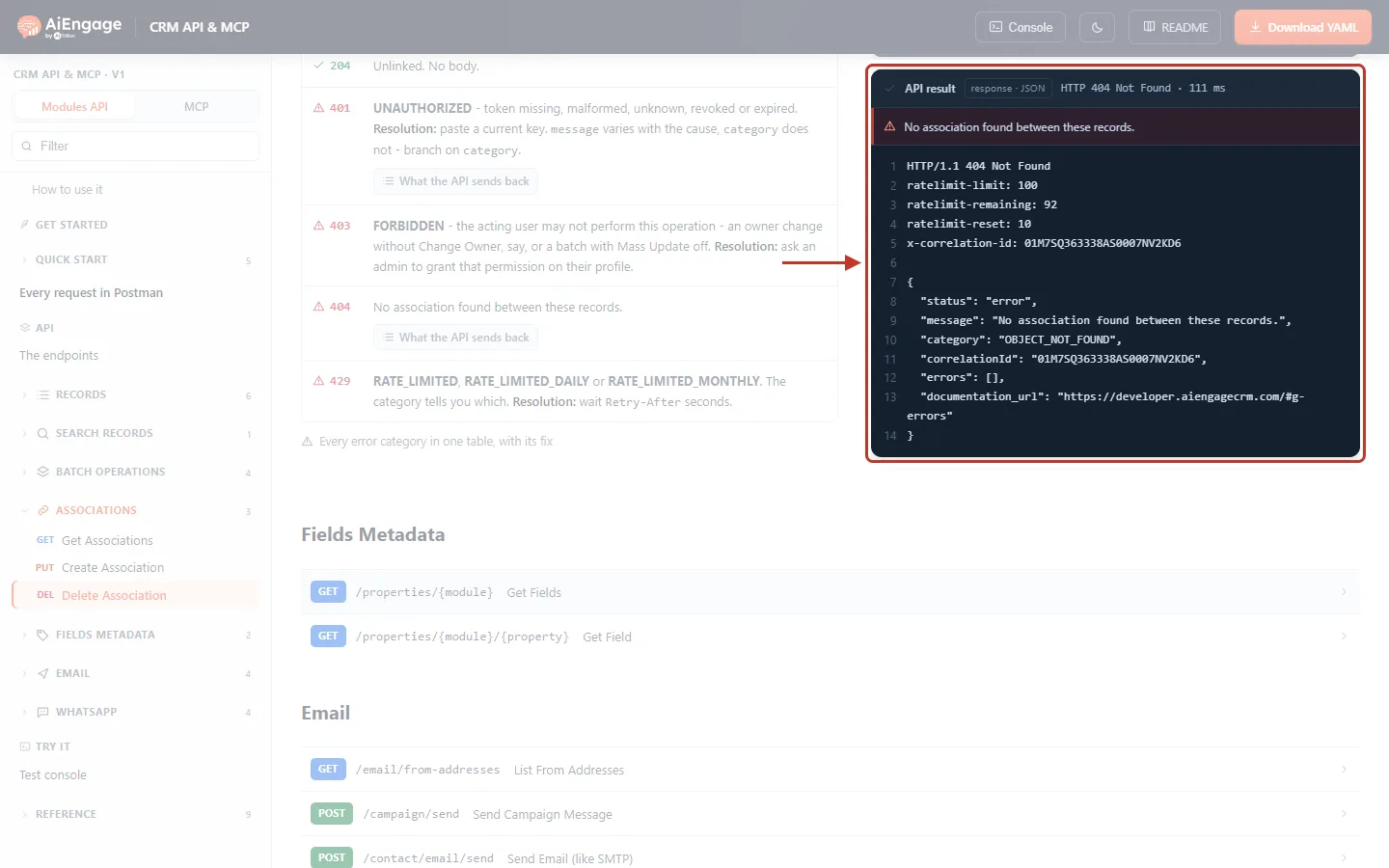
What this screenshot shows. The API result when the two records are not linked, ringed: HTTP 404 Not Found.
"message": "No association found between these records.","category": "OBJECT_NOT_FOUND".The API tells you honestly that there was nothing to remove, instead of pretending with a 204.
If you are cleaning up links and do not care whether they existed, treat this 404 as “already done”.
⚠️
Delete Association cannot be undone with an “undo” button. To restore a link you removed by mistake, call Create Association again with the same records.
Step 6: Fix the Common Errors#
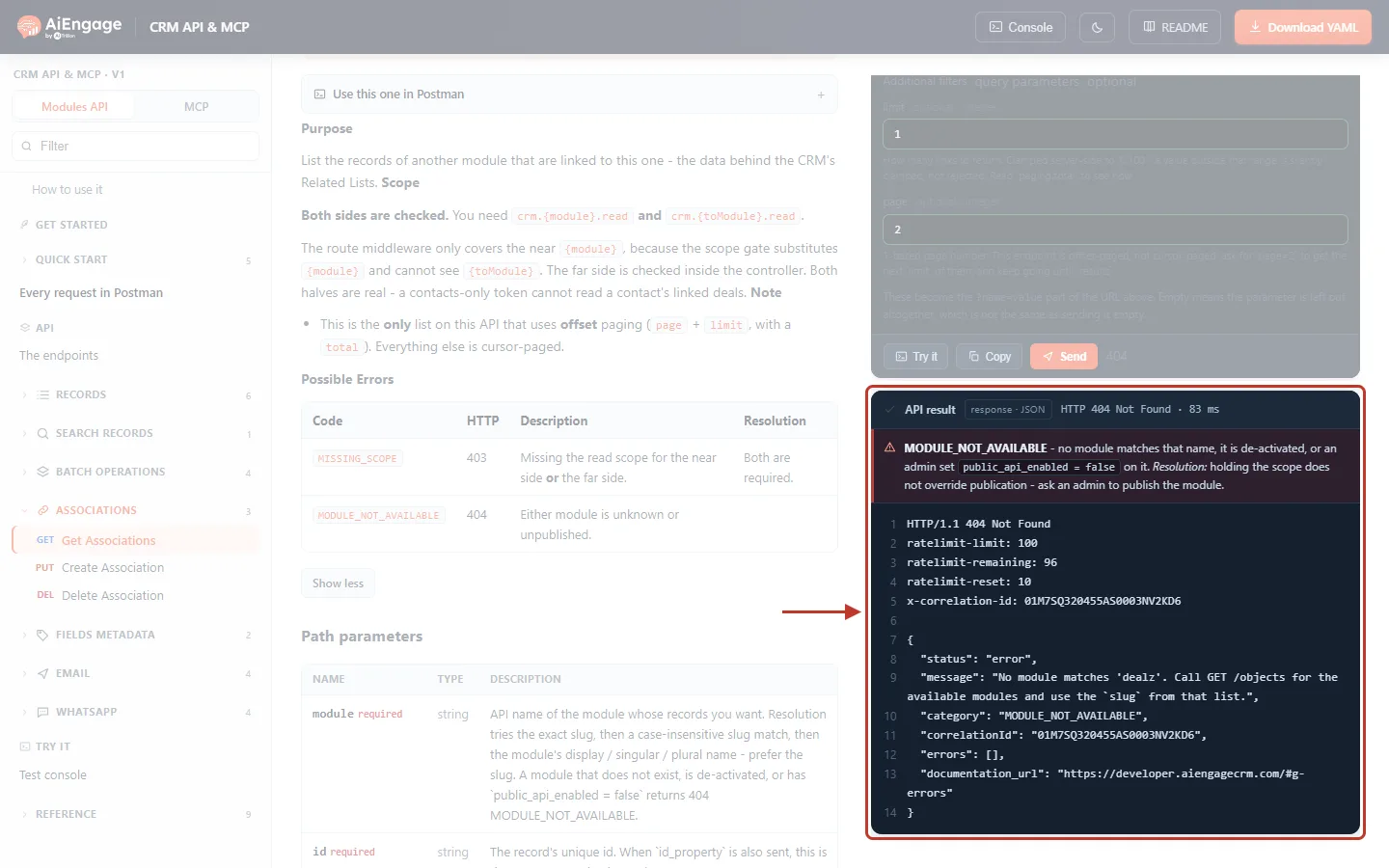
What this screenshot shows. The API result for {toModule} = dealz (a typo), ringed: HTTP 404 Not Found.
"message": "No module matches 'dealz'. Call GET /objects for the available modules and use the `slug` from that list.""category": "MODULE_NOT_AVAILABLE". The red bar adds that the module may also be deactivated or not published to the API by an administrator.Fix: use the exact slug from
GET /objects, for both{module}and{toModule}.
Code | HTTP | When | Fix |
|---|---|---|---|
| 400 | These two records cannot be linked (for example the modules are not related). | Check that the modules can be related in the CRM. |
| 401 | Token missing, wrong or revoked. | Check the |
| 403 | The key lacks the read/write scope on the near or far module. The message names the missing scope, e.g. “Token is missing required scope: crm.deals.write”. | Generate a key with the scope on both modules (Step 1). |
| 404 | A module slug is wrong, deactivated or not published. | Use the slug from |
| 404 | Create: one of the records does not exist. Delete: the records are not linked. | Check the ids; for Delete, the link may already be gone. |
| 429 | Too many calls in a short time. | Wait for |
More in API Errors & Troubleshooting.
Use the Associations API from Your Own Code#
List all deals of a contact, 100 at a time:
curl "https://app.aiengagecrm.com/cback/api/public/v1/objects/contacts/6af469f5d68d21cd13026048/associations/deals?limit=100&page=1" \
  -H "Authorization: Bearer cak_live_YOUR_TOKEN"
Link a contact to a deal (safe to retry):
curl "https://app.aiengagecrm.com/cback/api/public/v1/objects/contacts/6af469f5d68d21cd13026048/associations/deals/6af4692ed68d21cd13026046" \
  -X PUT \
  -H "Authorization: Bearer cak_live_YOUR_TOKEN" \
  -H "Idempotency-Key: 7d2f0c1e-9a4b-4f6e-8c3d-2b1a0e9f8d7c"
Read every page in Node.js:
async function allLinked(module, id, toModule) {
  const out = [];
  for (let page = 1; ; page++) {
    const res = await fetch(`https://app.aiengagecrm.com/cback/api/public/v1/objects/${module}/${id}/associations/${toModule}?limit=100&page=${page}`, {
      headers: { Authorization: `Bearer ${process.env.AIENGAGE_TOKEN}` },
    });
    if (!res.ok) throw new Error((await res.json()).message);
    const { results, paging } = await res.json();
    out.push(...results);
    if (out.length >= paging.total || results.length < paging.limit) return out;
  }
}Troubleshooting#
Problem | Likely cause | Solution |
|---|---|---|
403 although my key can read contacts. | It cannot read the far-side module. | Add the scope for the other module (e.g. Deals: Read). |
The list is empty, but I can see links in the CRM. | Wrong id or wrong module order, or the key creator cannot see those records. | Check the id and slugs; check the key creator’s permissions. |
Create returns 200, not 201. | The link already existed (in either direction). | Nothing to fix — |
Delete returns 404. | The records were not linked. | Treat it as already unlinked. |
The CRM still shows the old link after Delete. | The record page was open before the change. | Refresh the record page. |
I get fewer results than expected. | Only the first page was read. | Read further pages until you reach |
Best Practices#
Grant scopes on both modules — and only Read if your integration never links or unlinks.
Use Create Association freely for “make sure it is linked” logic: it never creates duplicates.
Send an Idempotency-Key with Create and Delete so retries after a timeout are safe.
Read with
limit=100and stop when you reachpaging.total.Store record ids, not names, in your own system so you always link the right records.
Frequently Asked Questions#
Does Delete Association delete the deal or the contact?
No. Only the link is removed; both records stay as they are.
Does the direction matter?
No. Linking a contact to a deal is the same link as linking the deal to the contact. You can list it from either side.
Can I link more than two records at once?
Each call links one pair. Call Create Association once for every pair.
Do I need a request body?
No. Everything is in the URL.
Does linking work with custom modules?
Yes, with any module that is published to the API — use its slug from GET /objects.
Previous and Next Articles#
Previous: Batch Operations in the CRM API: Create, Read, Update and Archive Up to 100 Records in One Call
Next: Fields Metadata API: List a Module’s Fields, Their Types, Required Rules and Picklist Values
Related Articles#
Was this article helpful?
Ready to implement this?
OpenAI Engage and apply what you just learned to your own workspace.
Open AI Engage CRM