Loading…


KnowledgeBase
Idempotency Keys & Safe Retries: Prevent Duplicate Records and Double Sends in the CRM API
Introduction#
Networks are not perfect. Sometimes your integration sends a request to the AiEngage CRM API, and the connection drops or times out before the answer comes back. Your code cannot tell what happened. Maybe the request never arrived. Or maybe the CRM did create the contact, or did send the email, and only the reply was lost.
If your code simply sends the same request again, the second case goes wrong: you get two copies of the same contact, or your customer receives the same email or WhatsApp message twice (and you pay for it twice).
An idempotency key solves this. It is a unique label that you attach to a request in the Idempotency-Key header. When the CRM sees the same key again with the same request, it does not do the work a second time. It simply sends back the answer it gave the first time. So you can retry as often as you need, and the work still happens only once.
In this guide you will learn, step by step:
Where the idempotency rules are documented in the developer portal.
How to add an
Idempotency-Keyto a request.What a safe retry looks like (the
Idempotency-Replayed: trueheader).What the 409 IDEMPOTENCY_KEY_CONFLICT error means, and how to avoid it.
Which endpoints require a key, and the 400 IDEMPOTENCY_KEY_REQUIRED error.
How to build safe retries into your own code, with ready-to-copy examples.
All screenshots come from the AiEngage developer portal, developer.aiengagecrm.com. Each one has a red ring and arrow on the part to look at, followed by a description of the whole screen. The API answers shown in the screenshots use example data (a sample contact called Ada Lovelace); no real record was created.
Before You Begin#
You need an API key that starts with
cak_live_. See API Keys Step by Step: Generate, Use and Revoke a Personal Access Token.You should know how to send an authorised request. See API Authentication & Bearer Tokens.
To follow the steps in the browser, open developer.aiengagecrm.com and paste your key once in the Paste your key here box. See Test the AiEngage CRM API in the API Console and Postman.
⚠️
The Send button in the developer portal is real. A POST to Insert Record creates a real contact in your CRM. Practise with a test contact (for example an
@example.com email address) and delete it afterwards.How Idempotency Keys Work (Quick Summary)#
Read this table once. Every step below shows one row of it in action.
What you send | What the CRM does | What you get back |
|---|---|---|
A new key (never used before) | Runs the request normally and remembers the answer for 24 hours. | The normal answer, for example |
The same key with the same request body | Does not run the request again. | The first answer again, unchanged, plus the header |
The same key with a different request body | Refuses the request. Nothing is changed. |
|
The same key while the first request is still running | Waits up to 5 seconds for the first request to finish, then replays its answer. | The replayed answer, or, if the first request is still not done, |
No key | Runs the request normally. Nothing is remembered. | The normal answer. A retry runs again and can create a duplicate. |
ℹ️
Which requests use the key? Only requests that change data:
POST, PATCH, PUT and DELETE. A GET only reads data, so it is always safe to repeat and the key is ignored.Step 1: Find the Idempotency Rules in the Developer Portal#
Open developer.aiengagecrm.com. In the left menu, under Reference, the guide has a short Idempotency section. It is the official one-paragraph summary of the rules.
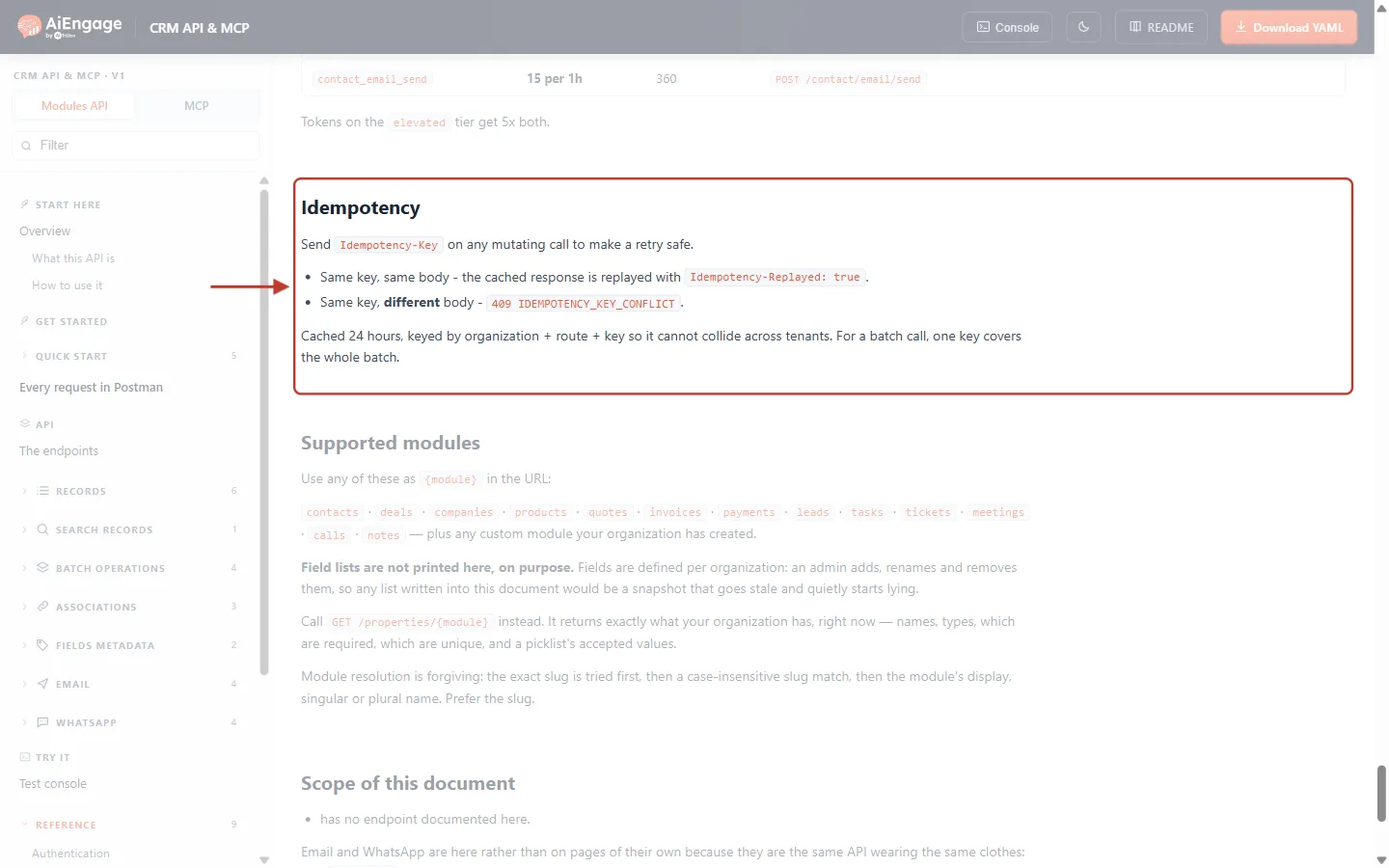
What this screenshot shows. The Idempotency section of the developer portal. It is ringed in red; the rest of the page is faded so you can focus on it.
Send
Idempotency-Keyon any mutating call to make a retry safe. “Mutating” means any call that creates, changes, archives or sends something.Same key, same body — the stored answer is sent back again, with the header
Idempotency-Replayed: true.Same key, different body — the API answers
409 IDEMPOTENCY_KEY_CONFLICT.Cached 24 hours, keyed by organization + route + key. Your keys can never clash with another company’s keys. One key covers a whole batch call.
Above the section (faded) is the end of the Rate limits table. Below it is Supported modules, the list of modules you can use in the URL.
The left menu shows every part of the guide: Get started, Quick start, the endpoint groups (Records, Search, Batch operations, Associations, Fields metadata, Email, WhatsApp) and Reference.
Scroll a little further up to the Errors table. It lists every error category the API can return, with the fix for each one.
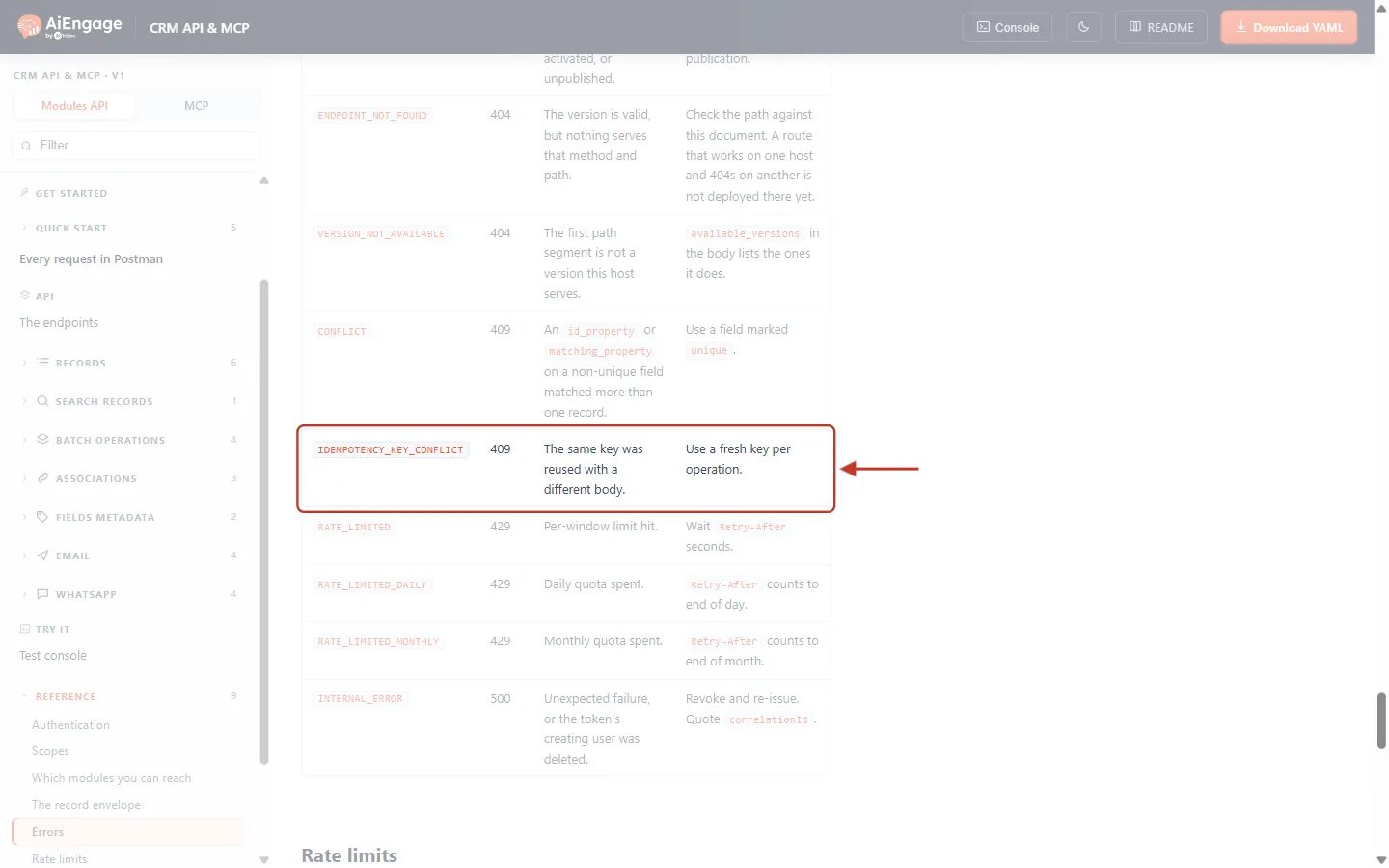
What this screenshot shows. The Errors table, with the IDEMPOTENCY_KEY_CONFLICT row ringed.
Code column:
IDEMPOTENCY_KEY_CONFLICT. This is the value ofcategoryin the error body. Your code should check this value, not the message text.HTTP column:
409.Description: “The same key was reused with a different body.”
Resolution: “Use a fresh key per operation.”
Just above is a different 409,
CONFLICT, which is about upsert matching more than one record. It has nothing to do with idempotency keys, so don’t confuse the two.Below are the 429 rate-limit errors (
RATE_LIMITED,RATE_LIMITED_DAILY,RATE_LIMITED_MONTHLY) andINTERNAL_ERROR(500). These are the errors that usually lead to a retry.
Step 2: See the Idempotency-Key Header on an Endpoint#
In the left menu, open Records → Insert Record (POST /objects/{module}). This endpoint creates one record, so it is the most common place where a careless retry creates a duplicate. Scroll down to the Headers table.
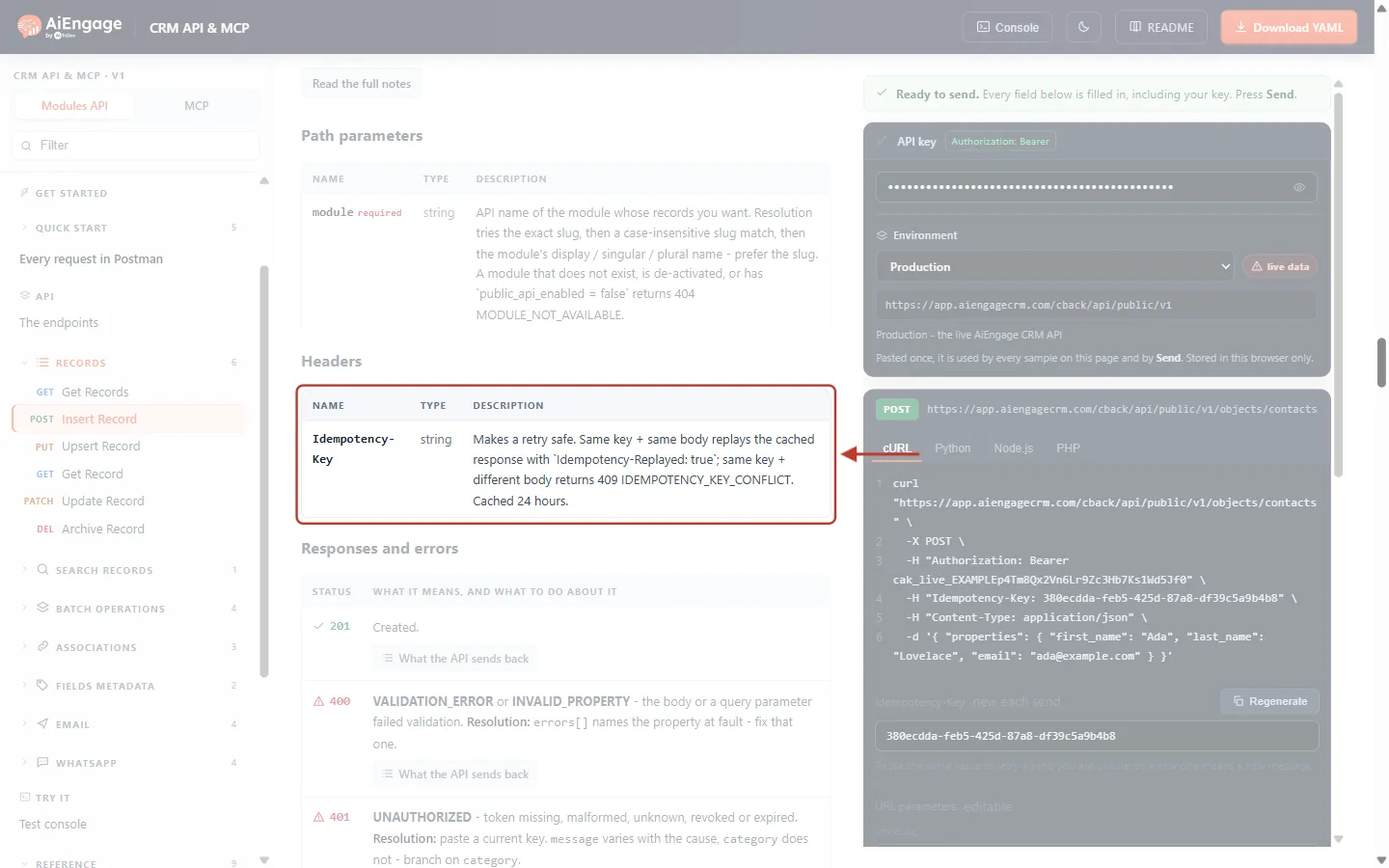
What this screenshot shows. The Headers table of the Insert Record endpoint, with the Idempotency-Key row ringed.
NAME:
Idempotency-Key. This is the exact header name to send. Header names are not case-sensitive.TYPE:
string. Any text works, but a random UUID (for example8f5c3b1a-4d2e-4a6b-9c1d-2e7f0a1b3c4d) is recommended. Keep it under 255 characters.DESCRIPTION: “Makes a retry safe. Same key + same body replays the cached response with
Idempotency-Replayed: true; same key + different body returns 409 IDEMPOTENCY_KEY_CONFLICT. Cached 24 hours.”There is no “required” label here. On Insert Record the key is optional but strongly recommended. (Step 8 shows the endpoints where it is required.)
Above it is the Path parameters table (
module). Below it, Responses and errors lists every status code the endpoint can return.On the right is the Try it panel that you will use in the next steps.
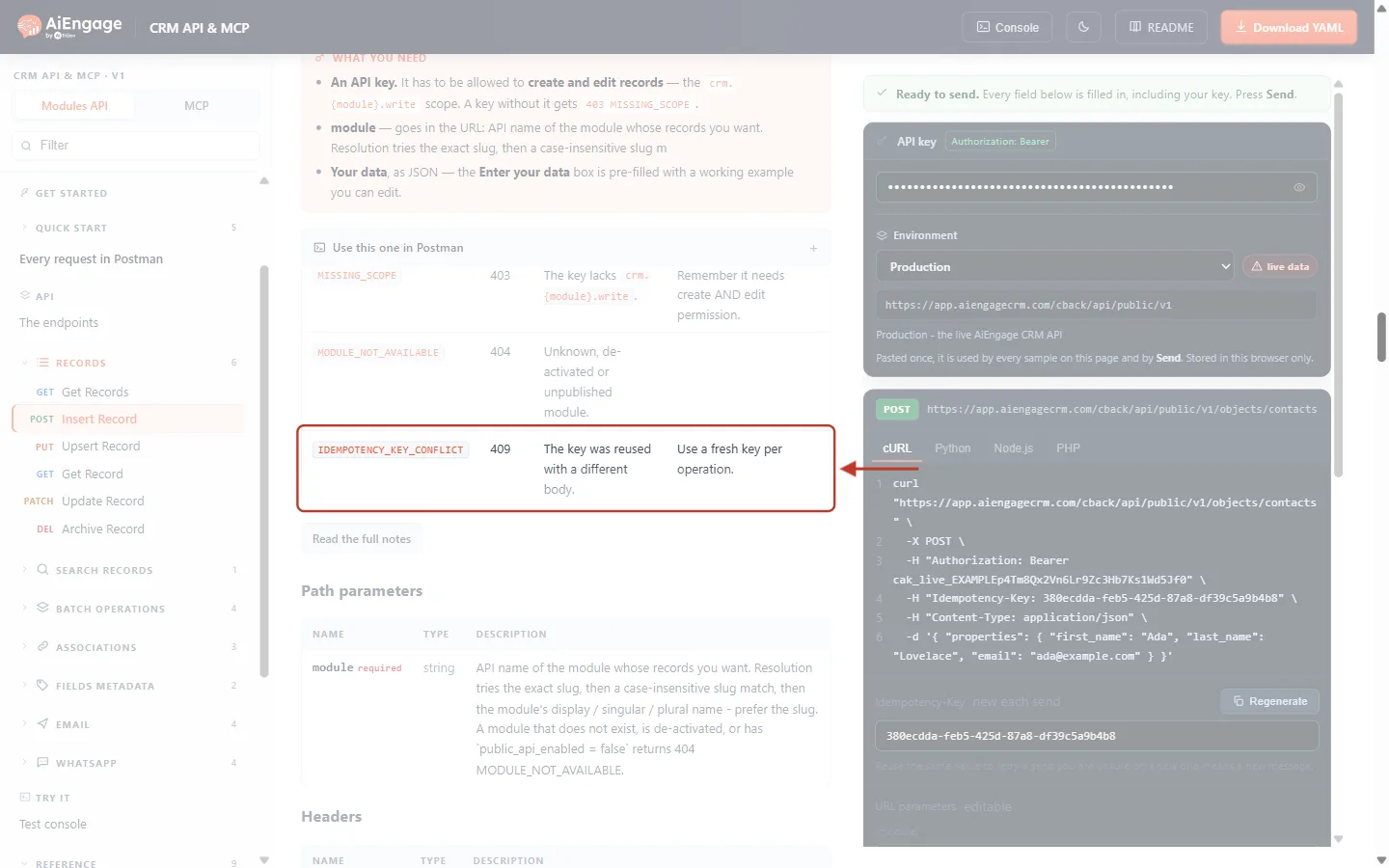
What this screenshot shows. The Possible Errors table near the top of Insert Record, with the IDEMPOTENCY_KEY_CONFLICT row ringed.
The same 409 error appears in the error list of every endpoint that changes data.
The other rows are the usual errors for this endpoint:
MISSING_SCOPE(403, the key is not allowed to write to this module) andMODULE_NOT_AVAILABLE(404, unknown or switched-off module).In the left menu, POST Insert Record is highlighted, so you can see which endpoint you are reading.
Step 3: Get an Idempotency Key for Your Request#
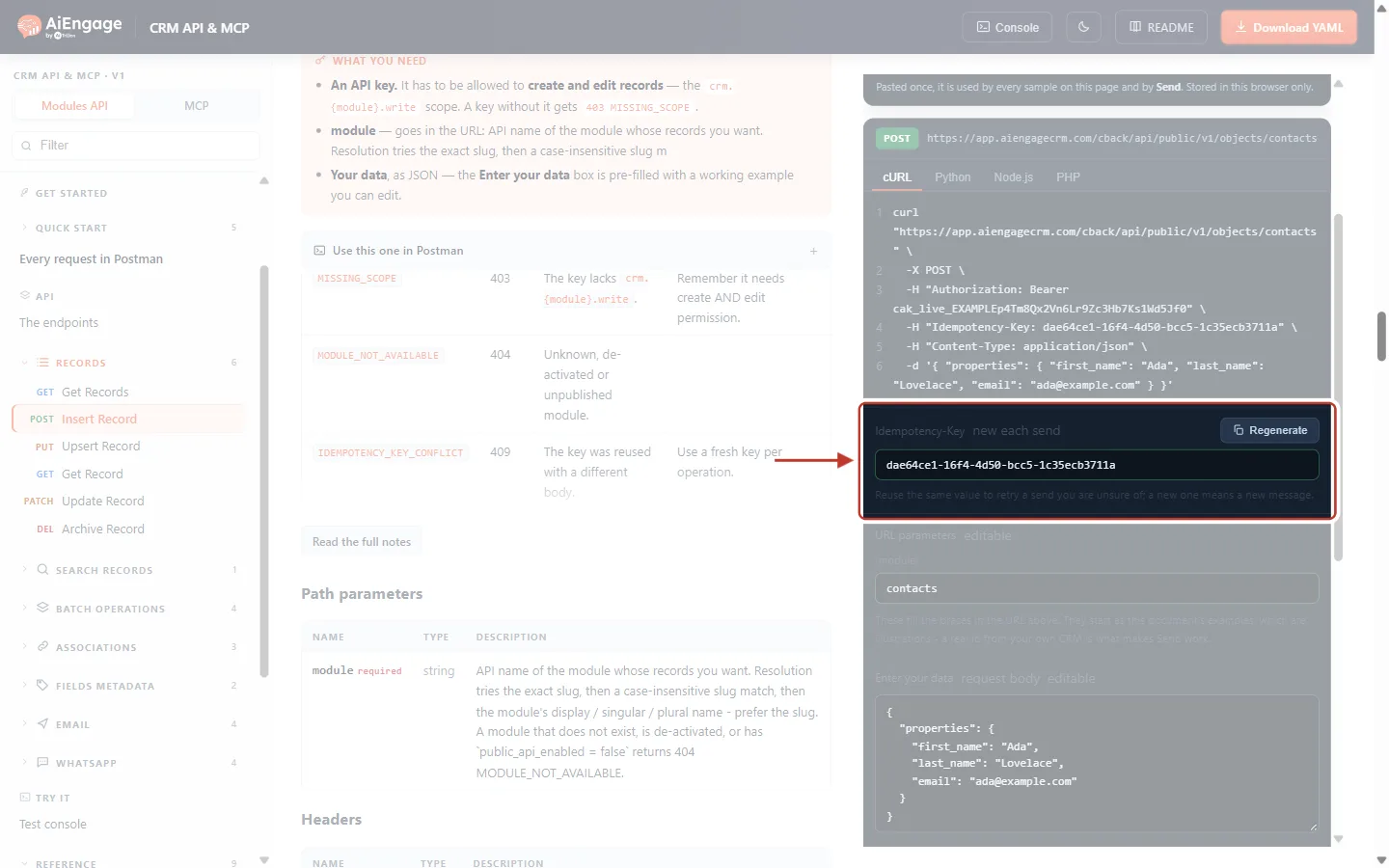
On the right of Insert Record is the Try it panel. Type contacts in the {module} box. Under the code sample you will find an Idempotency-Key box that is already filled in with a random value.
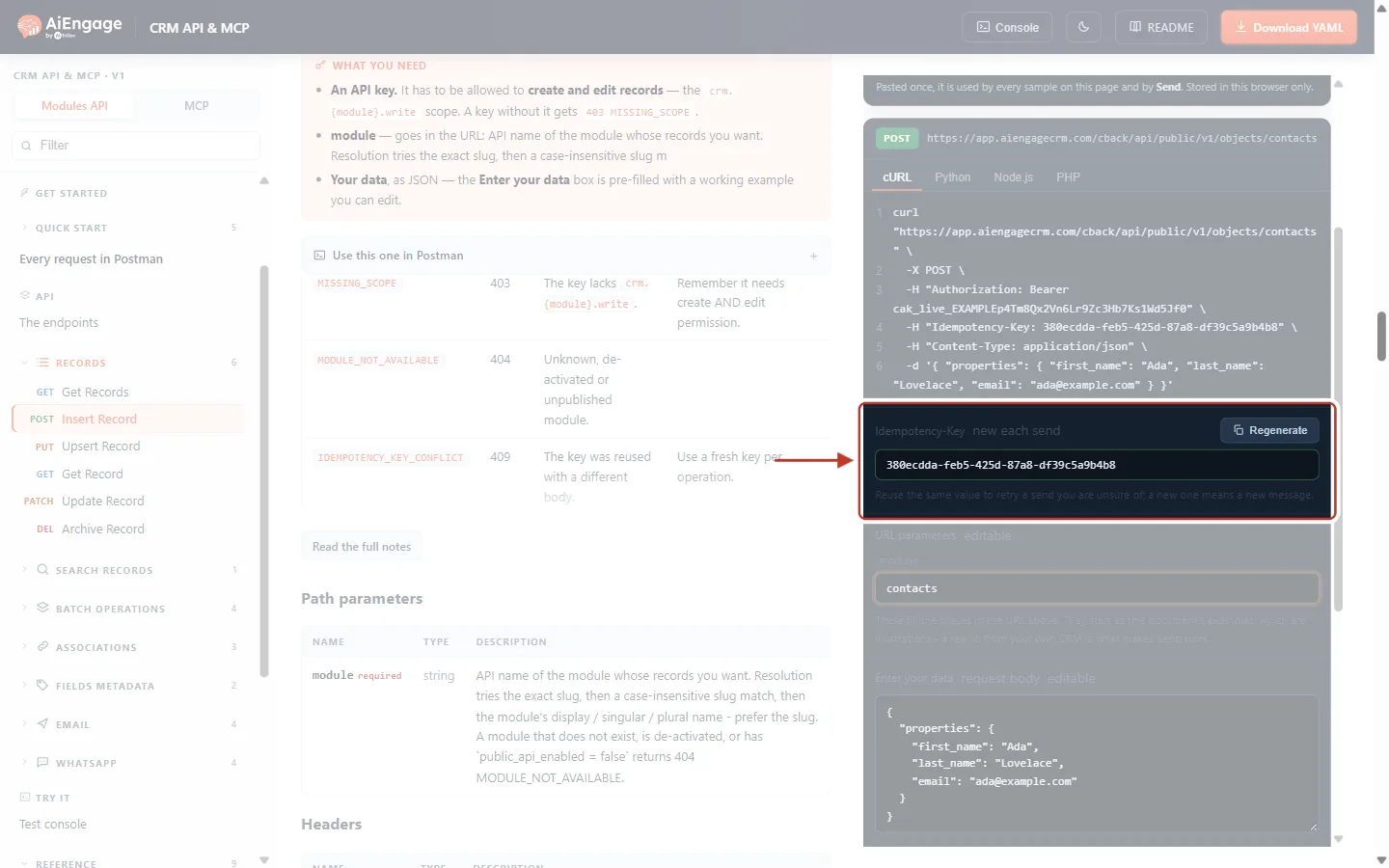
What this screenshot shows. The Idempotency-Key box of the Try it panel, ringed.
Idempotency-Key — the header name, with the chip new each send. The portal makes a fresh random key for you after every Send, so each press is a new operation.
The text box holds the current key (a UUID such as
380ecdda-feb5-425d-87a8-df39c5a9b4b8). You can type or paste your own value here.Regenerate — creates a brand-new random key straight away.
The hint under the box sums up the rule: “Reuse the same value to retry a send you are unsure of; a new one means a new message.”
Above the box is the cURL / Python / Node.js / PHP code sample. Below it are URL parameters (
contacts) and the Enter your data request body.
Look at the code sample above the box. The key has been added to the request as a header, on line 4.
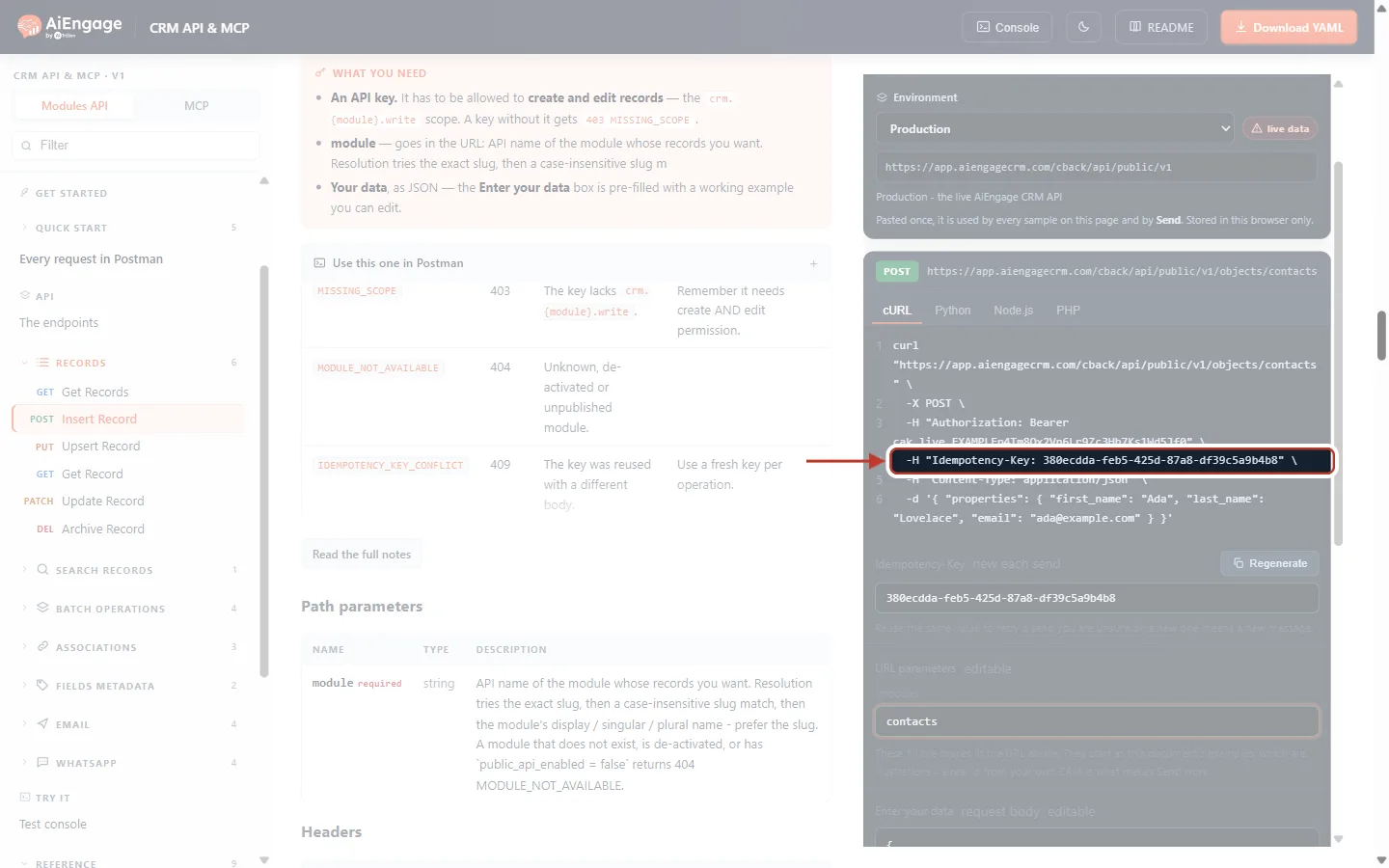
What this screenshot shows. Line 4 of the cURL sample, ringed: -H "Idempotency-Key: …".
Line 1 is the address:
https://app.aiengagecrm.com/cback/api/public/v1/objects/contacts.Line 2
-X POSTis the method. POST creates a record.Line 3 is the
Authorization: Bearer cak_live_…header with your API key (an example key is shown here).Line 4 is the idempotency key. This is the only line you need to add to your own requests.
Lines 5–6 are the
Content-Typeheader and the JSON body (first_name,last_name,email).The Python, Node.js and PHP tabs show the same request in those languages, also with the key.
✅
To create a key in your own code, use your language’s UUID function:
crypto.randomUUID() in Node.js, uuid.uuid4() in Python, [guid]::NewGuid() in PowerShell, or uuidgen on macOS and Linux. In Postman, the variable {{$guid}} gives a fresh UUID on every Send.Step 4: Send the Request the First Time#
Before pressing Send, copy the key from the Idempotency-Key box and keep it somewhere (for example in a text editor). You will need it in Step 5. Then press Send.
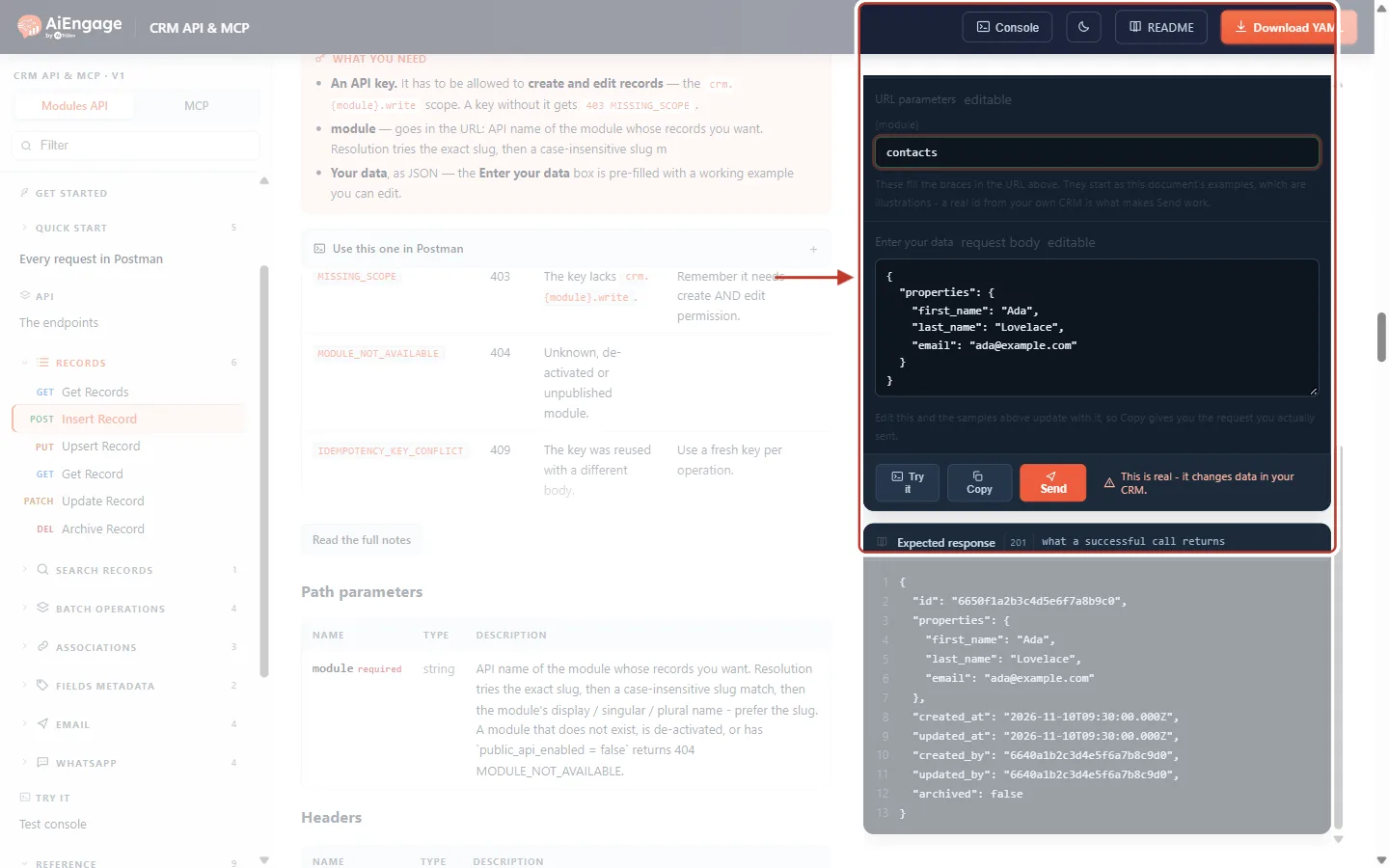
What this screenshot shows. The two things you use in this step, ringed together: the Idempotency-Key box and the row of buttons under the request body.
The key in the box is the one that will be sent with this request. Copy it now.
Try it opens the request in the API console, Copy copies the full command, and Send runs it.
The warning “This is real – it changes data in your CRM.” reminds you that this POST really creates a contact.
The grey number on the right (201) is the status a successful call returns.
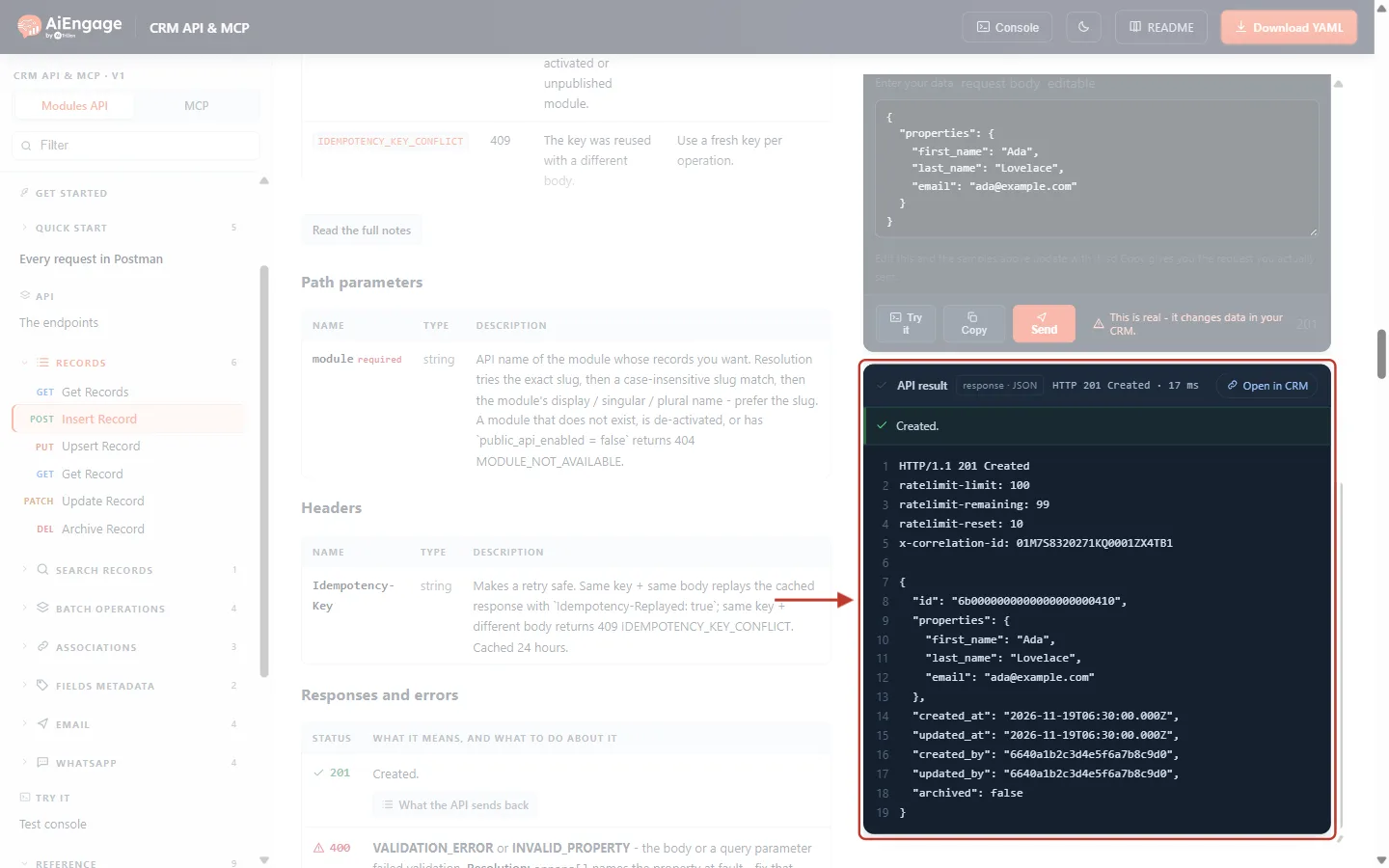
What this screenshot shows. The API result card after the first Send (example data).
The header bar says HTTP 201 Created and how long the call took. Open in CRM opens the new contact.
The green line Created. confirms success.
Lines 1–6 are the response headers. Notice that there is no
idempotency-replayedheader: the CRM really ran this request.ratelimit-limit,ratelimit-remainingandratelimit-resetshow how many calls you have left in the current rate-limit window.x-correlation-idis the request’s tracking number for support.From line 8 down is the new record: its
id, thepropertiesyou sent, the dates andarchived: false. Write down theid; you will compare it in Step 5.
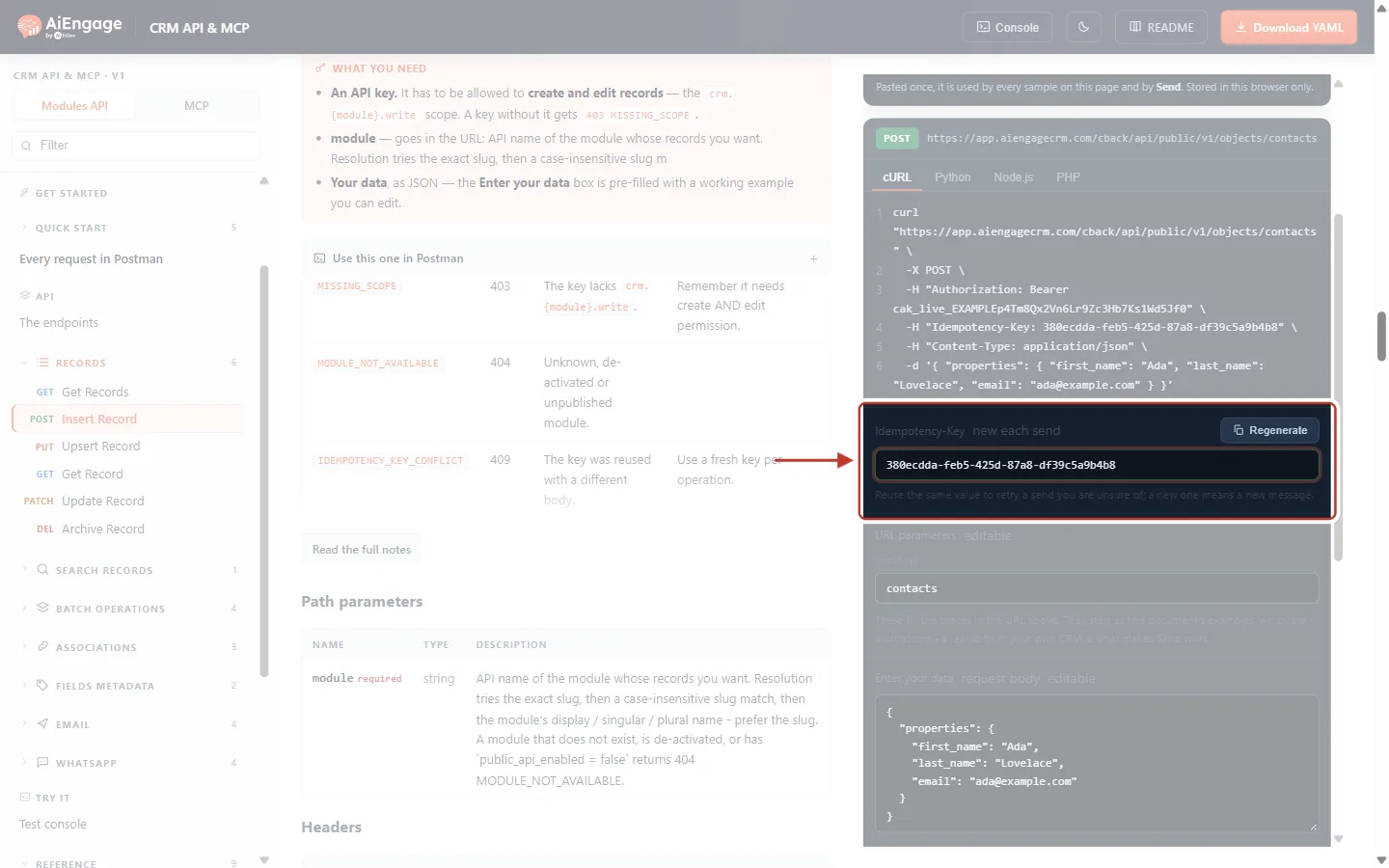
What this screenshot shows. The Idempotency-Key box right after the first Send. The value has changed.
Because of new each send, the portal has already replaced your key with a new random one, ready for the next operation.
If you pressed Send again now, the CRM would see a new key and create a second Ada Lovelace. That is exactly the duplicate you want to avoid when retrying.
Step 5: Retry Safely with the Same Key#
Now pretend the first request timed out and you never saw the answer. To retry safely, send the very same request with the same key. Paste the key you copied in Step 4 back into the box, leave the body exactly as it was, and press Send.
What this screenshot shows. The Idempotency-Key box with the original key from Step 4 pasted back in.
The value matches the first request exactly (
380ecdda-…in this example).The code sample above updates to the same key automatically, so Copy would also give you the retry command.
Do not change anything in Enter your data. The retry must be byte-for-byte the same request.
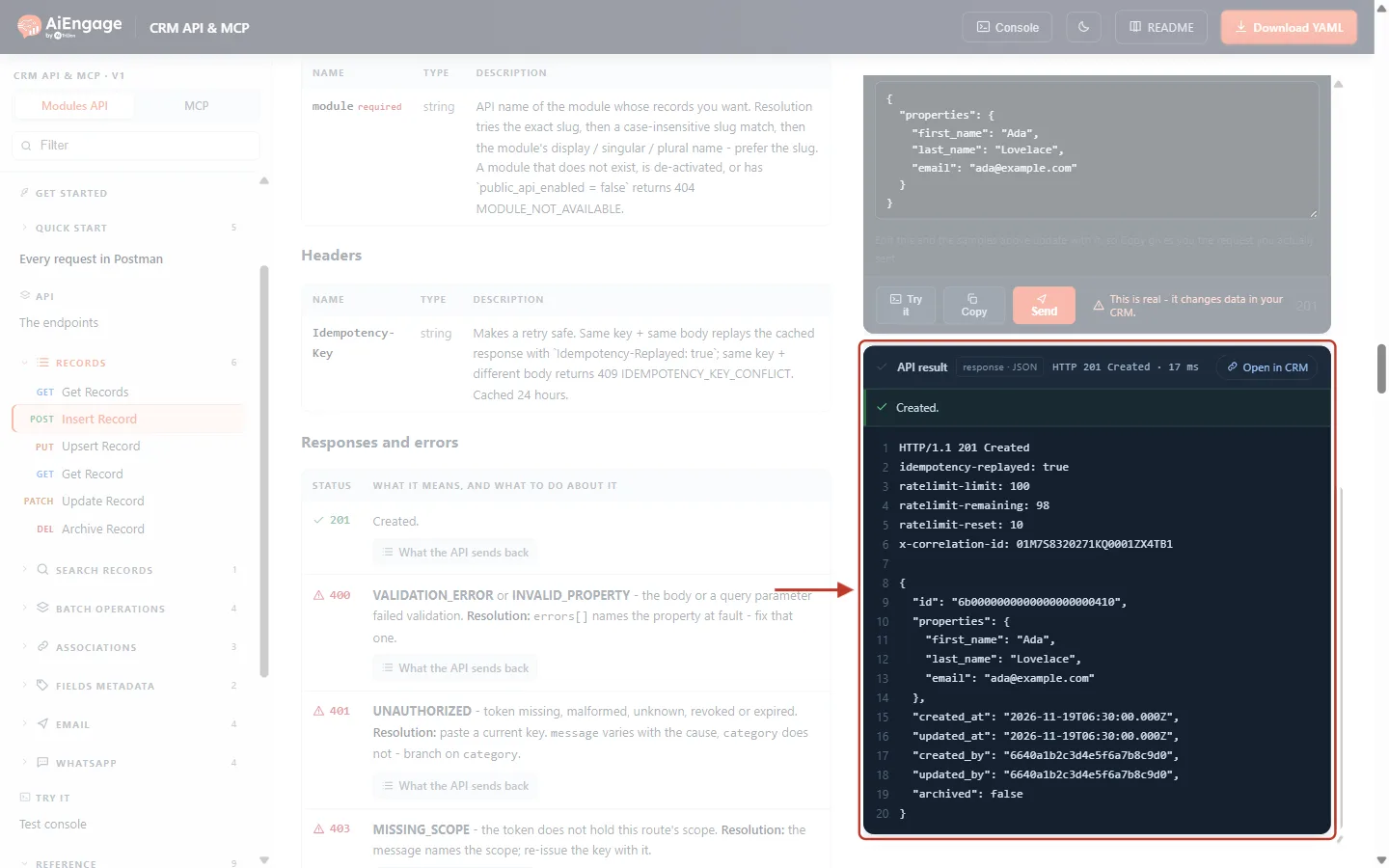
What this screenshot shows. The API result card after the retry (example data).
Line 2 is the important part:
idempotency-replayed: true. The CRM recognised the key and did not create the contact again.The status is still 201 Created, because the CRM sends back the first answer exactly as it was stored.
The
idon line 9 is the same id as in Step 4. There is still only one Ada Lovelace in the CRM.ratelimit-remainingwent down by one. A replay counts towards the short-term rate limit, but it does not use up your daily or monthly plan quota.On the left you can see the Headers table from Step 2 and the Responses and errors list (faded).
ℹ️
How your code should read this: if a response has
Idempotency-Replayed: true, treat it exactly like a normal success. The work was done, once. The header is there for your logs, so you can see that a retry happened.Step 6: Understand the 409 Conflict (Same Key, Different Body)#
A key belongs to one exact request. To see what happens if you break that rule, keep the same key in the box, change one value in the body — here the email becomes ada.lovelace@example.com — and press Send.
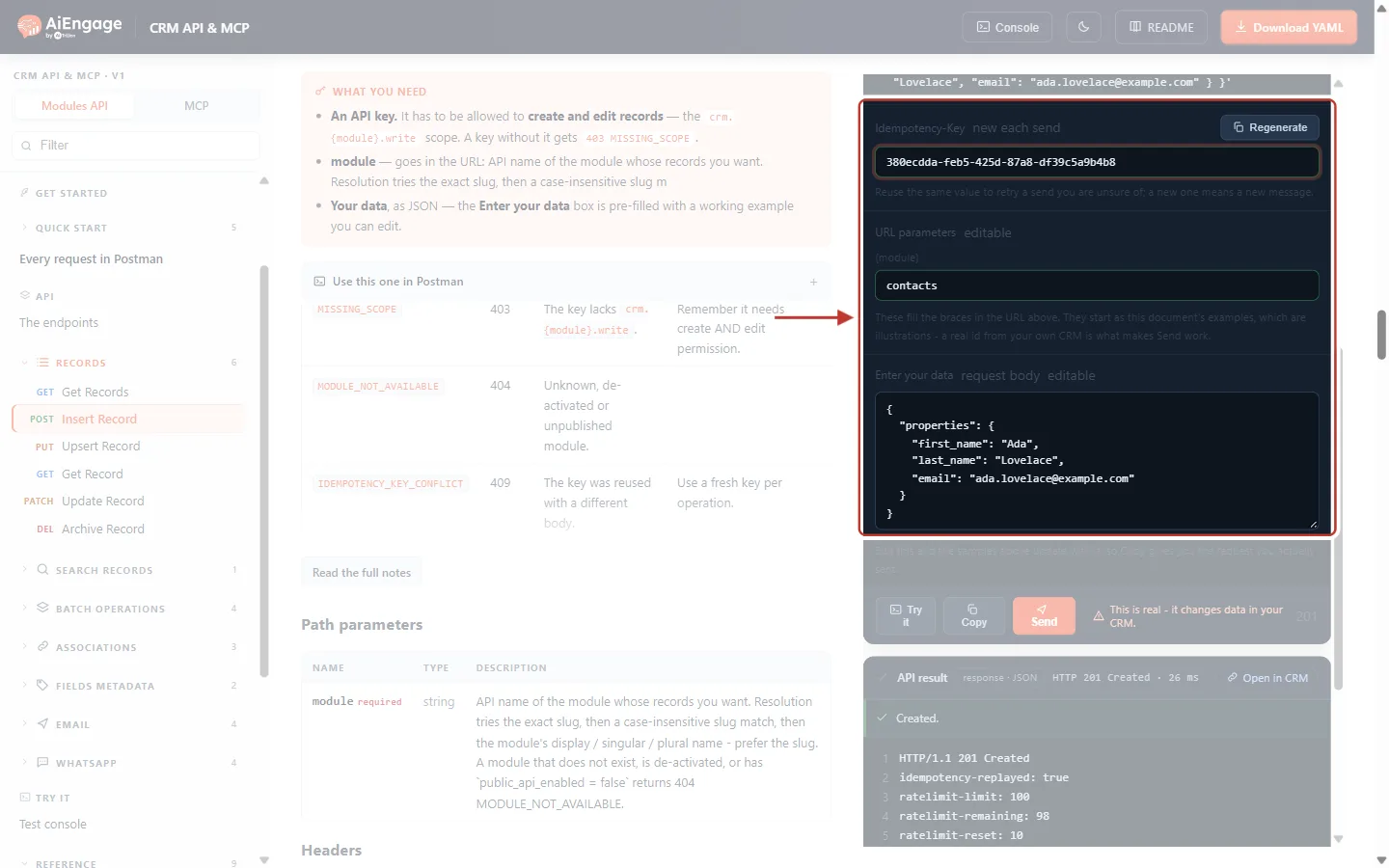
What this screenshot shows. The Idempotency-Key box (same key as before) and the Enter your data box with the changed email, ringed together.
The key is still
380ecdda-…, the key already used for the first request.The
emailin the body is now different from the first request.The
{module}box between them still sayscontacts.
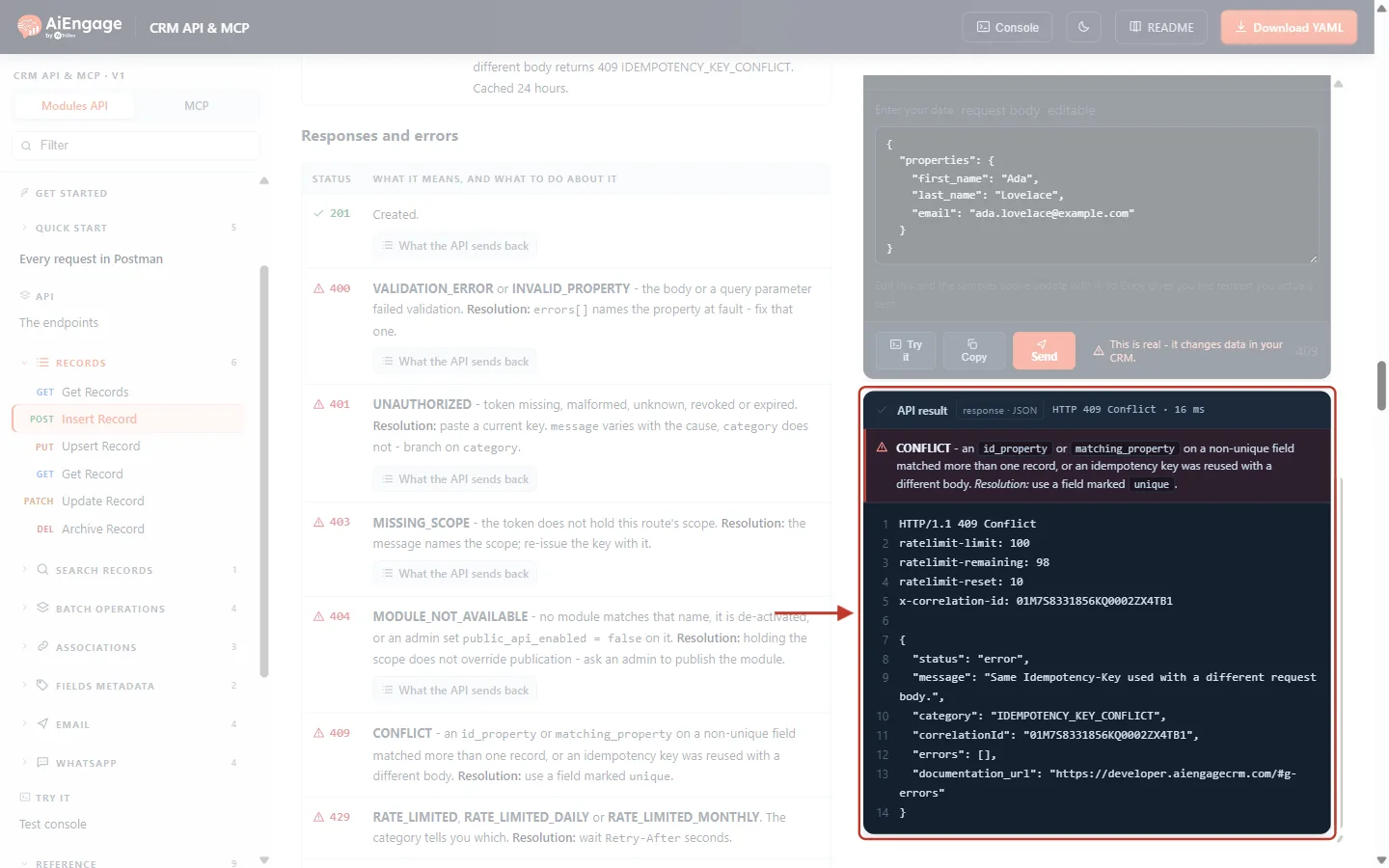
What this screenshot shows. The API result card showing the conflict.
The header bar says HTTP 409 Conflict.
The red banner is the portal’s general help text for 409 errors. It covers two different 409s; the one that applies here is “an idempotency key was reused with a different body”.
The body shows
"message": "Same Idempotency-Key used with a different request body."and"category": "IDEMPOTENCY_KEY_CONFLICT".There is no
idempotency-replayedheader and nothing was changed in the CRM: the contact was not created and the first contact was not updated.correlationIdanddocumentation_urlare included as in every error. Quote the correlation id if you contact support.
A 409 conflict almost always means a bug in your code: it is reusing one key for two different requests. The fix:
If you really meant to retry, send the original body again with the original key.
If this is a new operation (different data), give it a new key.
⚠️
Error answers are stored too. The CRM remembers the first answer whatever it was. If the first try came back with
400 VALIDATION_ERROR and you fix the body, the corrected request is a new request. Send it with a new key; with the old key you will get a 409.Step 7: Start a New Operation with a New Key#
When you want to do something new — for example create another contact — press Regenerate to get a fresh key, then press Send.
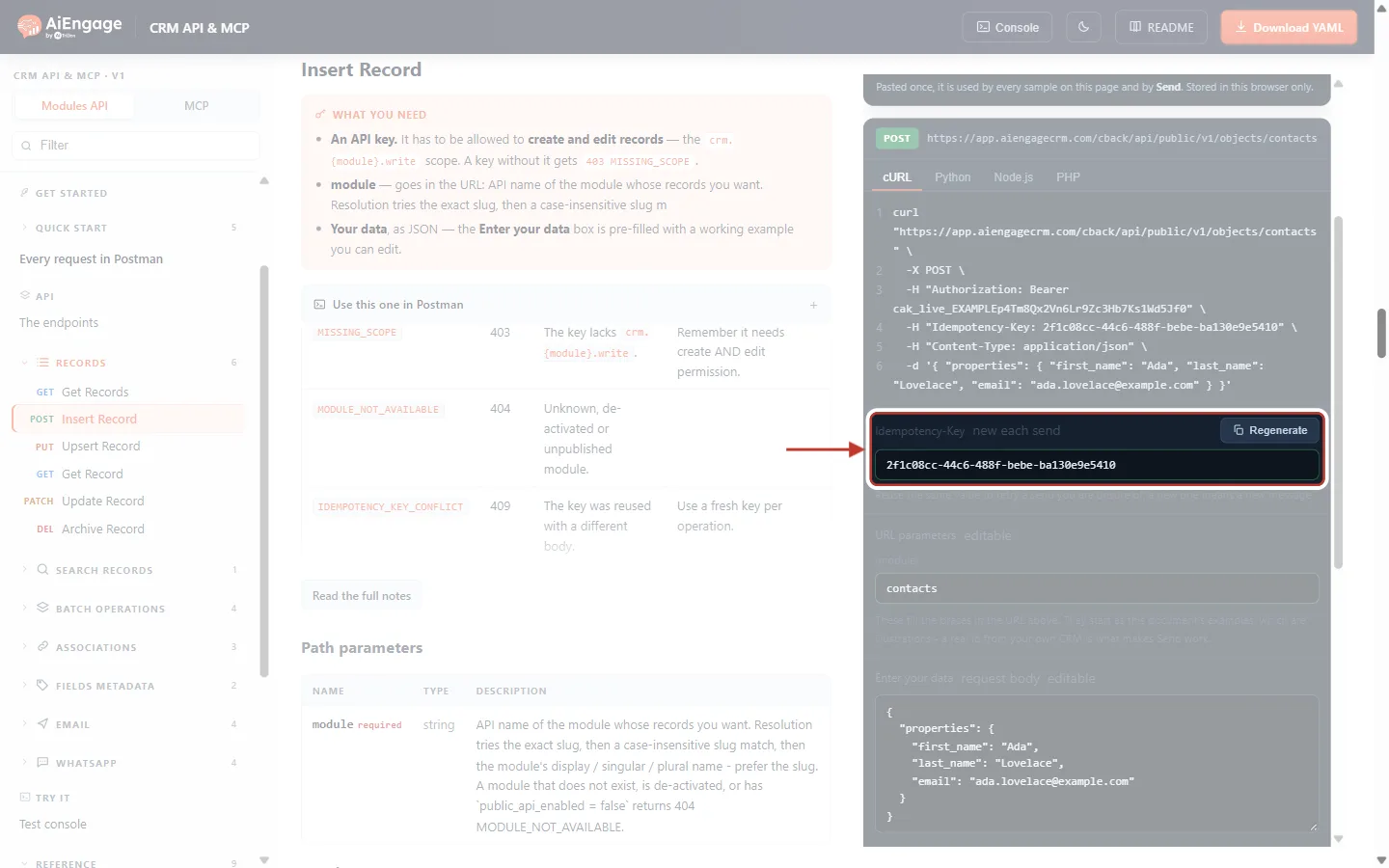
What this screenshot shows. The Regenerate button and the key box, ringed, right after Regenerate was clicked.
The box now holds a completely new key.
The body still has the changed email from Step 6. With a new key this is accepted as a new, separate request.
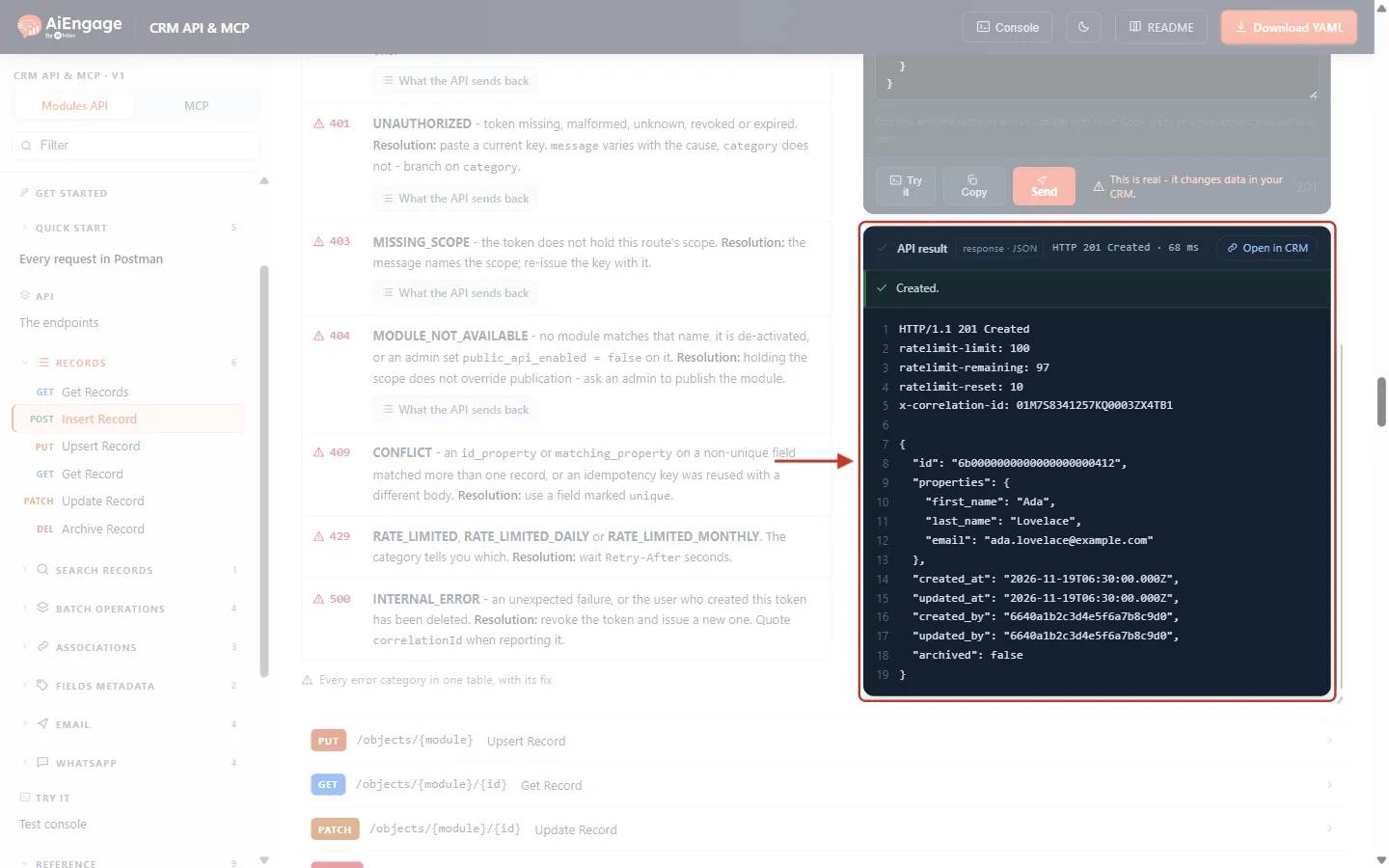
What this screenshot shows. The API result after sending with the new key (example data).
HTTP 201 Created and Created.
There is no
idempotency-replayedheader, so this request really ran.The
idis different from Steps 4 and 5: a second contact was created, as intended.
✅
The golden rule: one key per operation. Create the key once, before the first attempt, and use that same key for every retry of that operation. Make a new key only when the operation itself is new.
Step 8: Endpoints Where the Key Is Required#
A duplicate record can be cleaned up. A duplicate email or WhatsApp message cannot be taken back, and each one uses your credits. So the send endpoints refuse to work without a key. In the left menu, open Email → Send Email to a Contact and scroll to Headers.
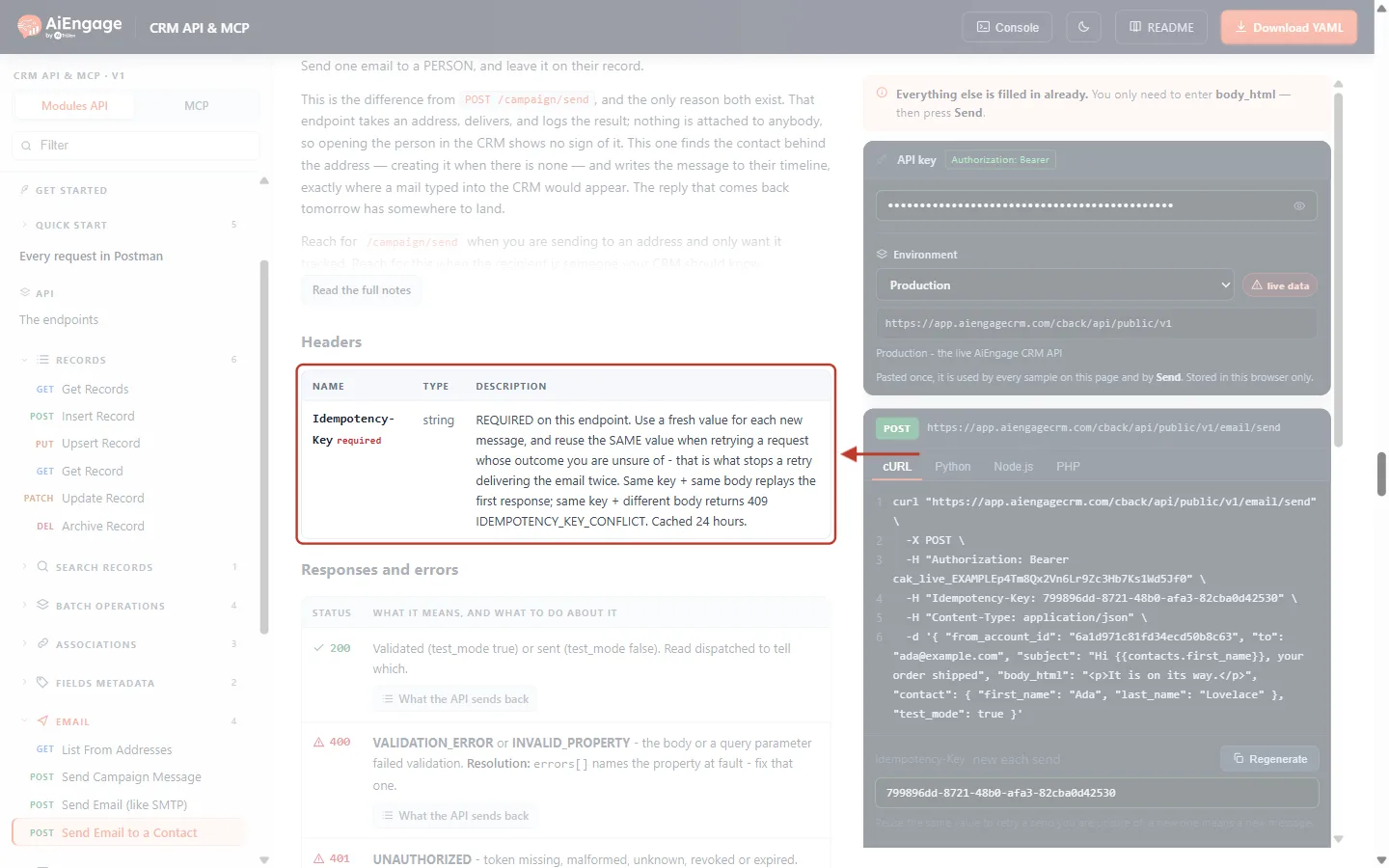
What this screenshot shows. The Headers table of Send Email to a Contact (POST /email/send), ringed.
Idempotency-Keycarries a red required label here.The description says: “REQUIRED on this endpoint. Use a fresh value for each new message, and reuse the SAME value when retrying a request whose outcome you are unsure of — that is what stops a retry delivering the email twice.”
On the right, the Try it panel’s cURL sample already includes the key on line 4, and the Idempotency-Key box sits below it.
In the left menu, the Email group lists the other send endpoints: Send Campaign Message and Send Email (like SMTP).
These endpoints require an Idempotency-Key:
Endpoint | What it does |
|---|---|
| Send Email to a Contact (saved on the contact’s timeline) |
| Send Campaign Message (one tracked message) |
| Send Email (like SMTP), transactional |
| Send WhatsApp to a Contact |
If you call one of them without the header, nothing is sent and the API answers:
HTTP/1.1 400 Bad Request

{
  "status": "error",
  "category": "IDEMPOTENCY_KEY_REQUIRED",
  "message": "This endpoint requires an Idempotency-Key header. Send a unique value per message, and reuse the SAME value when retrying a request whose outcome you are unsure of — that is what stops a retry delivering the email twice."
}
This refusal does not count against your plan quota. Add the header and send again.
ℹ️
The older WhatsApp endpoint
POST /whatsapp/templates/{id}/send does not require a key, so existing integrations keep working. It does accept one, and you should send one there as well.Step 9: Batch Calls and Upserts#
Batch calls. Open Batch operations → Insert Records (batch). It has the same Idempotency-Key header.
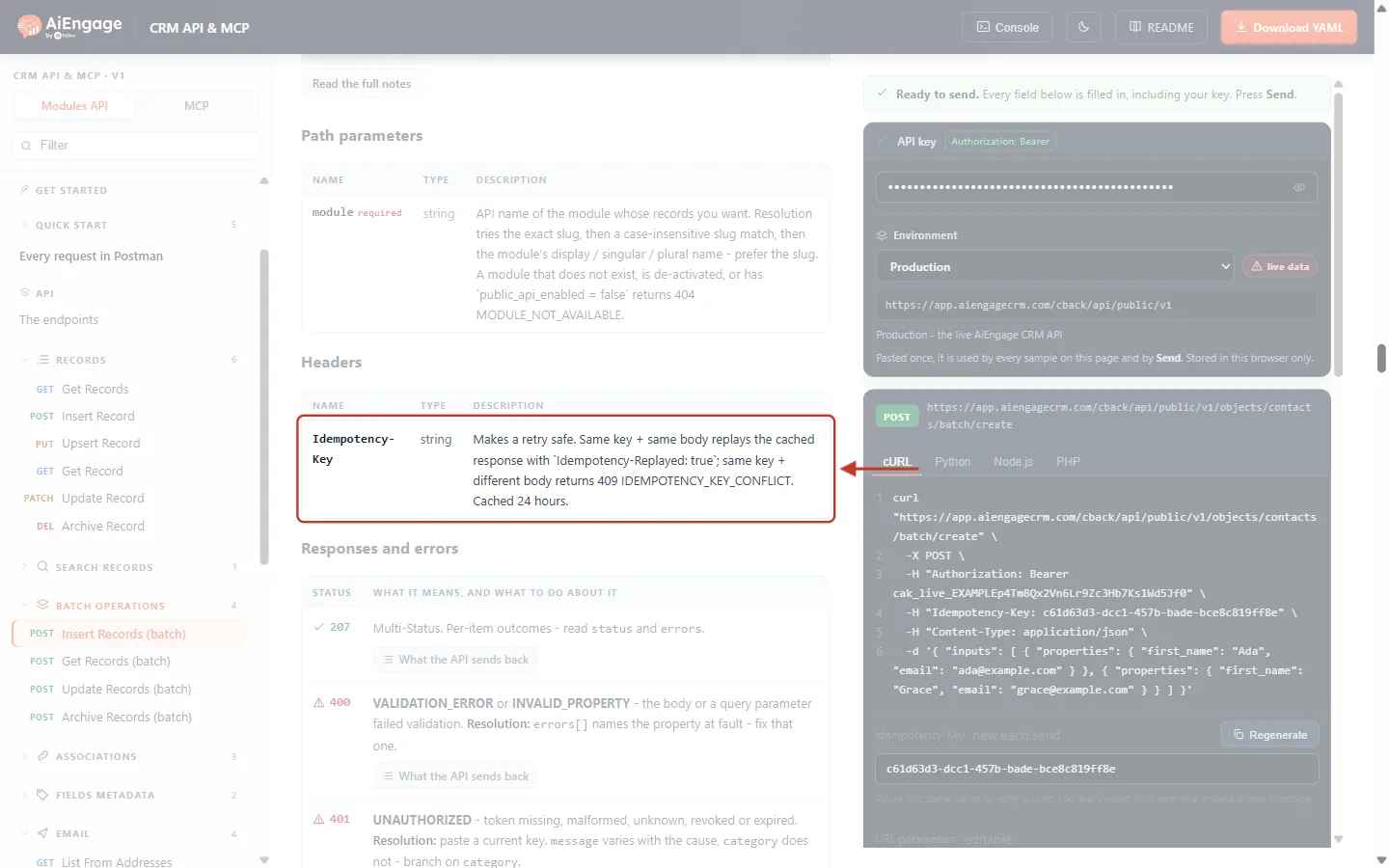
What this screenshot shows. The Idempotency-Key row in the Headers table of Insert Records (batch).
One key covers the whole batch (up to 100 records), not each record.
A retry with the same key and body gets the whole original
207 Multi-Statusanswer back, including the per-record results and errors.If some records in the batch failed and you want to resend only those, that is a different body, so use a new key.
Upserts. If you sync contacts from another system, Upsert Record is safe to repeat even without a key, because it matches on a field you choose.
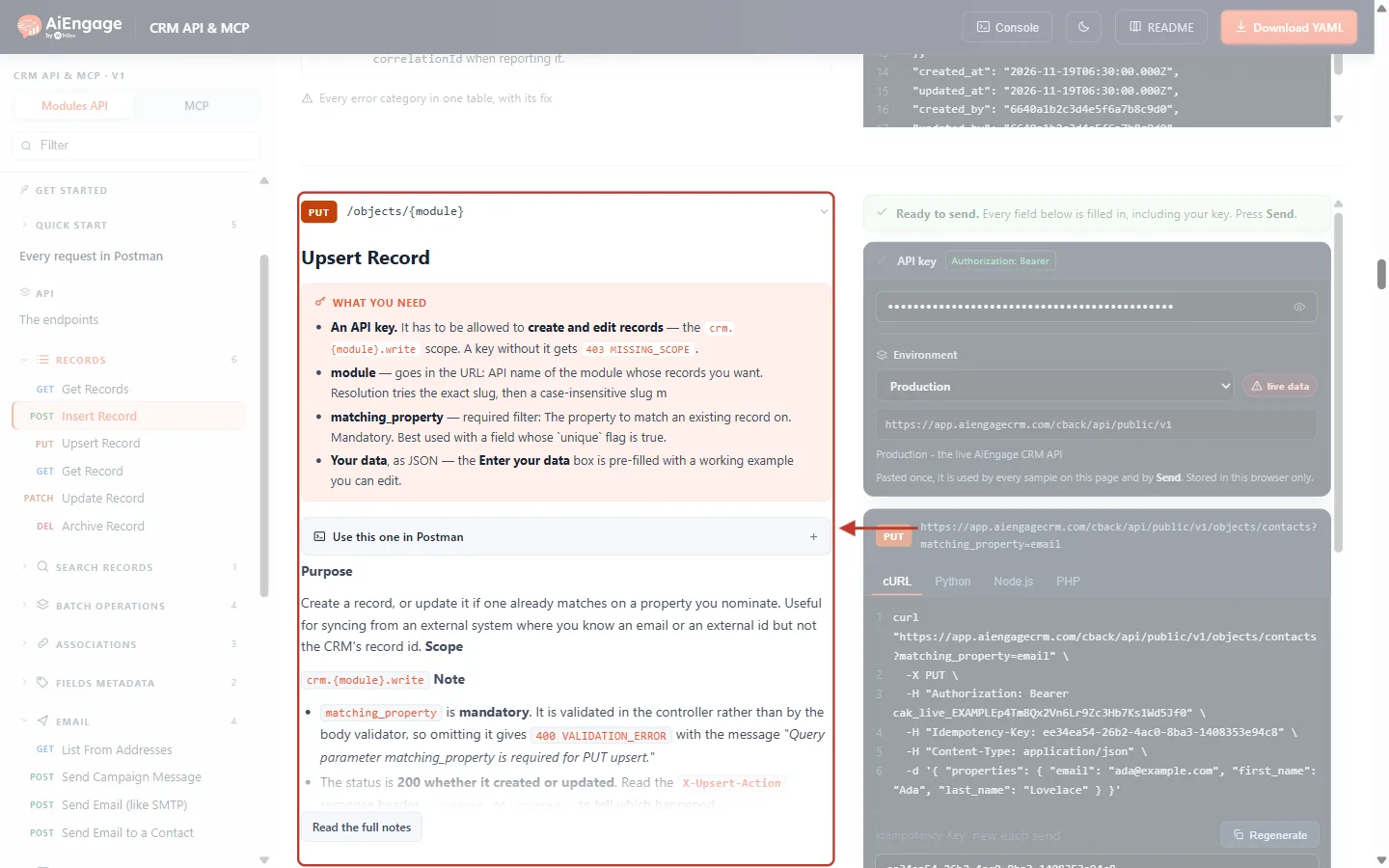
What this screenshot shows. The top of the Upsert Record endpoint (PUT /objects/{module}), ringed.
matching_property is mandatory: the field used to find an existing record, for example
email.Purpose: “Create a record, or update it if one already matches on a property you nominate.” Sending the same upsert twice updates the same record instead of creating a second one.
Use a field marked
uniquefor matching. A non-unique field that matches more than one record gives the separate409 CONFLICTerror from Step 1.On the right, the Try it panel adds
?matching_property=emailto the address and, as everywhere, anIdempotency-Key.
Step 10: The API Console Adds a Key for You#
Click Console at the top of the developer portal and choose POST · Insert Record in Start from an endpoint….
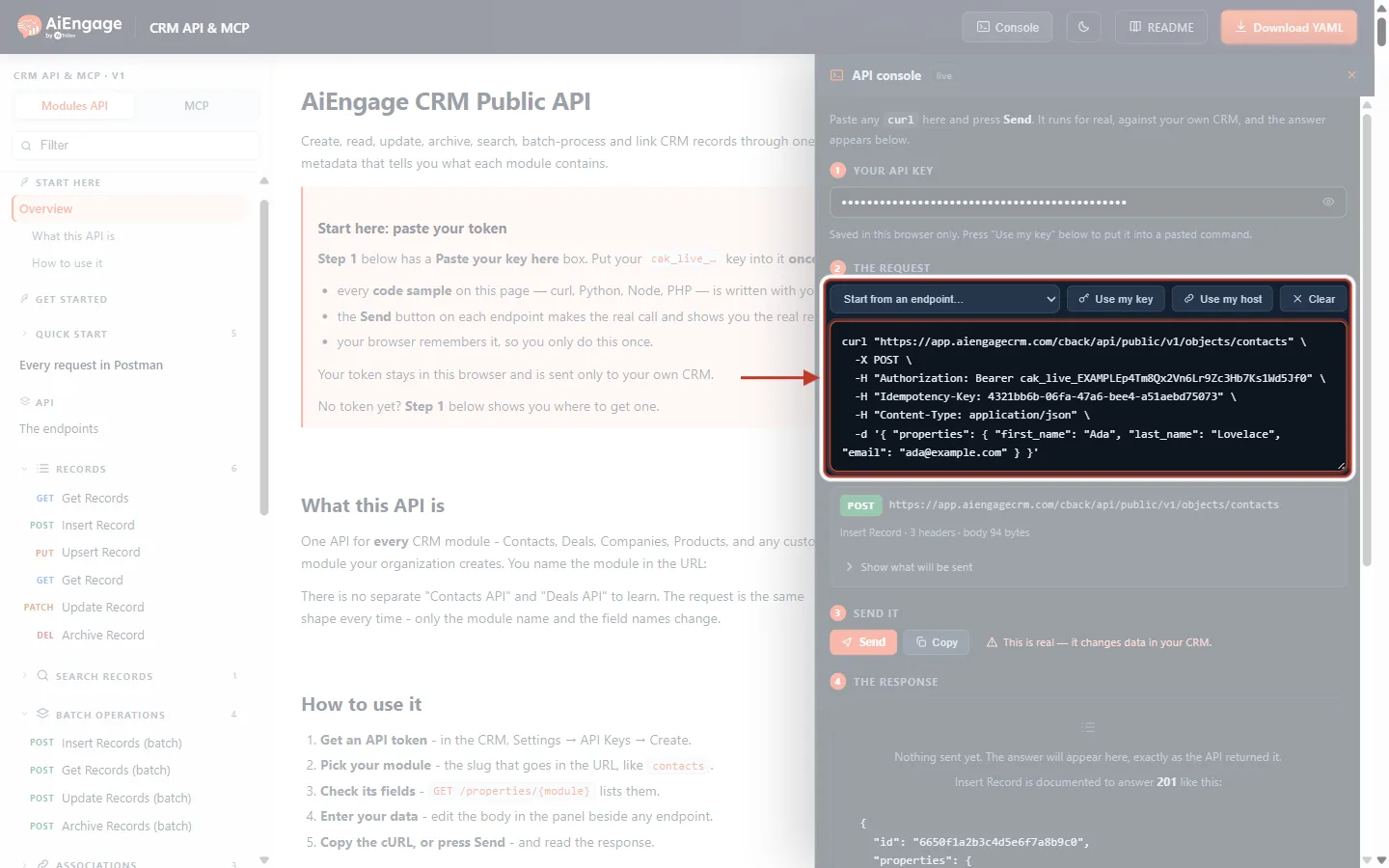
What this screenshot shows. The API console drawer, with the endpoint picker and the generated curl command ringed.
1 Your API key — your saved key (hidden as dots).
2 The request — the picker, Use my key, Use my host and Clear, and the command itself. The fourth line is
-H "Idempotency-Key: …": every write the console prepares already carries a key.Below it, a summary card shows the method, the address and “Insert Record · 3 headers · body 94 bytes”.
3 Send it and 4 The response work the same way as in the Try it panel.
If you paste your own curl command here, remember to keep its
Idempotency-Keyline when you retry it.
Step 11: Add Safe Retries to Your Own Code#
The pattern is always the same:
Create one key before the first attempt.
Send the request with that key.
If the connection fails, times out, or the answer is
429,503or another5xx, wait and send the identical request with the same key.Don’t retry other
4xxerrors (400, 401, 403, 404, 409). They will fail again; fix the cause first.Stop after a few attempts and log the
correlationId.
Node.js (18 or later)
import { randomUUID } from 'node:crypto';

const BASE = 'https://app.aiengagecrm.com/cback/api/public/v1';
const RETRY = new Set([429, 500, 502, 503, 504]);

async function createContact(properties) {
  const key = randomUUID();                 // ONE key for this operation
  const body = JSON.stringify({ properties }); // build the body ONCE

  for (let attempt = 1; attempt <= 5; attempt++) {
    try {
      const res = await fetch(`${BASE}/objects/contacts`, {
        method: 'POST',
        headers: {
          Authorization: `Bearer ${process.env.AIENGAGE_API_TOKEN}`,
          'Content-Type': 'application/json',
          'Idempotency-Key': key,             // same key on every attempt
        },
        body,
        signal: AbortSignal.timeout(15000),
      });
      if (res.ok) {
        if (res.headers.get('idempotency-replayed') === 'true') console.log('retry recognised, no duplicate');
        return await res.json();
      }
      if (!RETRY.has(res.status)) throw new Error(`${res.status}: ${await res.text()}`);
      const wait = Number(res.headers.get('retry-after')) || 2 ** attempt;
      await new Promise(r => setTimeout(r, wait * 1000));
    } catch (err) {
      if (err.name !== 'TimeoutError' && err.name !== 'TypeError') throw err; // TypeError = network failure
      await new Promise(r => setTimeout(r, 2 ** attempt * 1000));
    }
  }
  throw new Error('Gave up after 5 attempts');
}
Python (requests)
import os, time, uuid, json, requests

BASE = "https://app.aiengagecrm.com/cback/api/public/v1"
RETRY = {429, 500, 502, 503, 504}

def create_contact(properties):
    key = str(uuid.uuid4())                  # ONE key for this operation
    body = json.dumps({"properties": properties})
    headers = {
        "Authorization": f"Bearer {os.environ['AIENGAGE_API_TOKEN']}",
        "Content-Type": "application/json",
        "Idempotency-Key": key,              # same key on every attempt
    }
    for attempt in range(1, 6):
        try:
            res = requests.post(f"{BASE}/objects/contacts", data=body, headers=headers, timeout=15)
        except (requests.Timeout, requests.ConnectionError):
            time.sleep(2 ** attempt)
            continue
        if res.ok:
            if res.headers.get("Idempotency-Replayed") == "true":
                print("retry recognised, no duplicate")
            return res.json()
        if res.status_code not in RETRY:
            raise RuntimeError(f"{res.status_code}: {res.text}")
        time.sleep(int(res.headers.get("Retry-After", 2 ** attempt)))
    raise RuntimeError("Gave up after 5 attempts")
✅
Keep the key with the job. If your program can crash or restart between attempts (for example a queue worker), store the key together with the job, so the retry after the restart uses the same key. A key made fresh after a restart cannot protect you.
⚠️
Never use a fixed key for many calls. The CRM identifies a key by your organization, the endpoint pattern and the key — not by the record id or module in the address. If you send
PATCH /objects/contacts/A and then PATCH /objects/contacts/B with the same key and the same body, the second call is treated as a retry of the first: contact B is not updated. Always make a new key for every new call.Troubleshooting#
What you see | Why it happens | How to fix it |
|---|---|---|
| A key was reused for a request with a different body (Step 6). Even a changed space or field order in the JSON counts as different. | Retrying? Send the original body unchanged. New request? Use a new key. Build the body once and reuse the same string on every attempt. |
| You called a send endpoint without the header (Step 8). | Add |
| You retried while the first request was still running, and it took more than 5 seconds. | Wait for the seconds in |
A retry returned an old error, not a success | The first answer was an error and it was stored for 24 hours. A replay returns it unchanged. | Fix the cause, then send the corrected request with a new key. |
Duplicates were still created | The retry had no key, or a new key was made for each attempt. | Create the key once, before the first attempt, and reuse it on every retry. |
A second record or update was skipped and the answer has | The same key was used for two different calls with an identical body. | Use a new key for every new call. |
The same key worked again after a day | Keys are remembered for 24 hours only. After that the request runs as new. | Don’t retry with an old key after 24 hours. Check first (for example with a search) whether the earlier attempt succeeded. |
Best Practices#
Send an
Idempotency-Keyon every POST, PATCH, PUT and DELETE, not only on sends.Use a random UUID v4. Don’t build keys from timestamps or counters that could repeat.
Create the key once per operation and store it with the job until it finishes.
Build the request body once and resend exactly the same text on retries.
Retry only on network errors, timeouts,
429and5xx; respectRetry-Afterand back off between attempts. See API Rate Limits & Quotas: Understand the Limits, Read the Headers and Handle 429 Errors.Log
Idempotency-ReplayedandX-Correlation-Idso you can trace what happened.For syncs from another system, prefer Upsert Record with a unique matching field.
Frequently Asked Questions#
Do I have to send an idempotency key?
Only on the four send endpoints in Step 8. Everywhere else it is optional, but recommended on every call that changes data.
How long is a key remembered?
24 hours from the first request.
Can another company’s key clash with mine?
No. Keys are stored per organization, so your keys can only ever match your own requests.
Does a replayed request use up my quota?
No. A replay is not counted against your daily or monthly plan quota. It does count towards the short-term rate limit (for example 100 requests per 10 seconds).
Should I send a key on GET requests?
It does no harm, but it is ignored. GET requests only read data and are always safe to repeat.
Does a key make the CRM merge duplicate contacts?
No. It only stops the same request from running twice. Two different requests for the same person still create two contacts. To match on email or another field, use Upsert Record.
Previous and Next Articles#
Previous: API Pagination & Limits: Page Through Large Result Sets and Stay Within Rate Limits and Quotas
Next: API Rate Limits & Quotas: Understand the Limits, Read the Headers and Handle 429 Errors
Related Articles#
API Rate Limits & Quotas: Understand the Limits, Read the Headers and Handle 429 Errors
API Pagination & Limits: Page Through Large Result Sets and Stay Within Rate Limits and Quotas
Records, Modules & the Record Envelope: How Your CRM Data Looks in the API
API Keys Step by Step: Generate, Use and Revoke a Personal Access Token
Was this article helpful?
Ready to implement this?
OpenAI Engage and apply what you just learned to your own workspace.
Open AI Engage CRM