Loading…


KnowledgeBase
API Pagination & Limits: Page Through Large Result Sets and Stay Within Rate Limits and Quotas
Introduction#
Your CRM may hold thousands of contacts, deals or campaigns. The AiEngage CRM API never sends all of them in one answer. It sends them in pages of a size you choose, and gives you what you need to ask for the next page. The API also limits how fast and how much you can call it, so that one integration can’t slow the CRM down for everyone else.
This guide explains both, step by step:
Page size: the
limitparameter and its allowed range on each endpoint.Cursor pagination for records: follow
paging.next.afterpage by page until there are no more.Page-number pagination for campaigns, segments, lists and workflows:
page,totalandlast_page.Rate limits: how many calls per second, the
RateLimit-*headers on every answer, and how to handle error 429.Quotas: your organisation’s daily and monthly allowance, where to see it and how to get warned before you run out.
Each screenshot has a red ring, and an arrow where it helps, on the part to look at. Below it, What this screenshot shows explains the whole screen. The reference screenshots use example contacts and campaigns, not real data.
Before You Begin#
You need an API key with at least Contacts → Read. To try the campaign example, it also needs Campaigns → Read. If you haven’t made a call yet, start with Quick Start: Make Your First AiEngage CRM API Call in 5 Minutes.
The examples use the interactive API reference at
…/cback/api/public/v1/docs, authorized with your key (Authorize button, paste the key, Authorize). How to authorize is shown in API Authentication & Bearer Tokens.Every call you make while following this guide counts towards your API quota. A few dozen calls are nothing compared with the allowance.
Step 1: Read the Two Pagination Styles in the Reference#
Open the API reference and scroll down the introduction to Pagination.
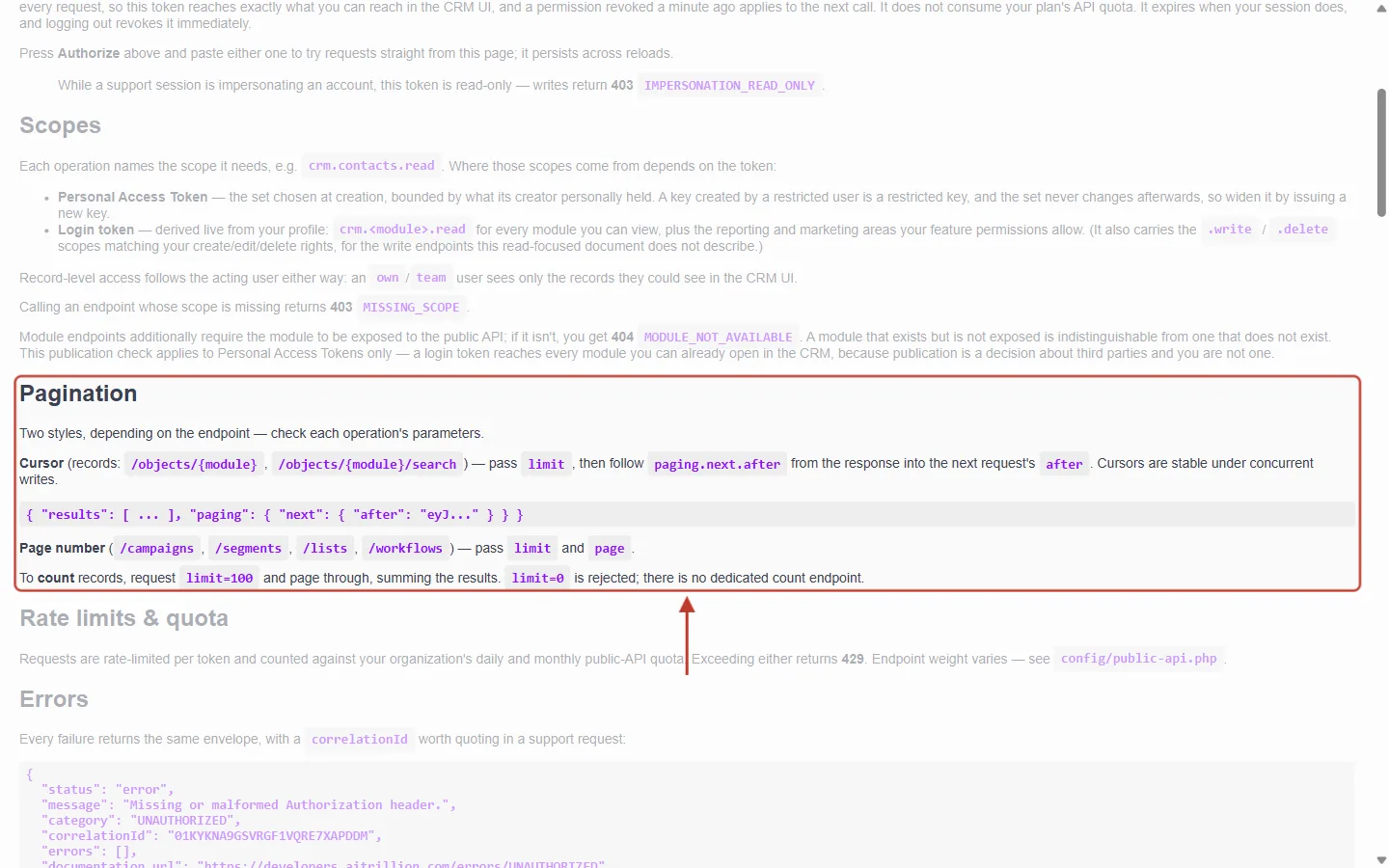
What this screenshot shows. The ringed Pagination section explains that there are two styles, and which endpoints use which.
Cursor is used by records:
/objects/{module}(List records) and/objects/{module}/search(Search records). You passlimit, then copypaging.next.afterfrom the answer into the next request’safter. Cursors are stable under concurrent writes: a record created or deleted while you page through is not skipped and doesn’t appear twice.The grey example shows the shape of a cursor answer:
{ "results": [ … ], "paging": { "next": { "after": "eyJ…" } } }.Page number is used by
/campaigns,/segments,/listsand/workflows. You passlimitandpage.To count records, request
limit=100and page through, adding up the results. There is no separate “count” endpoint for records.Above the ring are the Scopes rules; below it is Rate limits & quota (Step 6).
Style | Endpoints | You send | You get back |
|---|---|---|---|
Cursor | List records, Search records |
|
|
Page number | Campaigns, Segments, Lists, Workflows (also People and Web form submissions) |
|
|
Step 2: Choose a Page Size with limit#
limit is the number of results per page. Its default and maximum depend on the endpoint:
Endpoint | limit range | Default |
|---|---|---|
List records, Search records | 1–100 | 10 |
Campaigns, Segments, Lists, Workflows | 1–100 | 10 |
People ( | 1–200 | 50 |
Record timeline | 1–100 | 50 |
Notifications | 1–100 | 25 |
Search everything ( | 1–20 per group | 5 |
Batch create / read / update / archive | up to 100 records per call | — |
ℹ️
Always send a value inside the range. Today a value outside it is quietly adjusted (0 or a negative number becomes 1, and anything above 100 becomes 100), but the reference describes
limit=0 as rejected. Code that relies on the adjustment may break later. For batch calls, more than 100 records is refused with 400 VALIDATION_ERROR and nothing is saved.✅
Bigger pages mean fewer calls. To read a whole module, use
limit=100: 5,000 contacts then take 50 calls instead of 500 with the default of 10. Add properties= with only the fields you need, so each page stays small and fast.Step 3: Get the First Page of Records#
In the reference, open Records → GET /objects/{module} List records. Try it out is already on. Fill in the parameters:
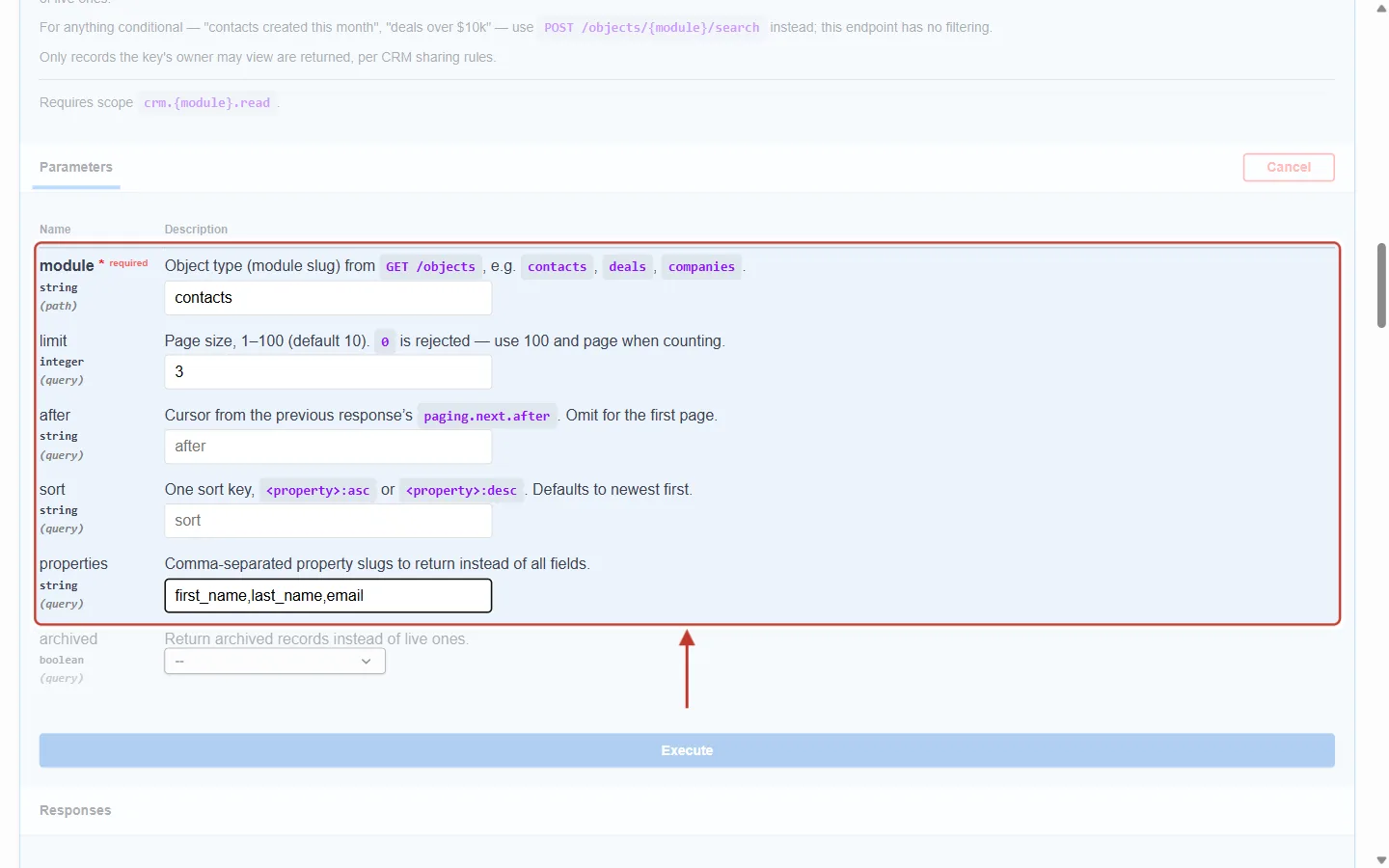
What this screenshot shows. The ringed parameters ask for the first page of contacts, three at a time.
module:
contacts.limit:
3, a small page so that the example is easy to follow. In real code you would use up to 100. Its description reads Page size, 1–100 (default 10).after: empty. Cursor from the previous response’s paging.next.after. Omit for the first page.
sort: empty, so the newest records come first.
properties:
first_name,last_name,email, to keep the answer short.Click Execute below the parameters.
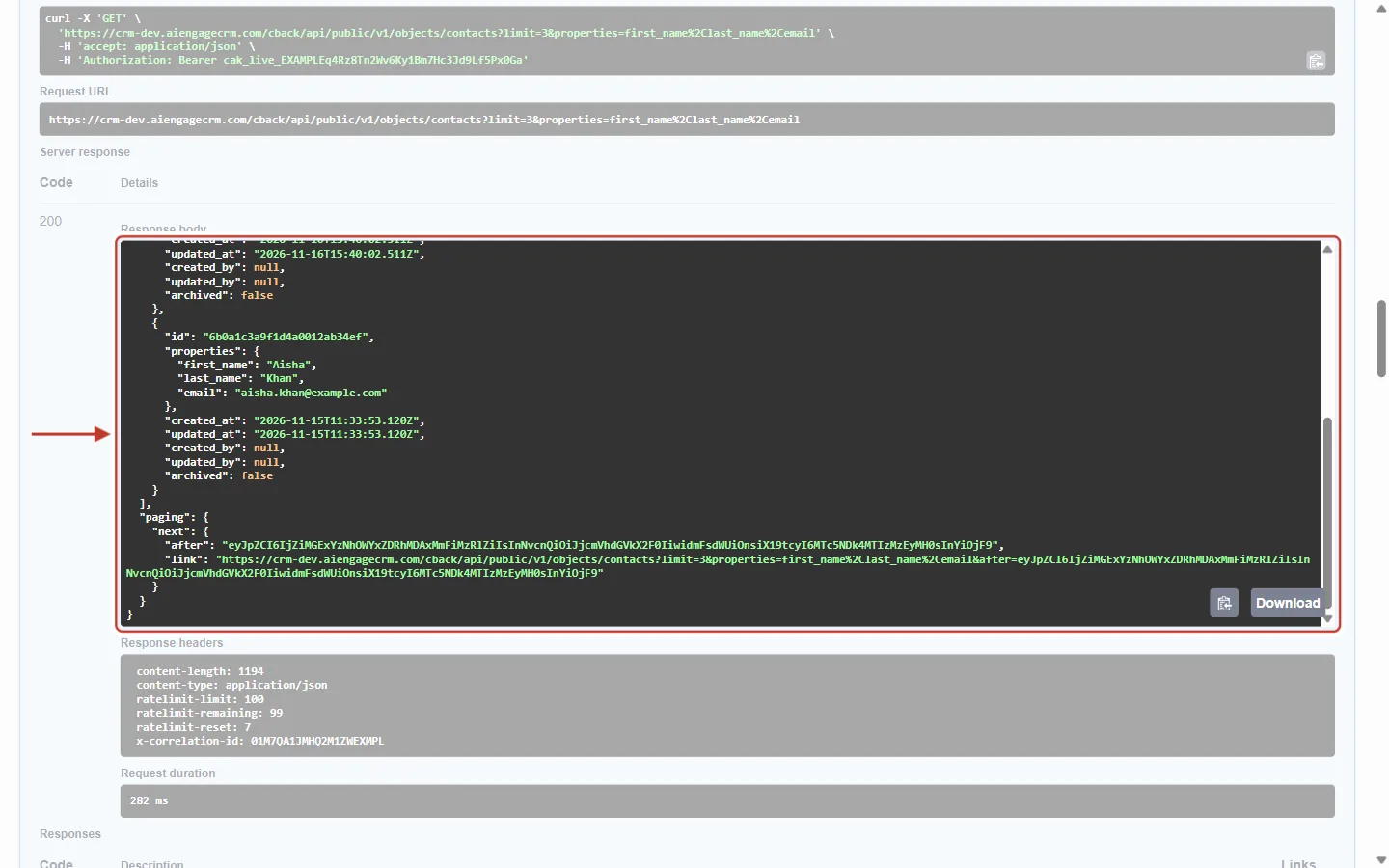
What this screenshot shows. The ringed Response body is scrolled to its end, where paging appears after the third contact.
Above
pagingis the last contact on this page, Aisha Khan. The first two (Priya Sharma and Daniel Brooks) are higher up in the box.paging.next.afteris the cursor: a long code that marks where this page ended. You don’t need to understand it. Copy it exactly as it is.paging.next.linkis the complete address of the next page, with the samelimitandpropertiesand the cursor already added. Calling that address is the easiest way to get the next page.If
pagingis present, there are more records. Its absence means you have reached the end (Step 4).
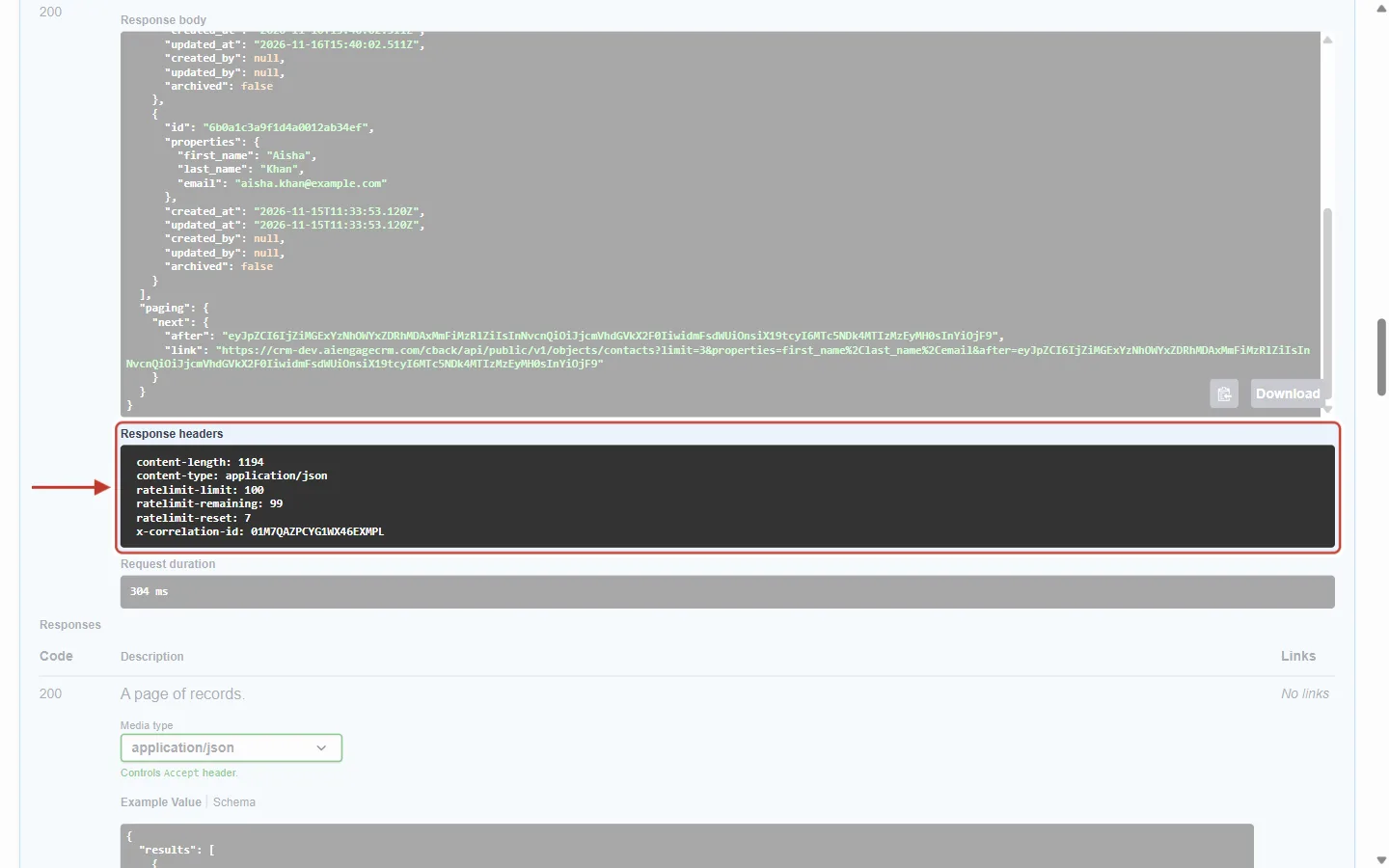
What this screenshot shows. The ringed Response headers come with every successful answer and tell you where you stand against the rate limit.
ratelimit-limit: how many calls are allowed in the current time window (here 100).ratelimit-remaining: how many are left in this window (here 99, because this was the first call).ratelimit-reset: how many seconds until the window starts again (here 7).x-correlation-id: this request’s unique reference. Log it, and quote it if you contact support about a call.Below: Request duration, how long the call took.
Step 4: Get the Next Page, and Recognise the Last One#
Copy the after value from the first answer and paste it into the after parameter. Leave every other parameter exactly as it was.
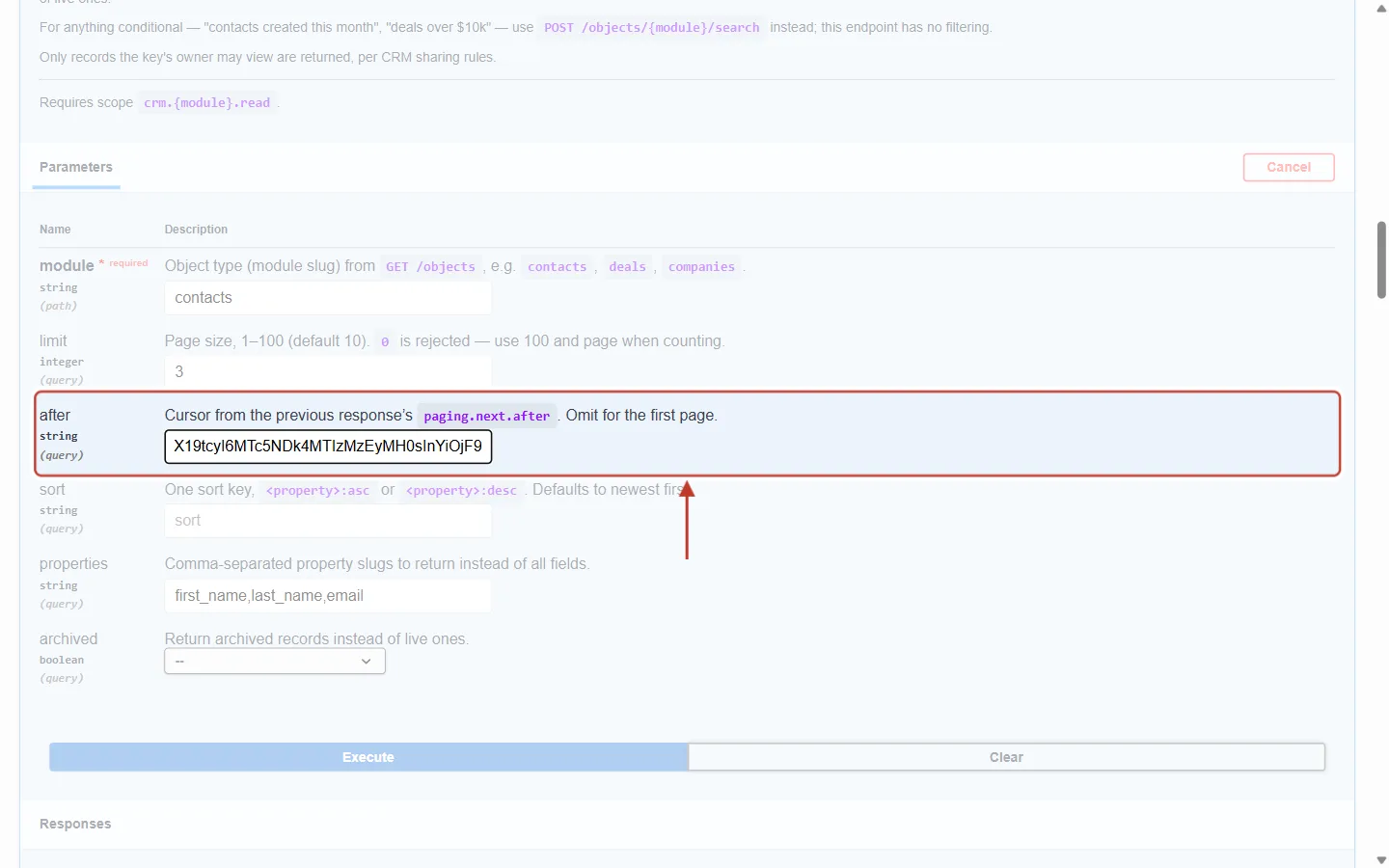
What this screenshot shows. The ringed after field now holds the cursor from page 1 (the end of the long value is visible).
module, limit (3) and properties are unchanged. Keep
sortunchanged too: a cursor belongs to the sort order it was created with.Click Execute.
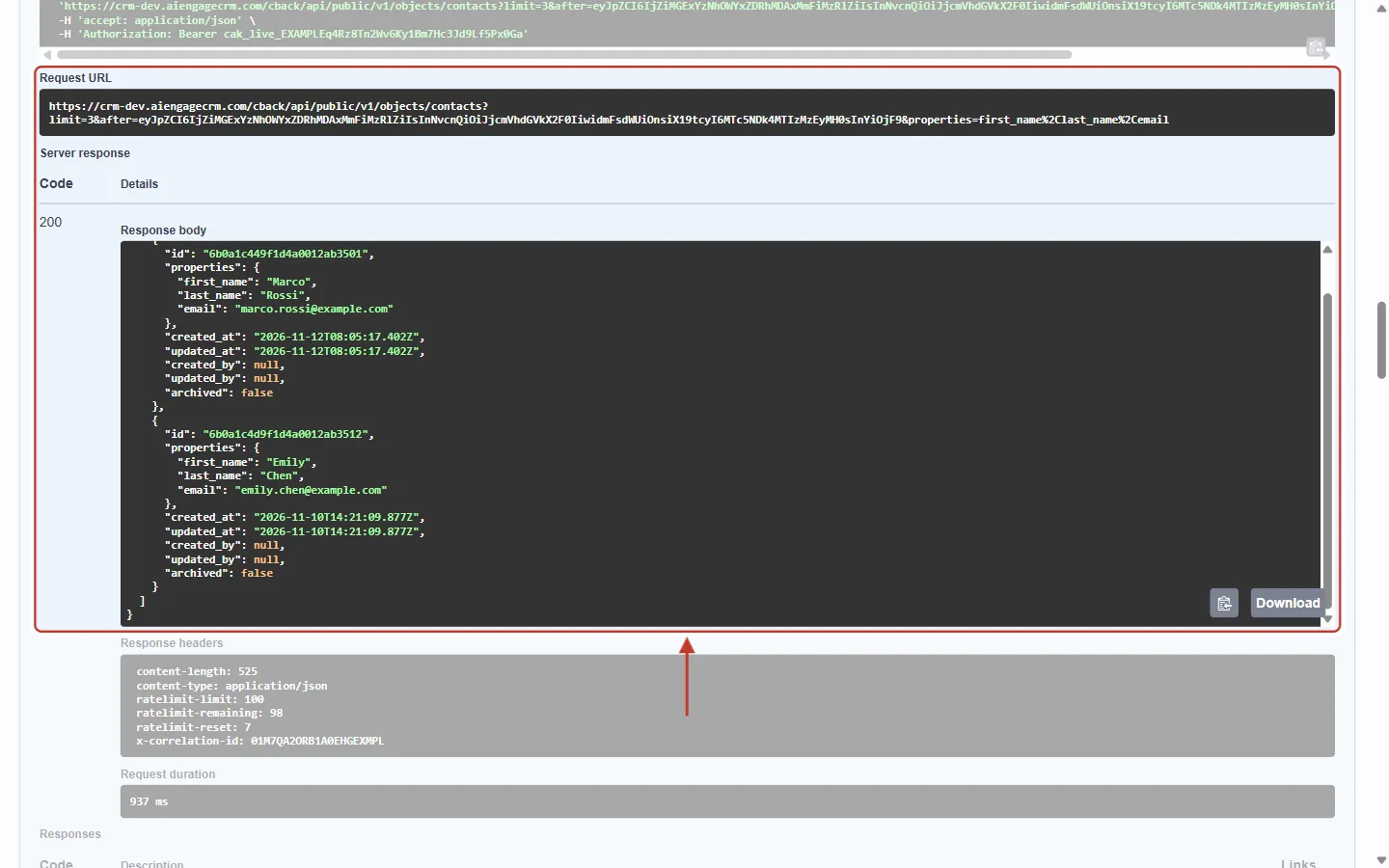
What this screenshot shows. The ringed area shows the request and its answer: the last page.
Request URL: the same address as before, now with
after=eyJ…added.Response body: the next two contacts, Marco Rossi and Emily Chen. Only two came back although the limit is 3, because there were no more.
The body ends straight after
results, with nopaging. That is the signal to stop. In this example the module had five contacts: three on page 1 and two on page 2.
⚠️
Don’t stop when a page has fewer results than
limit. Stop only when paging is missing. A page can occasionally come back short (for example, when records you aren’t allowed to see are left out) while more pages still follow.What a broken cursor looks like#
A cursor must be sent back exactly as you received it. If it is changed, cut short or made up, the API refuses it. Here after was set to abc:
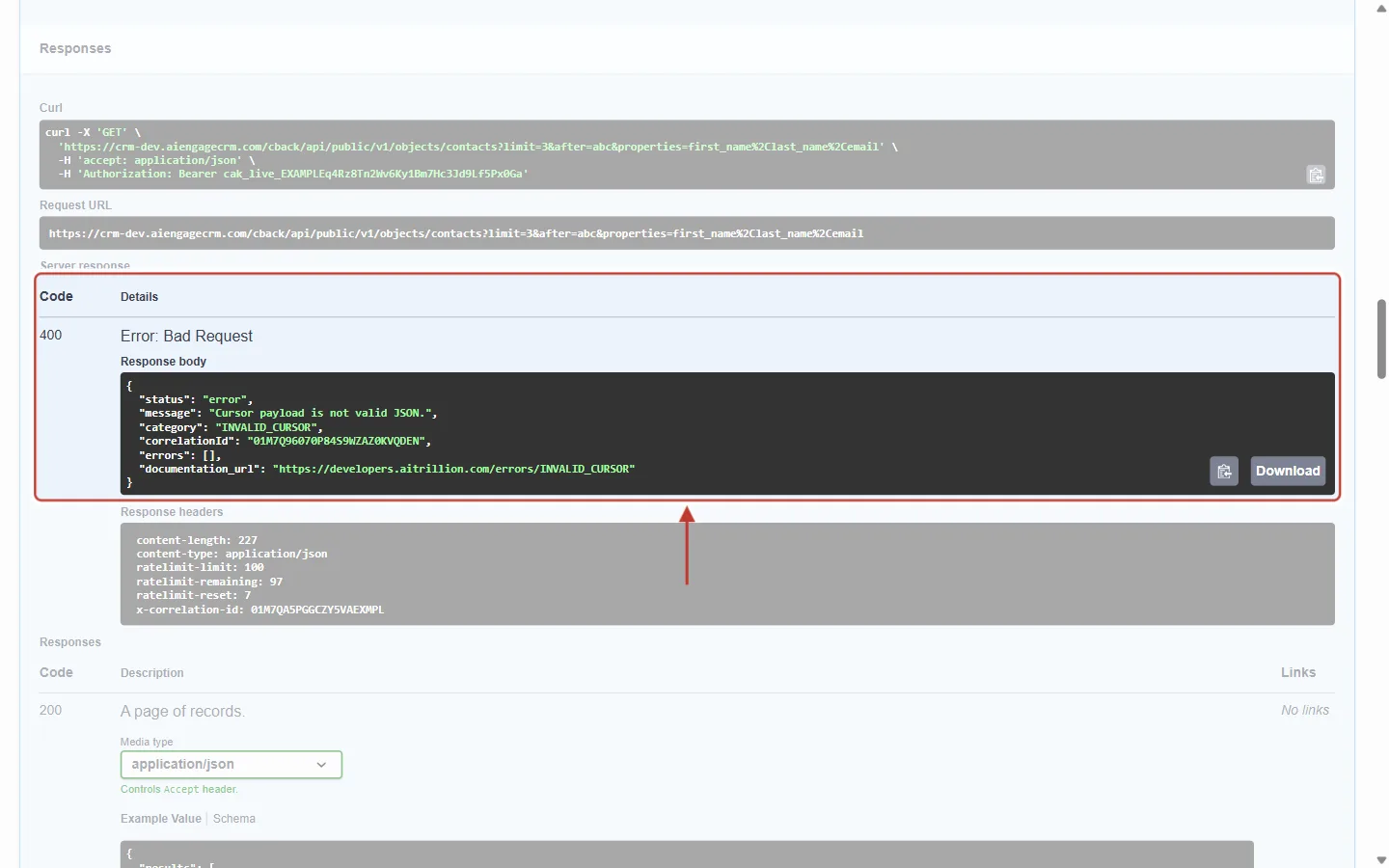
What this screenshot shows. The ringed answer is an error: Code 400, Error: Bad Request.
message: Cursor payload is not valid JSON.category: INVALID_CURSOR.correlationId: the reference to quote to support.Fix: copy
paging.next.afteragain in full, with no spaces or line breaks added, or usepaging.next.linkinstead. Never build a cursor yourself, and don’t reuse one with differentsortormodulevalues.
Search records pages the same way#
POST /objects/{module}/search (for filtered questions such as “contacts called Sharma” or “deals over 10,000”) also uses cursor pages. Because it is a POST, limit and after go inside the request body, not in the address.
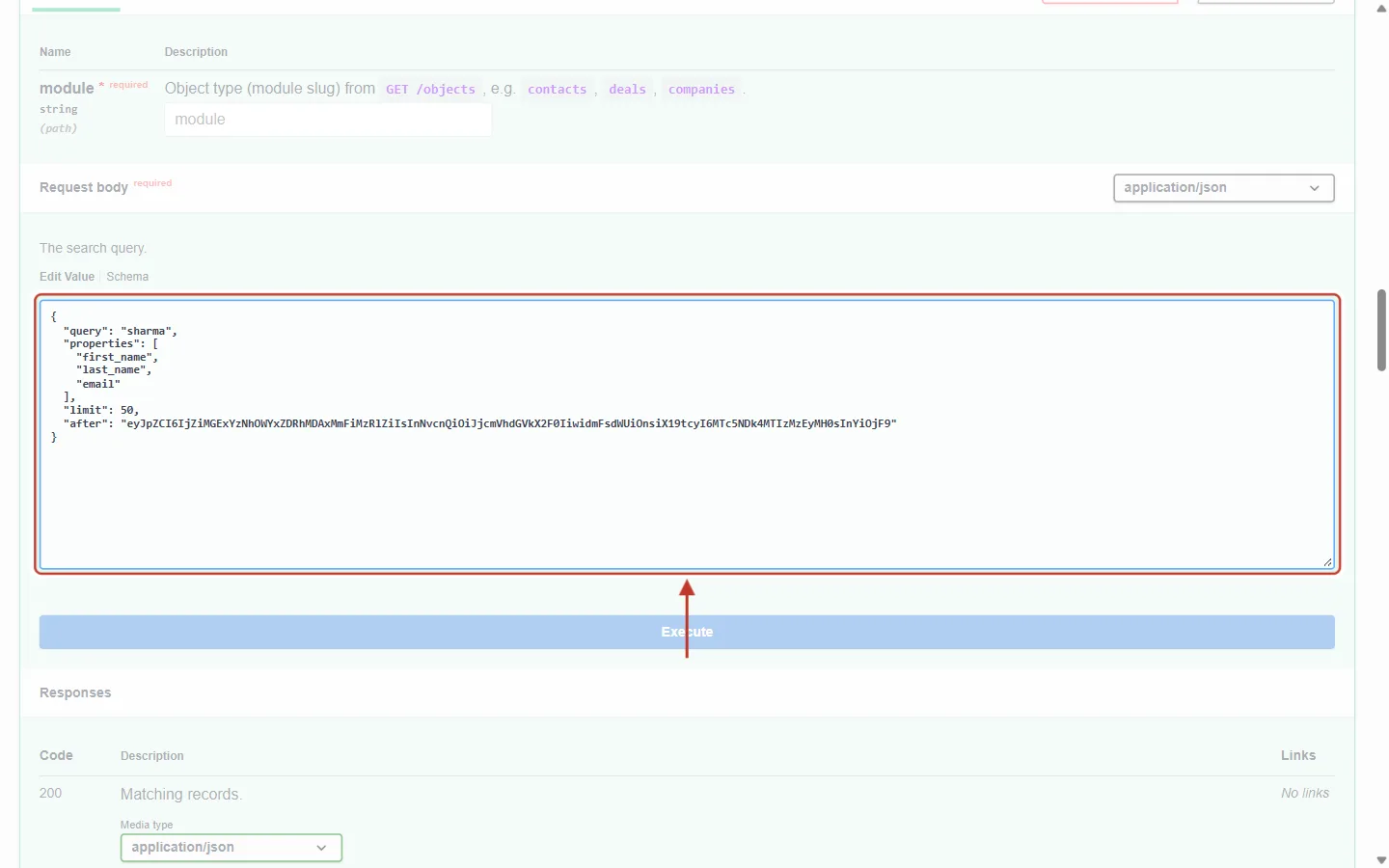
What this screenshot shows. The ringed Request body of Search records shows where paging goes in a search.
query: sharma, a free-text search across the module’s searchable fields. (For exact conditions, usefilterGroups: up to 5 groups of up to 6 filters each.)properties: the fields to return.limit: 50 results per page (1–100, default 10).after: the cursor from the previous search answer’spaging.next.after. Leave it out for the first page. Keepquery,filterGroupsandsortsthe same on every page.Above the ring are the module field and the body’s media type (application/json). Execute is below.
Step 5: Page-Number Pagination (Campaigns, Segments, Lists, Workflows)#
These endpoints work like the pages of a book. You ask for page 1, 2, 3 and so on, and the answer tells you how many pages exist. Open GET /campaigns List campaigns:
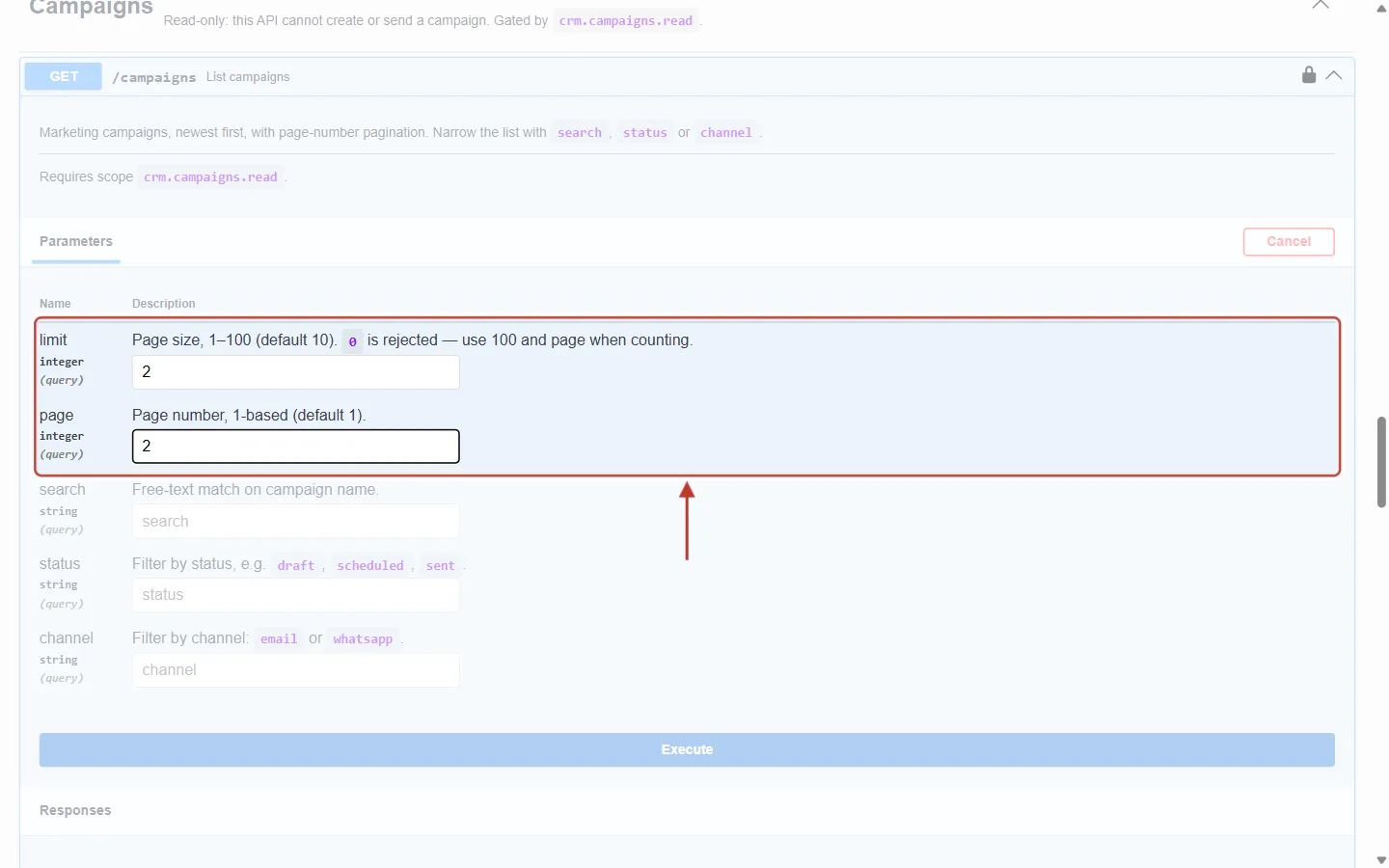
What this screenshot shows. The ringed parameters ask for page 2 with 2 campaigns per page.
limit:
2. Page size, 1–100 (default 10).page:
2. Page number, 1-based (default 1). The first page is 1, not 0.The other parameters of this endpoint (search, status, channel) filter the list. Keep them the same on every page.
Click Execute.
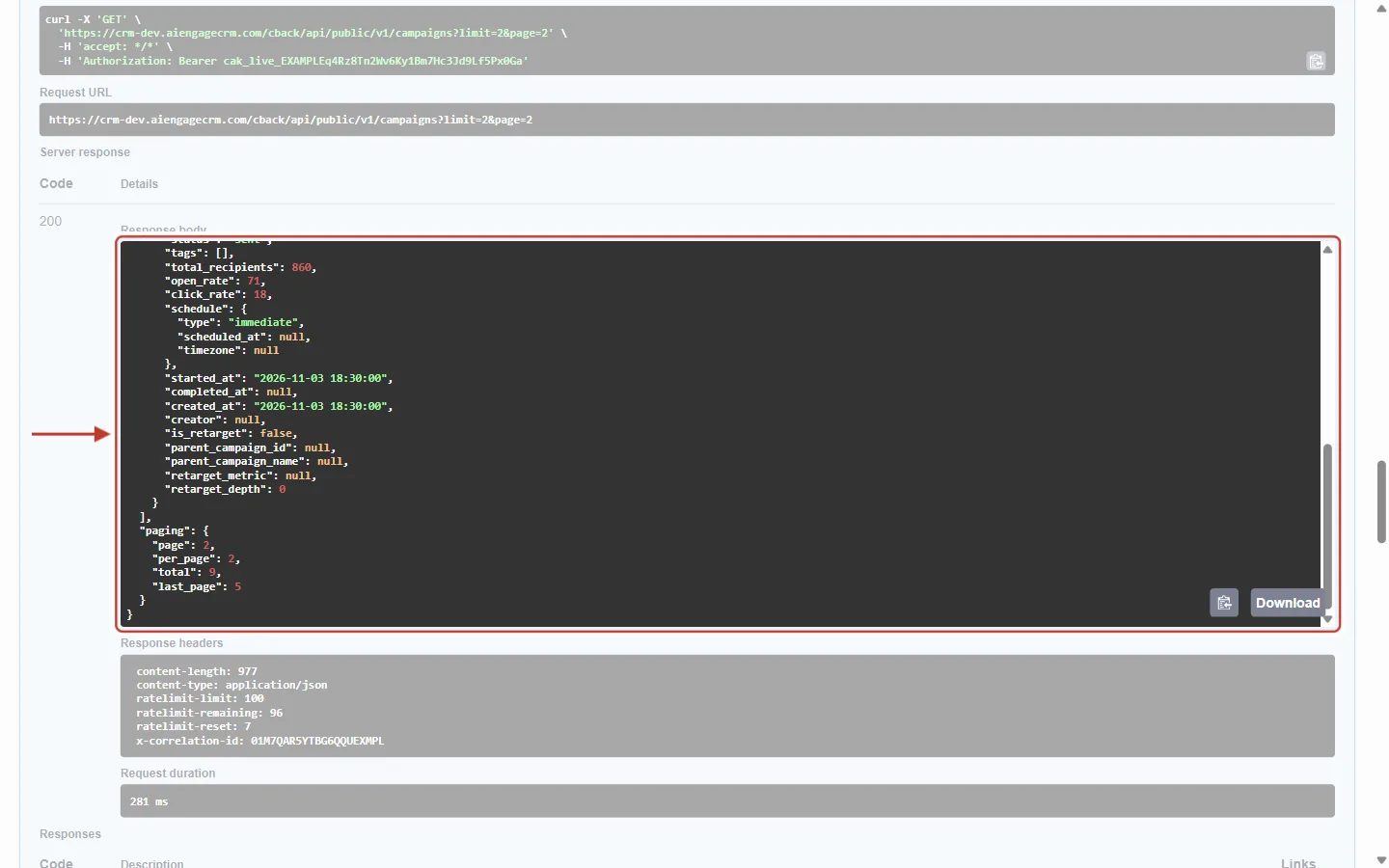
What this screenshot shows. The ringed Response body is scrolled to its end, where paging describes the whole list.
Above it is the second campaign on this page (Festive Offer Reminder, a WhatsApp campaign with 860 recipients).
page: 2, the page you received.per_page: 2, your limit.total: 9 campaigns in all, matching your filters. Unlike cursor endpoints, this tells you the count straight away.last_page: 5. Keep asking for the next page untilpageequalslast_page.Segments, Lists and Workflows answer with the same four fields. People (
/users) answers withpage,limitandtotal.
Example: Read Every Contact in Your Own Code#
This loop reads a whole module with cursor pages of 100, and waits when the API asks it to (Step 6). Store the key in an environment variable, never in the code.
JavaScript (Node.js 18 or later):
const BASE = "https://app.aiengagecrm.com/cback/api/public/v1";
const headers = { Authorization: `Bearer ${process.env.AIENGAGE_API_KEY}` };
const sleep = (s) => new Promise((r) => setTimeout(r, s * 1000));

async function getAll(module, properties) {
  const all = [];
  let url = `${BASE}/objects/${module}?limit=100&properties=${properties}`;
  while (url) {
    const res = await fetch(url, { headers });
    if (res.status === 429) {                       // too fast or quota used up
      await sleep(Number(res.headers.get("Retry-After") || 10));
      continue;                                     // retry the same page
    }
    if (!res.ok) throw new Error(`${res.status} ${await res.text()}`);
    const data = await res.json();
    all.push(...data.results);
    url = data.paging?.next?.link || null;          // no paging = last page
  }
  return all;
}

const contacts = await getAll("contacts", "first_name,last_name,email");
console.log(contacts.length, "contacts");
Python (with requests):
import os, time, requests

BASE = "https://app.aiengagecrm.com/cback/api/public/v1"
HEADERS = {"Authorization": f"Bearer {os.environ['AIENGAGE_API_KEY']}"}

def get_all(module, properties):
    results, params = [], {"limit": 100, "properties": properties}
    while True:
        r = requests.get(f"{BASE}/objects/{module}", headers=HEADERS, params=params)
        if r.status_code == 429:
            time.sleep(int(r.headers.get("Retry-After", 10)))
            continue
        r.raise_for_status()
        data = r.json()
        results += data["results"]
        nxt = data.get("paging", {}).get("next")
        if not nxt:
            return results
        params["after"] = nxt["after"]   # same limit/properties, new cursor

contacts = get_all("contacts", "first_name,last_name,email")
print(len(contacts), "contacts")
Page-number endpoints (for example campaigns):
page = 1
while True:
    r = requests.get(f"{BASE}/campaigns", headers=HEADERS, params={"limit": 100, "page": page})
    r.raise_for_status()
    data = r.json()
    handle(data["results"])
    if page >= data["paging"]["last_page"]:
        break
    page += 1
Step 6: Understand the Rate Limits#
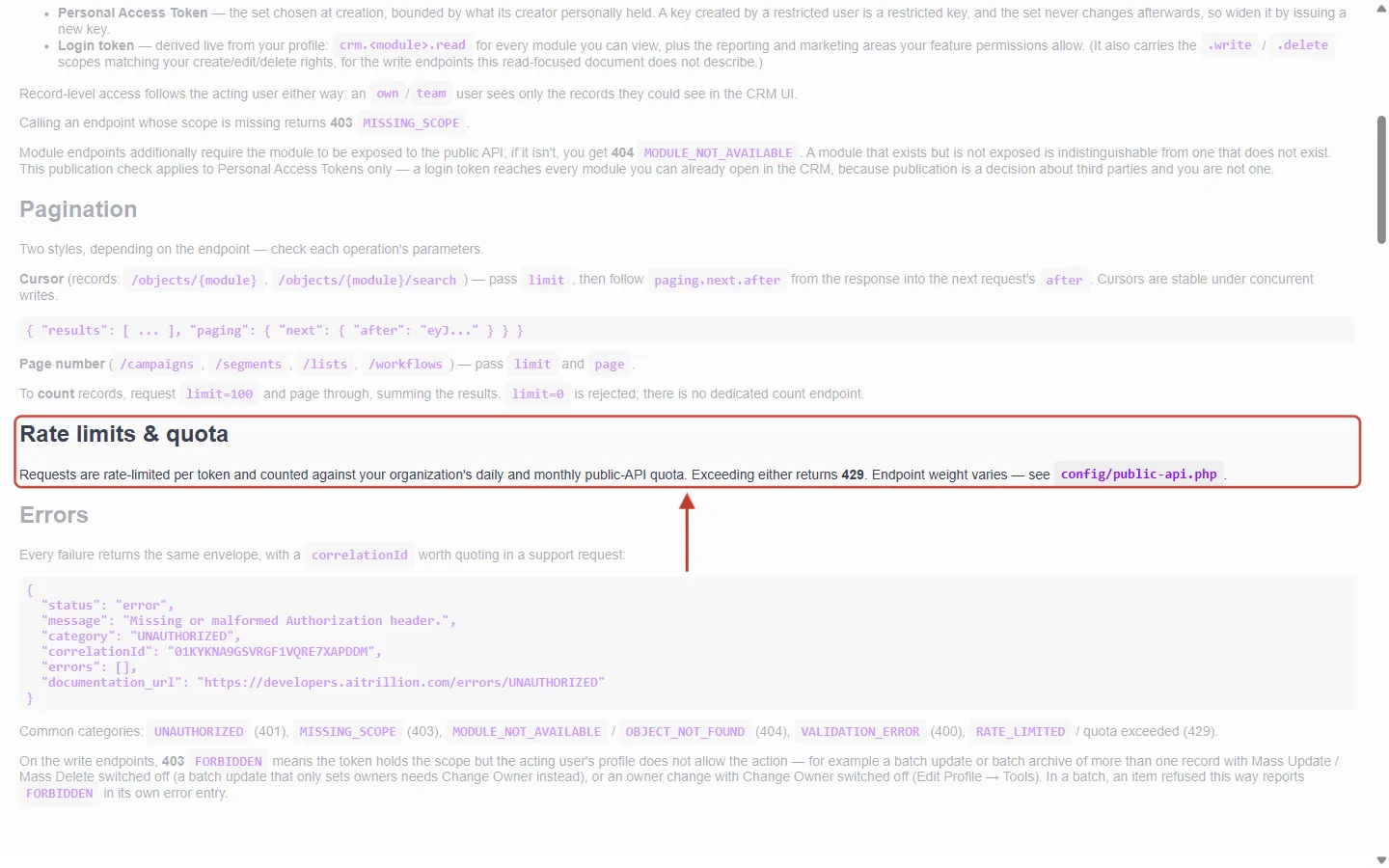
What this screenshot shows. The ringed Rate limits & quota section summarises the two kinds of limit.
Requests are rate-limited per token: each API key has its own short-term speed limit, so one busy integration doesn’t slow down another.
…and counted against your organization’s daily and monthly public-API quota: all keys together share one allowance (Step 7).
Exceeding either returns 429, and some endpoints cost more than others (they use a tighter bucket, as in the table below).
Below the ring, Errors shows the standard error format with its
correlationId.
Each endpoint belongs to a bucket with its own speed and daily cap, counted per API key:
Bucket | Speed limit | Daily cap | Applies to |
|---|---|---|---|
general | 100 calls per 10 seconds | 250,000 | Almost everything: listing and reading records, fields, reports, campaigns, lists and so on |
search | 5 calls per second | 50,000 | Search records and Batch read |
email_send | 5 calls per 60 seconds | 500 | Sending email and email campaigns through the API |
contact_email_send | 15 calls per hour | 360 | Sending an email to one contact |
Keys on the elevated tier get five times both numbers. The exact limit for your key is always in the RateLimit-Limit header, so read it from there rather than hard-coding it.
Answer | What happened | What to do |
|---|---|---|
429 RATE_LIMITED | Too many calls in the current window for this key. | Wait the number of seconds in the |
429 RATE_LIMITED_DAILY | The daily cap is used up. |
|
429 RATE_LIMITED_MONTHLY | Your organisation’s monthly quota is used up. |
|
Slow down before you are stopped. When
RateLimit-Remaininggets close to 0, waitRateLimit-Resetseconds before the next call.Don’t retry instantly in a loop. Instant retries after a 429 are refused too and still use up your allowance.
A 401 answer has no RateLimit headers, because the key is checked before the rate limiter. Don’t write code that expects them on every answer.
In a web browser, your own scripts may not be able to read these headers. From server code (curl, Node.js, Python, PHP) they are always there. The reference page shows them because it runs on the same site.
Retrying a write safely: send an
Idempotency-Keyheader on create, update and send calls. If you retry with the same key and body within 24 hours, you get the original answer back instead of a duplicate record or message.
Step 7: Watch Your Organisation’s Quota#
Besides each key’s speed limit, your organisation has a monthly and a daily allowance of API calls, set by your plan and shared by every key. MCP connections (AI assistants such as Claude) use the same allowance. To see it, open Settings → API Keys → Usage.
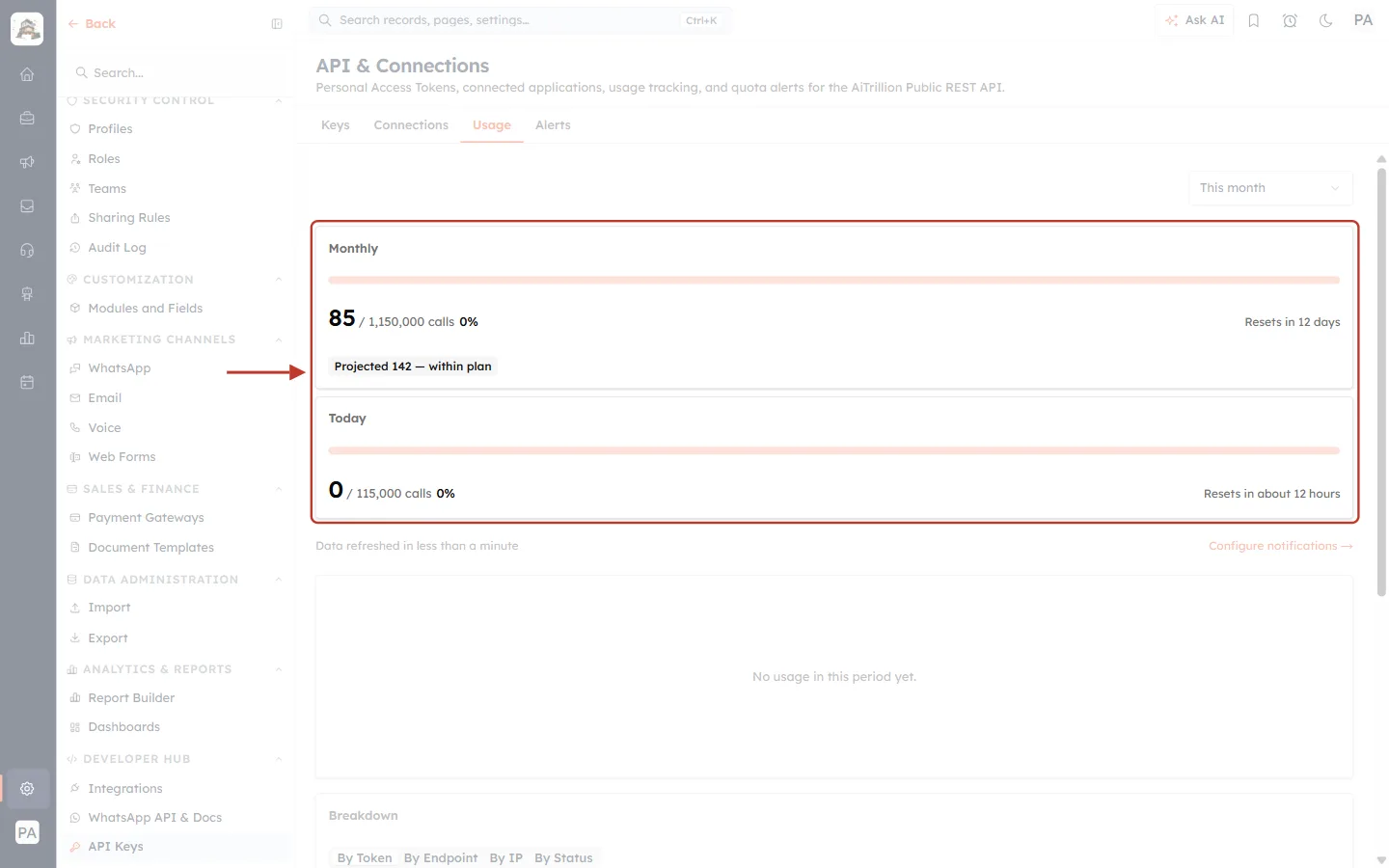
What this screenshot shows. The ringed Monthly and Today cards show how much of your allowance is used.
Monthly: 85 / 1,150,000 calls and 0%. Calls this month out of the monthly allowance (the numbers are from an example account; yours depend on your plan). The bar fills as you use it. Resets in 12 days says when the count starts again.
Projected 142 — within plan estimates the month-end total at the current pace, so you can see early if you are heading over.
Today: 0 / 115,000 calls, today’s count against the daily allowance, which Resets in about 12 hours.
Top right: This month changes the period of the charts below. Below the cards: Data refreshed… and Configure notifications →, which opens the Alerts tab.
Further down are a chart, a Breakdown by token, endpoint, IP and status (find which key or call uses the most), and Recent activity (the last 100 calls).
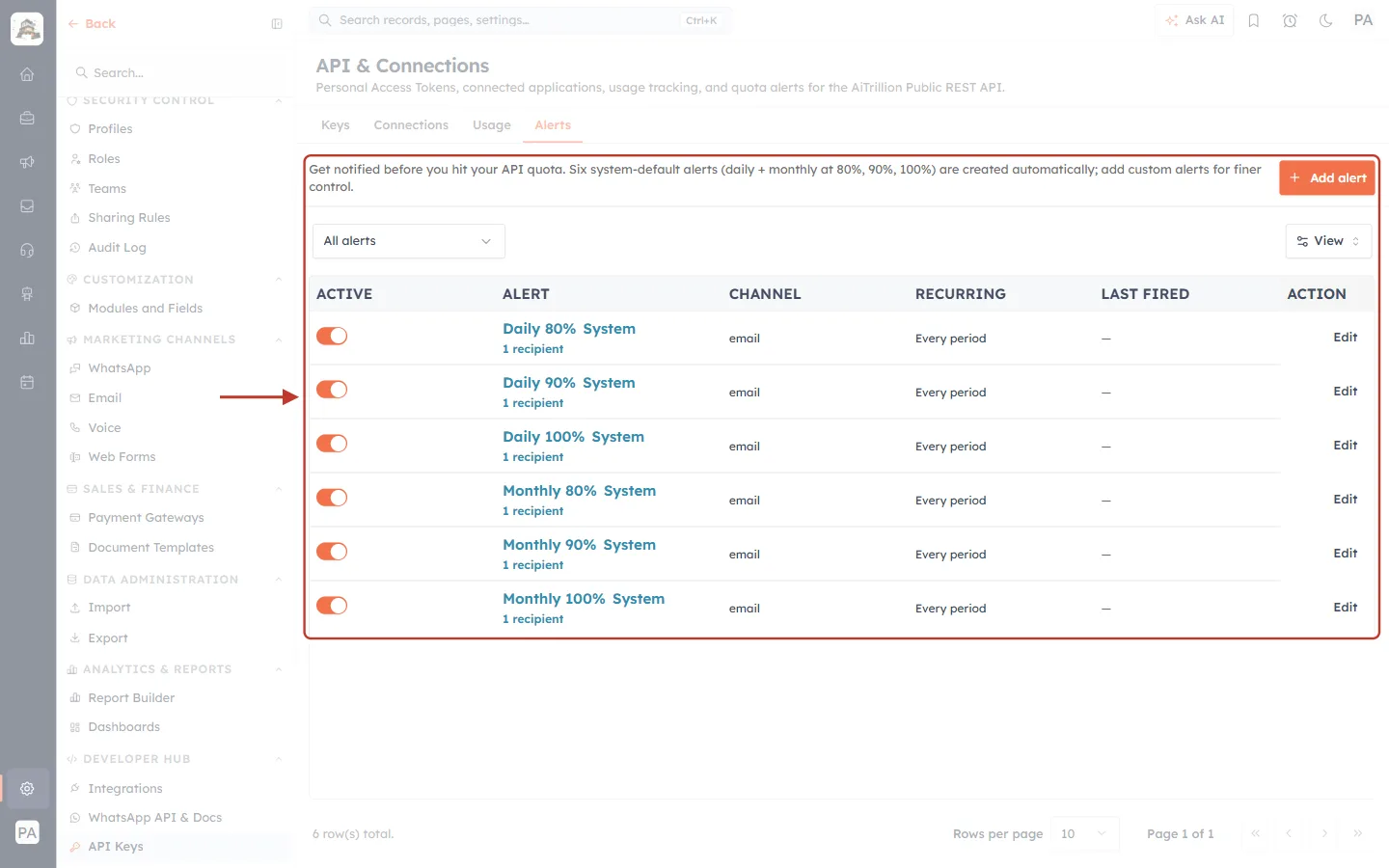
What this screenshot shows. The ringed Alerts tab emails you before you run out.
Get notified before you hit your API quota. Six system-default alerts (daily + monthly at 80%, 90%, 100%) are created automatically; add custom alerts for finer control.
The six rows are Daily 80%, Daily 90%, Daily 100%, Monthly 80%, Monthly 90% and Monthly 100%, each marked System with its number of recipients.
ACTIVE: the orange switch turns an alert on or off. CHANNEL: email. RECURRING: Every period, so it can fire again next day or month. LAST FIRED: — until it is triggered. Edit changes the threshold or recipients.
Add alert (orange, top right) creates your own, for example at 50%. Full details are in Monitor API Usage & Set Quota Alerts.
Best Practices#
Use
limit=100andproperties=for bulk reads: fewer, smaller calls.Follow
paging.next.link(orafter) untilpagingdisappears. Never guess or build cursors.Keep every other parameter identical from page to page.
For big exports, page through steadily rather than firing many calls at once, and read
RateLimit-Remainingas you go.On 429, wait
Retry-Afterseconds, then retry. Use an exponential back-off if it happens again.Don’t re-download everything on a schedule. Store what you have and use Search records with a filter on
updated_atto fetch only what changed.Give each integration its own key, so its usage shows separately in the Usage breakdown.
Frequently Asked Questions#
How do I count all my contacts?
Records have no count endpoint. Page through with limit=100 and add up the results. Page-number endpoints (campaigns, segments, lists, workflows) give you total directly.
Can I jump straight to page 10 of my contacts?
No. Cursor pages can only be read in order, each from the previous one’s cursor. Page-number endpoints do let you ask for any page.
Do cursors expire?
Use a cursor straight away, as part of one run through the pages. To start again later, begin from the first page without after.
Records were added while I was paging. Will I miss or duplicate any?
No. Cursors stay stable while records are created or changed. Records created after you started may simply not appear in that run.
Does trying calls in the reference page use my quota?
Yes, when you authorize it with an API key. Every call counts.
Can my limits be raised?
The quota depends on your plan, and some keys can be moved to the elevated tier. Contact our support team with your use case.
Previous and Next#
Related Articles#
Was this article helpful?
Ready to implement this?
OpenAI Engage and apply what you just learned to your own workspace.
Open AI Engage CRM