Loading…


KnowledgeBase
The Company Detail Page
Overview & Timeline#
Click any company to open its detail page. The centre has two tabs: Overview (all the company’s fields, grouped into Company Information, Address, and Company Details) and Timeline (its complete, automatic activity history — see the record timeline).
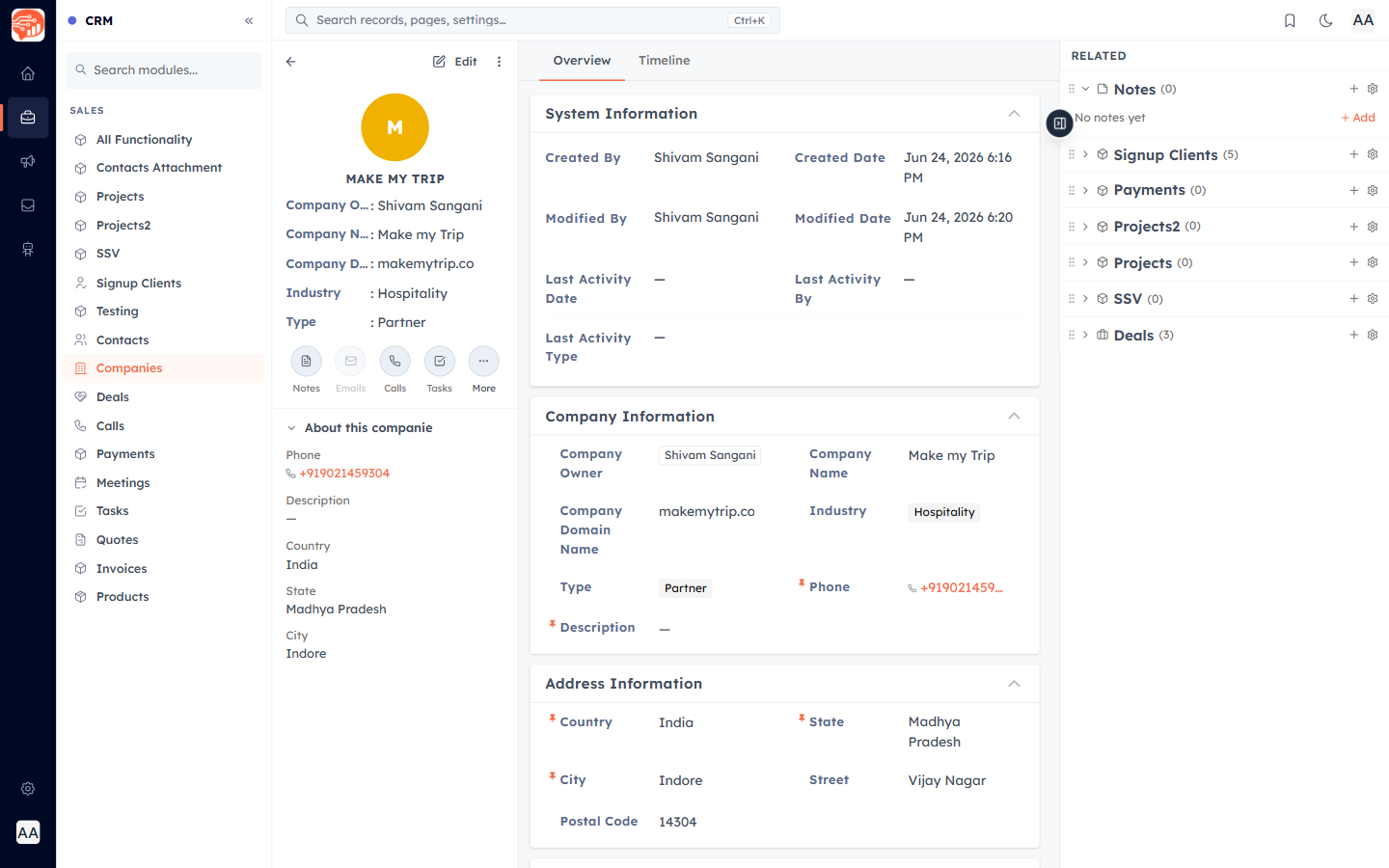
The summary card & quick actions#
The left rail shows a summary — the company’s name, owner, and key fields — plus quick-action chips to jump to Notes, log a Call, or add a Task or Meeting, all pre-linked to this company. Below it, "About this company" pins the fields you reference most.
ℹ️
The Emails chip is disabled on companies — sending email is available on Contacts, since email addresses live on people, not organizations.
Related records#
The right Related sidebar lists every record connected to this company — deals, payments, notes, and more — each with a count. This is where the company’s whole relationship lives; learn how to link records next.
Was this article helpful?
Ready to implement this?
OpenAI Engage and apply what you just learned to your own workspace.
Open AI Engage CRM